Here’s What We Cover
This article is already long enough, so I won’t set the tone or stage with flowery ad copy, and we can dive right into why you’re here…
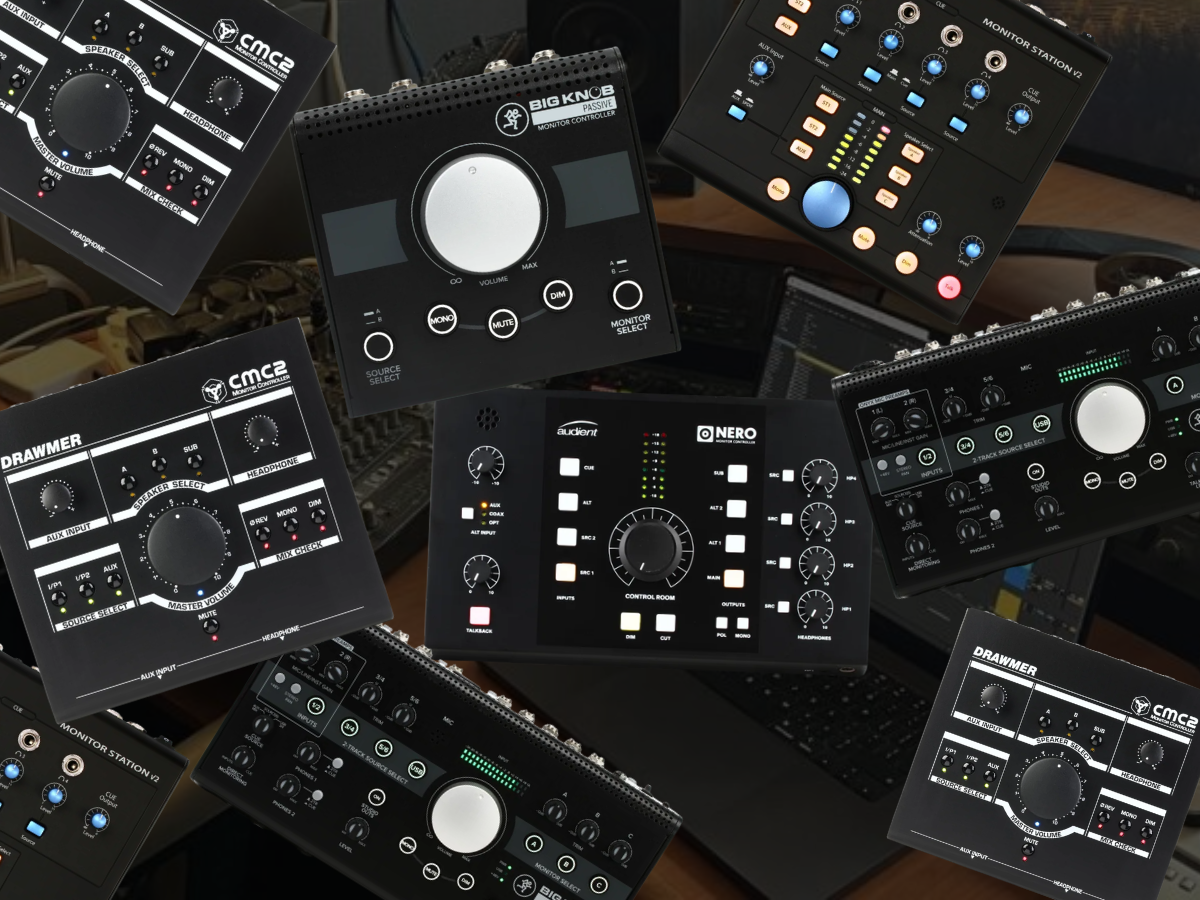
For most electronic producers running a hybrid studio and looking for monitors, I would start with the Drawmer CMC2 because it gives you three stereo sources, two monitor pairs, a dedicated subwoofer output, headphone monitoring, mono, dim, mute, and polarity checks without turning the desk into another software-controlled system.
The PreSonus Monitor Station V2 is the better fit when recording other people is part of the room, while the Audient Nero earns its higher price once three monitor pairs, several headphone paths, digital sources, and talkback become normal studio needs. Producers who only need level control and A/B switching can spend far less with the Heritage Audio Baby RAM or Mackie Big Knob Passive.
But now that the quick-and-dirty recommendations are out of the way, we can get into the weeds and have a more meaningful convo about these things.
Disclosure: This article contains affiliate links. Magnetic may receive a commission if you purchase something after following one of them. That does not change which products I include or what I say about their limitations.
How I Compared These Monitoring Controllers
A monitoring controller starts becoming relevant when the interface volume knob stops covering what the room actually needs. One pair of monitors and one stereo source can live happily from an interface for years, but a hybrid studio usually grows sideways. Another pair of speakers comes in for mix checks, then a sub, a hardware synth mixer, headphones for tracking, a phone or second computer for references, and suddenly the monitor section is doing a job the interface was never designed to handle from the front panel.
That is the context I used here throughout this piece!
I looked at how many sources each controller accepts, how many speaker destinations it can manage, whether a sub can be handled independently, what happens when headphones enter the picture, and whether talkback matters for the producer it is aimed at. I also paid attention to mono, dim, mute, polarity, and how quickly I can reach those controls while I am working.
That last part comes up constantly in the interviews I do with producers.
In my conversation with Hannes Bieger about studio design, he talked about building a room around years of learning what supports his work and what gets in the way. I think that applies directly to monitor control. The box earns the desk space when speaker checks, level changes, and source switching become immediate enough that I stop thinking about them.
| Monitor controller | Best use | Key specification | Main limitation | Typical price |
|---|---|---|---|---|
| Drawmer CMC2 | Best overall for a hybrid production room | 3 stereo sources, 2 monitor pairs, dedicated sub output | No talkback and only one headphone amp | Around $400 |
| PreSonus Monitor Station V2 | Best for tracking and cue mixes | 3 speaker pairs, 4 headphone amps, talkback | Large desktop footprint | Around $350 |
| Audient Nero | Best for larger hybrid studios | 3 speaker outputs, sub output, 4 headphones, digital inputs | Expensive if you only switch two speakers | Around $800 |
| Heritage Audio Baby RAM | Best passive controller | 2 stereo inputs, 2 stereo outputs, stepped passive attenuation | No headphones, talkback, digital input, or dedicated sub control | Around $200 |
| Mackie Big Knob Passive | Best budget option | 2 sources, 2 monitor pairs, passive control | Limited expansion potential | Around $70 |
| Mackie Big Knob Studio+ | Best controller/interface combination | 4 stereo sources, 3 monitor pairs, USB interface, talkback | Less appealing if you already own an interface you like | Around $350 |
Drawmer CMC2
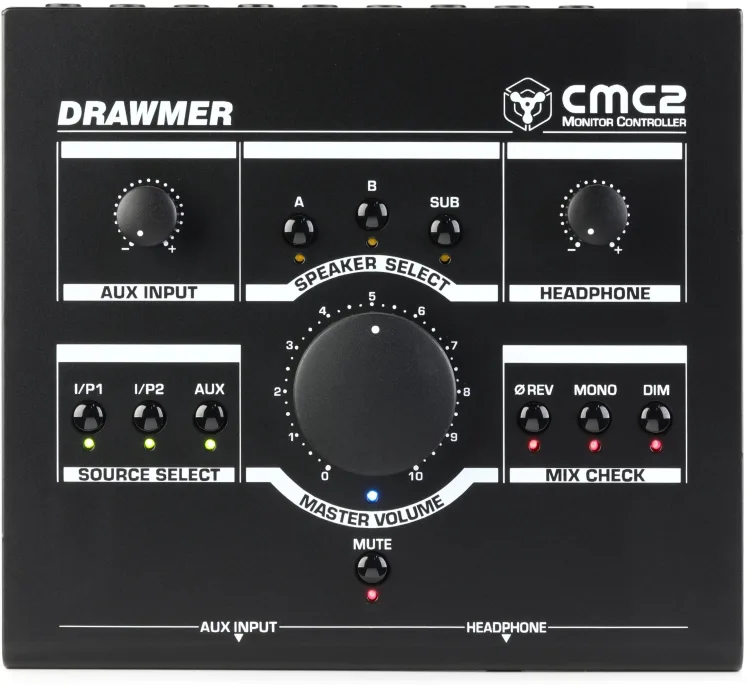
The Drawmer CMC2 is the first monitoring controller I would look at for the kind of hybrid room a lot of electronic producers eventually build. It accepts three stereo sources, feeds two stereo monitor pairs, includes a separate subwoofer output, and gives you mono, polarity reversal, dim, mute, and headphone control directly from the desk. That covers a surprising amount of territory without filling the front panel with controls most producers will rarely touch.
The best reason I have for putting it here actually comes from an artist rather than the manufacturer. In Zardonic’s My Toolbox feature on Magnetic, he called the CMC2 an essential part of his monitoring chain and talked about switching between his PMC result6 and Quested v2108 speakers. The bigger lesson there is that the speakers are showing him different things about the same record, and the CMC2 makes moving between those perspectives immediate.
That is exactly how I think a monitoring controller should earn its place. I am not adding another box because a giant volume knob makes the studio look serious. I am adding it because I want to hear a problem, hit one button, and check that same problem somewhere else.
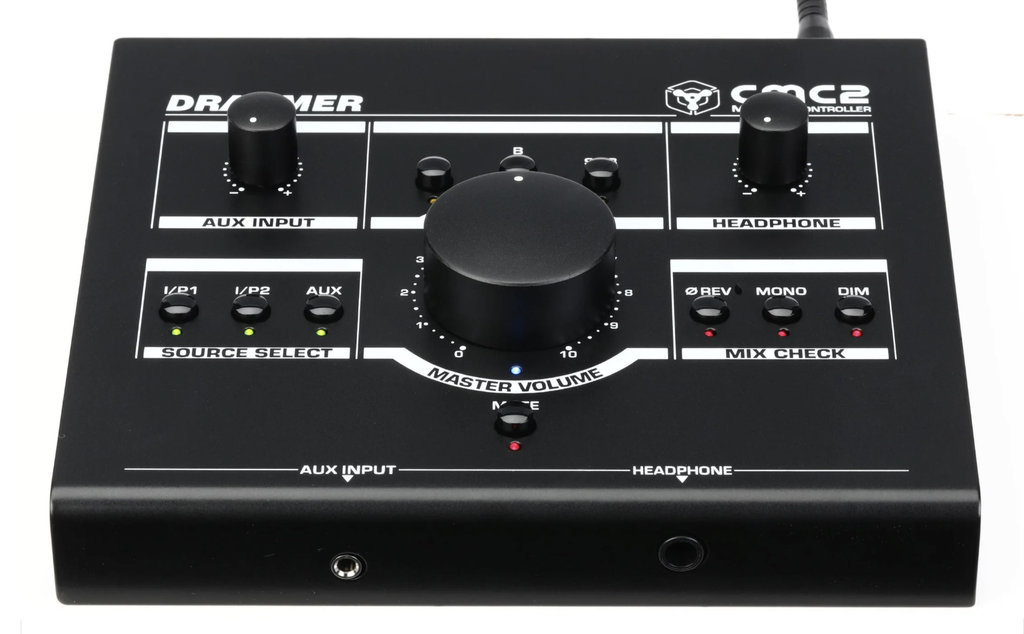
The dedicated subwoofer output is also a big reason I like the CMC2 for electronic producers. My iLoud Sub review got deep into why sub integration matters in smaller production rooms, especially when kicks and basslines live below what compact monitors reproduce comfortably. Being able to bring that low-frequency extension in and out from the monitoring position is far easier than changing routing inside interface software every time I want another perspective.
That also is exactly what we chatted about with Plastician when I talked with him about his KRK Kreate 8 monitoring setup. His day-to-day room covers production, DJ prep, and label work, while other speakers come in later for extra checks. That is a very normal electronic music studio now. The room is doing several jobs, and moving between listening systems quickly becomes part of the work.
I would skip the CMC2 if you regularly record singers or musicians in another part of the room and need dedicated talkback or several independent headphone feeds. That is where the PreSonus and Audient options start earning their extra controls.
PreSonus Monitor Station V2

The PreSonus Monitor Station V2 moves the focus from a one-person production desk toward a room where recording other people happens often enough to influence the buying decision. You get three sets of balanced speaker outputs, two main stereo source inputs, an auxiliary section, S/PDIF input, a dedicated cue path, an onboard talkback microphone, and four headphone amplifiers with individual level controls.
That combination changes what the controller can do. I could have one interface feeding the main mix, another source available for references, three speaker systems calibrated against each other, and several people listening on headphones without building a completely separate cue setup around the room.
For an electronic producer who only records hardware synths, that is probably excessive.
For someone producing vocalists, running writing days, recording collaborators, or moving between music production and small tracking jobs, those headphone paths are much easier to justify.
The three speaker outputs are another reason I like the PreSonus at this price. A normal electronic studio could use one pair of nearfields, a smaller alternate pair, and a third system that gives a completely different read on the midrange. When I talked with Plastician about his own monitor setup, that idea of using one system every day and bringing other speakers into the later checking process was central to how he described working.
Hannes Bieger gets even closer to the technical side in his five mixdown tips for Magnetic, where monitoring is discussed as a larger chain that includes speakers, D/A conversion, cabling, headphones, and reference material. That is an important point here because a monitor controller cannot rescue a bad listening environment. What it can do is make those comparisons fast enough that they actually become part of every mix.
The obvious limit is desk space. The Monitor Station V2 is a substantial box, and much of what you are paying for disappears if you never use the headphone amplifiers or talkback. A producer working alone with two monitor pairs and a sub would probably get closer to what they need from the CMC2.
PreSonus Monitor Station V2 at Sweetwater
Audient Nero

The Audient Nero is where I would go once the phrase hybrid studio stops meaning one synth beside a laptop and starts describing a room with several listening and recording paths that stay connected every day.
Nero supports multiple analog sources, digital input, three stereo speaker outputs, a dedicated subwoofer output, four headphone outputs, onboard talkback, mono, polarity, cut, and dim. That puts it much closer to a full desktop monitoring center than a simple speaker selector.
What interests me is less the raw connection count and more what can remain physically available. A hardware mixer can feed the monitor section, the interface can occupy another, another playback source can stay attached, and digital audio can have its own route without constantly repatching the desk.
Three speaker pairs plus separate sub control also fit the way larger electronic production rooms tend to develop. You may have the full-range pair you know best, smaller speakers near the screen, and another system that tells you something different about vocals or midrange balance.
The sub can then become another variable in that comparison instead of something permanently attached to one speaker pair.

Nero also makes a better case than most controllers here when other people are working in the room. Four headphone outputs and talkback take it beyond simple A/B monitoring and toward a setup where vocalists or collaborators can work without adding another headphone distribution system.
That connects directly with my interview with Hannes Bieger about how his studio has developed over roughly 25 years. He talked about his studios changing as his work changed, and I think that is a smart way to look at something like Nero. Studios rarely get completed once and stay frozen. Synths get added, speakers change, outboard enters the rack, and suddenly the monitoring section needs to accommodate a room that has become very different from the one you started with.
The limitation is simple. Spending around $800 on monitor control is hard to justify if you have one interface, two speakers, one pair of headphones, and no plans to expand. The Baby RAM or Big Knob Passive can solve the basic level-and-switching problem for much less.
Heritage Audio Baby RAM
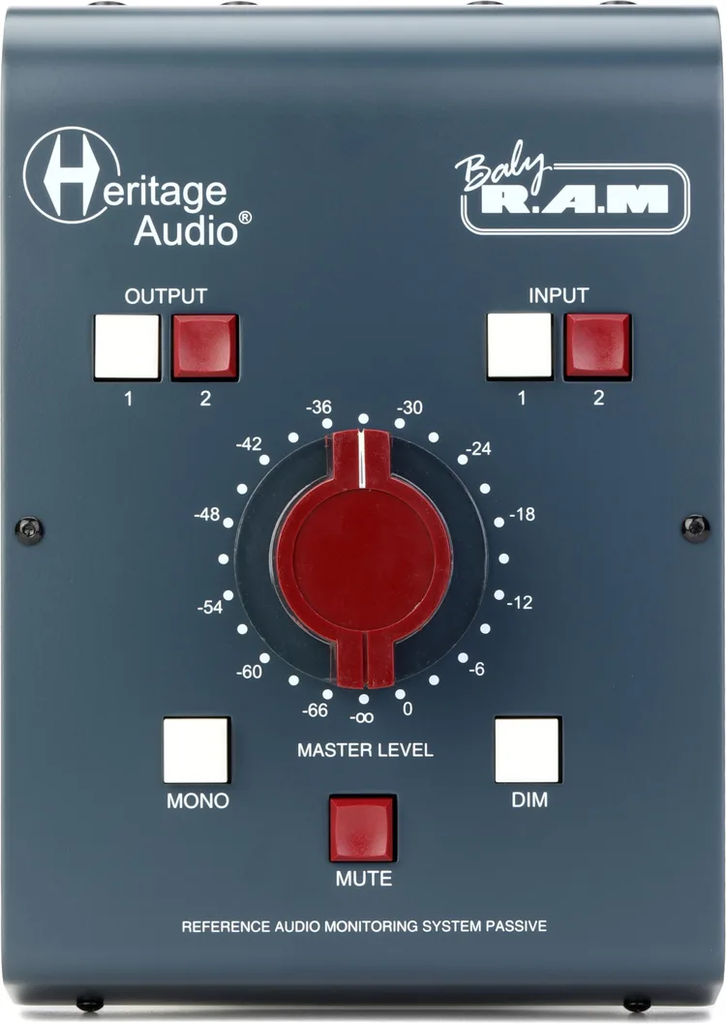
The Heritage Audio Baby RAM is where I would look if the monitoring problem is simple and I want the hardware to stay out of the way.
It is completely passive and gives you two stereo inputs, two stereo outputs, mute, dim, mono, and a 24-step level control. Heritage uses balanced connections and a stepped attenuator rather than turning this into another active desktop hub.
For a producer who has already spent money on an interface they like, that is appealing. There is no second audio interface, talkback mic, headphone distribution system, Bluetooth section, or software layer being added to the room. Audio comes in, level gets attenuated, and it gets sent to the selected speaker pair.
I would pair something like this with a small hybrid studio where the interface already handles headphones and the main need is putting monitor switching within reach. Maybe the room has the primary nearfields and a pair of small references. Maybe the second input comes from a hardware mixer. The Baby RAM covers that without asking you to redesign anything.
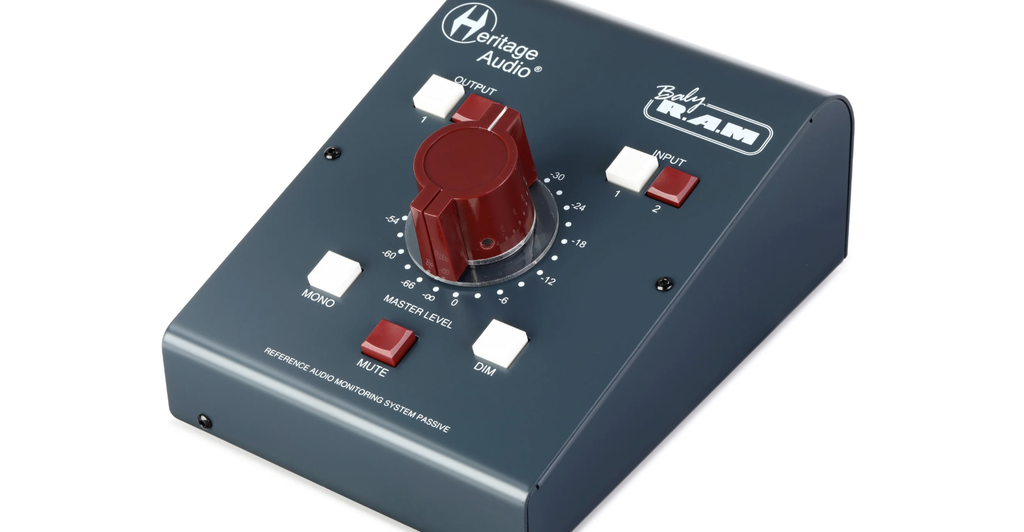
The mono button matters almost as much as the second speaker output. Hannes Bieger’s mixdown feature on Magnetic is a good reminder that monitoring is about developing a trustworthy listening process, and mono checking is one of those simple tests that producers skip when it lives three clicks deep inside the DAW. Put the button beside the volume control, and the check takes seconds.
That same thinking carries over to my iLoud Sub review (which is a freaking amazing subwoofer by the way, if you’re in a smaller studio especially. Check it out, you’ll thank me later…).
Better monitoring comes from making comparisons with fewer variables in the way. A passive monitor controller will not correct the room or extend the speakers, but it can make switching listening conditions much easier.
There is no headphone amplifier, no talkback, no dedicated subwoofer section, and no digital input. If those functions are already on the shopping list, I would move to Drawmer, PreSonus, or Audient rather than stacking extra boxes around the Baby RAM.
Heritage Audio Baby RAM at Sweetwater
Mackie Big Knob Passive

There is a reason the Mackie Big Knob concept has lasted. At the inexpensive end of the category, the Big Knob Passive solves the fundamental monitoring problem without trying to run the rest of the studio.
It gives you two stereo sources, two stereo monitor outputs, a large level control, and buttons for mono, mute, and dim. It does not need power because the audio path is passive.
That is enough for a lot of producers.

If you have one interface, one main pair of monitors, a second set of speakers, and no need for a sub section or talkback, I have a hard time arguing that you automatically need an expensive monitor controller. Put the Big Knob between the interface and speakers, set the monitor levels, and handle normal listening from the desk.
This can also work when the interface is mounted away from the listening position. I spend a lot of time around rack hardware, and putting the main level control at arm’s reach can be a much bigger day-to-day improvement than the price suggests.
Magnetic has touched the Big Knob family before in our Mackie studio gear coverage, though I am treating this as a category recommendation rather than implying I have published a dedicated long-term Big Knob Passive review.
The purchase limit is expansion.
No headphone amplifier, sub control, talkback, or third speaker output is waiting for the room to grow. If you already plan another monitoring system or tracking area, spending extra now could save you from replacing the controller shortly afterward.
Mackie Big Knob Passive at Sweetwater
Mackie Big Knob Studio+
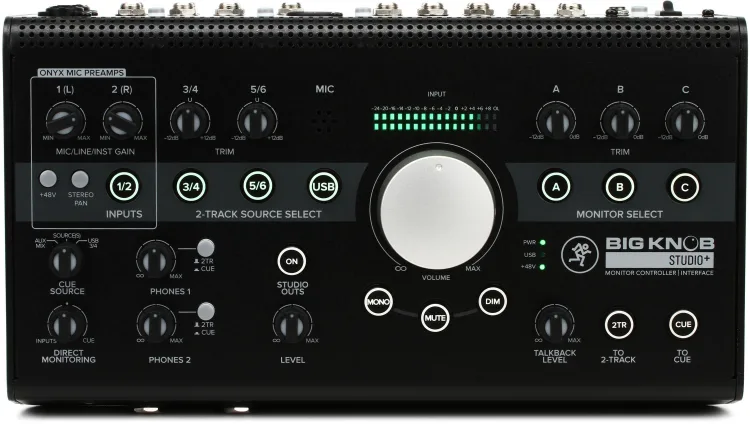
The Mackie Big Knob Studio+ takes almost the opposite approach from the passive model. Instead of doing one job, it combines monitor management with a USB audio interface, two Onyx microphone preamps, two headphone outputs, talkback, several selectable sources, and three monitor destinations.
That combination gives it a fairly specific buyer.
I would consider it for a newer hybrid studio where the producer has not already invested heavily in an interface. You can record a couple of sources, handle the main monitor system, switch between three speaker destinations, send headphones, and communicate with someone recording elsewhere in the room from the same desktop hardware.
Three monitor destinations at this price are also appealing if you are buying the controller for speaker comparison. The output trims let you bring those systems closer together in listening level, which makes A/B comparisons far more informative than jumping between speakers where one pair is noticeably louder.

The reference input is another small feature I like. Plugging a phone or playback device into the monitor section sounds mundane, but it reflects the way studios actually operate. Reference music does not always originate from the production computer.
That point ties back to Hannes Bieger’s mixdown advice, where reference material sits alongside the monitoring hardware as part of the listening process. The easier I can make those comparisons, the more likely I am to actually use them while I am still making decisions.
I wouldn’t buy the Studio+ if I already had an SSL, RME, Universal Audio, Focusrite, Arturia, or similar interface I planned to keep. At that point, I would rather spend the money on a dedicated monitoring controller and let each piece handle its own job.
Magnetic’s earlier Mackie studio hardware feature included the Big Knob Studio controller family alongside the company’s interfaces and monitors, so there is already some internal context for where this product sits inside a larger home-studio setup.
Mackie Big Knob Studio+ at Sweetwater
Common Mistakes When Buying A Monitoring Controller
The first mistake is buying around the number of buttons instead of the routing you actually use. A huge controller with four headphone outputs does nothing for a producer who works alone every day. Write down your sources, monitor pairs, subwoofer, headphones, and recording areas before comparing products.
The second mistake is forgetting how the subwoofer is connected. Some controllers treat the sub as a dedicated destination, while simpler passive boxes only switch stereo outputs. My iLoud Sub review spent a lot of time on how crossover, timing, level, and calibration affect a subwoofer’s usefulness, so I would decide how the sub needs to interact with each speaker pair before buying the controller.
The third mistake is assuming a monitor controller fixes the room.
It cannot, full stop.
In that same iLoud Sub review, room behavior was a major reason calibration mattered in the first place. Speaker placement, listening position, low-frequency decay, and acoustic treatment still affect what reaches your ears after you install the new controller.
The fourth mistake is buying an interface/controller combination when you already own an interface you plan to keep for years. That can duplicate converters and recording features you rarely touch.
The fifth is ignoring where the box will physically sit. Hannes talked extensively about designing his workspace around how he actually operates in my studio-design interview with him, and monitor control is a good example of why that matters. This is hardware you touch constantly. If it ends up behind the MIDI keyboard or far enough away that changing speakers takes effort, the purchase has missed much of the point.
How To Choose A Monitoring Controller For Your Studio
Start with speaker count. One monitor pair does not automatically demand a dedicated controller, although a large physical level knob, mono button, and mute control can still improve the desk. Two pairs make hardware switching easier to justify. Three pairs immediately narrow the field.
Next, decide whether the subwoofer needs independent control. Electronic producers spend enough time making low-end decisions that I would treat this as a genuine buying criterion. My iLoud Sub testing reminded me how dramatically the low-end picture changes once the mains and sub are properly integrated, and being able to check that low-frequency extension quickly is worth considering before choosing a controller.
Then look at headphones and talkback. If you record yourself at the desk, one headphone output is probably enough. If people record on the other side of the room, a dedicated cue path and talkback mic become much harder to ignore.
Finally, decide whether you want a passive device or an active studio hub. The Baby RAM and Big Knob Passive appeal because they do very little. The Nero and Monitor Station V2 make sense when the controller needs to take over a much larger part of the room.
The right answer depends on what you actually want sitting under your hand every day.
Honorable Mentions
SPL Control One: This interests me for headphone-heavy rooms because its Phonitor Matrix is built around making headphone playback relate more naturally to speaker listening. At its price, I would want headphone monitoring to be a major part of the room before choosing it over Nero.
SPL 2Control: Another headphone-centered option with dual headphone amplification, crossfeed, two speaker pairs, and a mono speaker or subwoofer output. It enters a much narrower buying bracket once the price pushes toward four figures.
Heritage Audio RAM System 2000: This takes Heritage’s monitor-control concept much further, adding analog and digital sources, Bluetooth, several stereo monitor outputs, dedicated sub control, cue I/O, talkback, and headphone amplification. I would look at it for a larger project or commercial room before a normal bedroom setup.
Wrapping Things Up
The best monitor controllers for hybrid studios are the ones that remove repeated monitoring jobs without adding a pile of controls you never touch.
I would start with the Drawmer CMC2 for most electronic production rooms because two monitor pairs, a subwoofer, several stereo sources, a headphone amp, and the normal mix-check buttons cover the needs I see most often. Zardonic’s own use of the CMC2 backs that up from a working producer’s perspective rather than leaving the recommendation on a specification sheet.

The PreSonus Monitor Station V2 is the better move when vocalists or other musicians are regularly recording with you. Audient Nero earns its higher cost once the studio has several speakers, several headphones, digital sources, and a real need for talkback.
The Heritage Audio Baby RAM is the passive controller I would buy when I already like the rest of my monitoring chain and simply want speaker switching and stepped level control. Mackie’s Big Knob Passive handles a simpler version of that job for much less, while the Big Knob Studio+ fits a newer room where buying the interface and monitor section together reduces the number of separate boxes on the desk.
The broader lesson I keep coming back to from my conversation with Hannes Bieger about studio design is that the room should support the way you work every day. A monitoring controller earns its place when checking another speaker, dropping into mono, muting the room, or talking to the person recording becomes immediate enough that the hardware disappears from the decision.

Will Vance is a professional music producer who has been involved in the industry for the better part of a decade and has been the managing editor at Magnetic Magazine since mid-2022. In that time period, he has published thousands of articles on music production, industry think pieces and educational articles about the music industry. Over the last decade as a professional music producer, Will Vance has also ran multiple successful and highly respected record labels in the industry, including Where The Heart Is Records as well as having launched a new label with a focus on community through Magnetic Magazine. When not running these labels or producing his own music, Vance is likely writing for other top industry sites like Waves or the Hyperbits Masterclass or working on his upcoming book on mindfulness in music production. On the rare chance he's not thinking about music production, he's probably running a game of Dungeons and Dragons with his friends which he has been the dungeon master for for many years.