Table of Contents
A good MIDI controller should disappear once the idea starts. That sounds simple, but a lot of budget controllers get in the way fast. The keys feel cheap, the pads miss hits, the DAW control feels half-finished, and the creative features are either too basic or too hidden to become part of the routine.
That is why the Novation Launchkey 25 MK4 is still worth talking about in 2026. It is small enough for a home desk, cheap enough for newer producers, and much more capable than a plain 25-key keyboard. With full-size keys, 16 pads, 8 encoders, Scale Mode, Chord Map, a generative arpeggiator, USB-C, MIDI Out, and custom DAW support, it is one of the better compact controllers in its price range.
Quick answer: The Novation Launchkey 25 MK4 is still worth buying in 2026 if you want a compact full-size-key MIDI controller with pads, chord tools, Scale Mode, MIDI Out, NKS support, and good DAW control for under $200 at many retailers. Skip it if you need more keys, faders, semi-weighted action, or a standalone production system.
What Is The 2026 Verdict On The Novation Launchkey 25 MK4?
The Launchkey 25 MK4 still gets a positive verdict in 2026, especially for producers who want a compact controller that feels like a real writing tool instead of a cheap keyboard with transport buttons.
The key reason is balance. It has enough hands-on control to matter, but it does not take over the desk. The 25 full-size keys make it more comfortable than mini-key controllers for chord work and basslines. The pads are much better than I expect in this price range, especially with polyphonic aftertouch. The encoders, OLED screen, MIDI Out, and creative modes make it feel less like an entry-level afterthought.
At the current $189.99 to $209.99 range, it is one of the easiest compact MIDI controllers to recommend if you use Ableton Live, Logic, Cubase, Reason, Bitwig, Ardour, or switch between several DAWs. FL Studio users should compare it against FLkey 2 before buying, because Novation now has a dedicated FL Studio line with tighter labels and scripting.
My updated verdict is simple: buy the Launchkey 25 MK4 if you want a small full-size-key controller that can help you write faster inside a DAW. Buy the Launchkey 37 MK4 if two octaves feel cramped. Skip both if you want a standalone box like the MPC Key 37 G2.
Novation Launchkey 25 MK4 25-key Review At A Glance
- Built for Portability: Lightweight and compact, it fits anywhere—from a cramped desk to your backpack. Feels sturdy enough for regular use.
- Pads That Shine: The RGB pads are responsive, fun, and surprisingly expressive with polyphonic aftertouch. Perfect for beats, samples, and chops.
- Ableton Integration: If you’re on Ableton Live, it’s like having a cheat code. Seamless workflow, especially for sketching out ideas.
- Creative Tools: Chord modes and the arpeggiator make experimenting fast and easy, even if music theory isn’t your thing.
- Worth the Price: It’s hard to beat this feature set at this price. Great for beginners or as a portable sidekick for pros.

What Changed For 2026?
The main 2026 update is that the Launchkey MK4 range is still current and has expanded. Novation now offers a wide Launchkey MK4 lineup, including Mini, full-size, and larger keyboard versions, with the 88-key model recently filling out the top of the range.
The Launchkey 25 MK4 still sits in the sweet spot for smaller desks. Novation lists it at $209.99, while Sweetwater currently lists it at $189.99 and backordered with more expected. That means it remains a very competitive sub-$200 controller when retailer pricing is lower than Novation’s direct price.
The other 2026 update is FLkey 2. Novation’s own Launchkey page now points FL Studio-first users toward FLkey 2, while recommending Launchkey MK4 for people who use Ableton Live, Logic, Cubase, Reason, Bitwig, Ardour, or multiple DAWs. That matters because the Launchkey 25 MK4 does support FL Studio, but it is no longer the most specific Novation choice for that DAW.
The last update is that the compact-controller category has gotten crowded. Arturia, Akai, Native Instruments, M-Audio, Nektar, and Novation all have good options near this price. The Launchkey 25 MK4 wins when DAW control, pads, chord features, and full-size keys matter in a small footprint.
How Much Does The Novation Launchkey 25 MK4 Cost In 2026?
The Novation Launchkey 25 MK4 is currently listed at $209.99 direct from Novation and $189.99 at Sweetwater during this check.
| Product | Current Price | Current Status | Best Fit |
|---|---|---|---|
| Novation Launchkey 25 MK4 | $189.99 to $209.99 | Current | Compact full-size-key DAW control |
| Novation Launchkey Mini 25 MK4 | $109.99 to $139.99 | Current | Travel, small desks, mini-key users |
| Novation Launchkey 37 MK4 | Around $239.99 direct | Current | More keys without going large |
| Novation FLkey 2 37 | Around $229.99 | Current | FL Studio-first users |
| Akai MPK Mini Plus | Around $169 | Current | 37 mini keys and compact control |
| Native Instruments Komplete Kontrol A25 | Around $169 | Current | NI software users |
| Arturia KeyLab Essential mk3 49 | Around $249 | Current | Arturia Analog Lab users who want more keys |
| Akai MPC Key 37 G2 | $999.99 | Current | Standalone production keyboard |
Design and Build
When I first unboxed the Launchkey 25 MK4, I thought, “Damn, this thing is compact.”
It’s lightweight and small enough to slip into a backpack, making it perfect for producers on the go or those with limited studio space, which I know is becoming increasingly the norm these days. The synth-weight mini-keys feel responsive enough for most playing styles, but I’ll admit that if you’re coming from a fully weighted keyboard, they might take a bit of adjustment. For its intended purpose—electronic music production and [maybe] live performance—its keys do their job well.
The 16 RGB-backlit performance pads are another slick feature. I found them to be super responsive, whether I was finger drumming or triggering samples in Ableton. The polyphonic aftertouch was an unexpected bonus of a keyboard at this price point, letting me add expressive dynamics to my playing. The eight rotary encoders are solid and feel satisfying, offering tactile control over parameters without constantly diving into your computer.
Honestly, I usually don’t really use finger pads or rotary knobs on smaller keyboards like this as I usually just use them for playing keys and maybe some rudimentary arp patterns, but I actually found myself gravitating towards them more with the Launchkey 25 MK4!
What surprised me most was how it all felt durable despite being so lightweight. Sure, it’s not built like a tank, but for regular use, it holds up well. The design balances portability and functionality, making it a great fit for smaller setups or mobile workflows.
Core Features
Keys and Pads

The 25 velocity-sensitive keys feel pretty decent, especially for a MIDI controller in this range and vibe. I thought they were great for sketching out ideas, but the limited range can feel restrictive if you’re working on more intricate compositions. The octave buttons help, but if you’re used to a 49- or 61-key setup, you might feel a little cramped. For basic melodies and chords, though, they work just fine.
The pads, though—those are where the Launchkey shines, and while I know I mentioned it briefly above in the previous section, it bears a bit more focus here. I found myself using them constantly for beats, triggering effects, samples, and even vocal chops. The polyphonic aftertouch adds a level of nuance that I didn’t expect, making it easy to experiment with dynamics and expression. I was building drum loops and triggering one-shots, and all the while they felt precise and fun to use.
One of my favorite things about the pads is how they encourage a more hands-on approach to production. I know I touched on this above in the article, but I was really just impressed by these pads more so than other entry-level MIDI keyboards I’ve used in the past.
If you like to avoid the mouse and focus on performance, these pads make that transition seamless. For the price, they offer impressive control. I’ve used other controllers with mushy or inconsistent pads, but these are genuinely satisfying.
DAW Integration
I was legit impressed by how seamlessly this controller works with Ableton Live. It felt like the hardware and software were designed together, from triggering clips to controlling the mixer. The integration is one of the main reasons I’d recommend this to any Ableton user and once I got the flow of this keyboard alongside my Push 3 Standalone, it was one of the most compact, screen-less sketch-pad setups I’ve had in my decade or more of producing.
That said, while the controller technically supports other DAWs like Logic Pro and FL Studio, the experience isn’t as smooth. If you’re not an Ableton user, you’ll still get a lot out of it, but you might not enjoy all the bells and whistles. I tested it with Logic Pro, and while it worked fine, it lacked the same level of integration that makes it shine with Ableton. Luckily, I’m an Ableton user, though, and I know the largest swath of our readership is as well, so most of you out there will be just fine with how it works its way into your flow.
Chord and Scale Modes

The chord and scale modes are a creative powerhouse and something I’ve come to expect and love in other Novation keyboards I’ve reviewed.
Fixed Chord lets you lock in a specific chord shape and play it anywhere on the keyboard, while User Chord allows you to store custom chords for instant recall. I found these features super useful during songwriting sessions when I wanted to experiment without overthinking theory. Even for someone like me, who’s comfortable with music theory, these tools sped up my workflow a ton.
The Scale modes—Scale Snap, Scale Filter, and Scale Easy—are incredibly handy for staying in key too. As someone who likes to jam, I appreciated how these tools kept my improvisations from sounding off. They’re intuitive enough for beginners but flexible enough for advanced users who want to push boundaries. I’ve used the Scale Snap mode practice live sets here in the studio, and I could see it been a game-changer on stage.
That being said, if you plan on doing live performances with a MIDI keyboard, I would recommend getting something with a bit more keys from the Novation MK4 range if for any other reason than being, when performing live, your kit is a big part of the stage-appeal of your performance and 25 keys doesn’t make for much of a set piece. Maybe go with the 49 or 61-key options instead?
Generative Arpeggiator

I’ll admit, I wasn’t expecting to spend much time with the arpeggiator, but it surprised me. The Mutate and Deviate controls let me add subtle variations to patterns, making them feel more organic. Editing arpeggios at the step level opened up a ton of possibilities for creating sweet rhythms and textures. I’ve used it to build everything from tight rhythmic sequences to sprawling cinematic textures.
If you’re new to step editing, there’s a bit of a learning curve, but once I got the hang of it, I found it adds a lot to my workflow. For electronic and cinematic music, I could definitely see if being a real game-changer and the arpeggiator makes it easy to stumble upon happy accidents that can inspire entire tracks or reimagine an already familiar arpeggiator when playing out live.
Connectivity
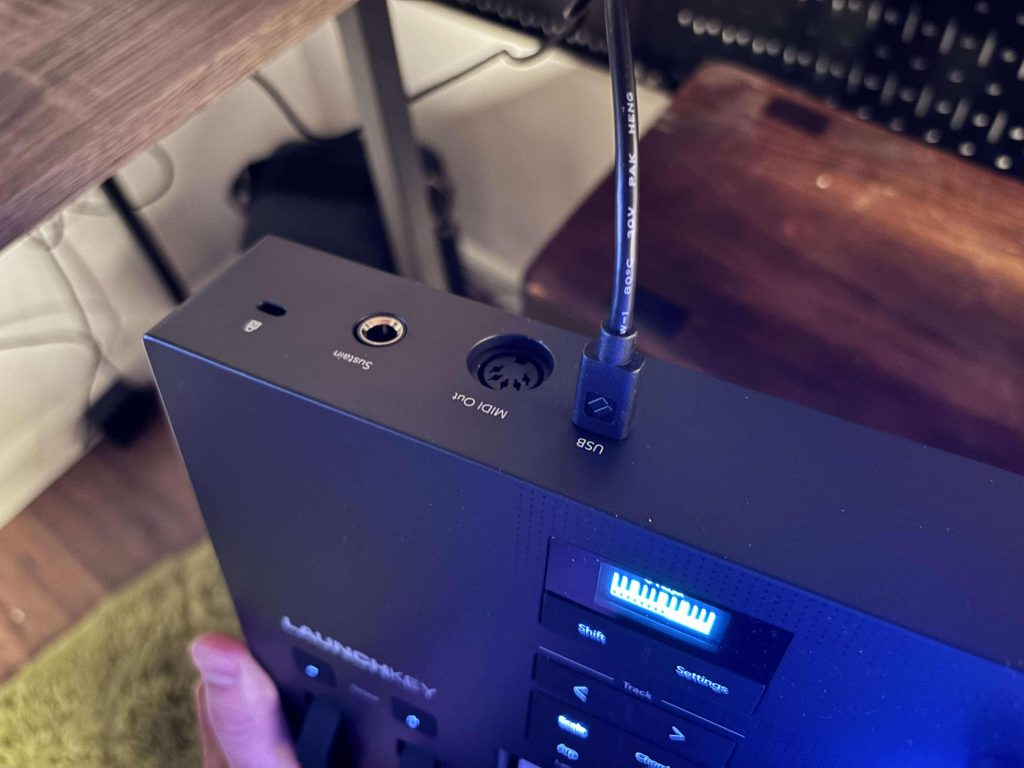
The Launchkey 25 MK4 checks most of the boxes regarding connectivity which is pretty standard now for most keyboards (regardless of price point).
The USB MIDI and 1/8-inch MIDI Out options make it versatile for studio and live setups, and the sustain pedal input is a nice touch for more expressive playing. I used it with a mix of hardware and software instruments and didn’t run into any compatibility issues. To be honest though, while the sustain option is obviously great to have, I can also see it being overkill on a 25-key MIDI controller as the only people who I have ever met who use the sustain pedal are composers and pianists, and I would imagine they would feel constricted on such a small keyboard; but that’s only a personal and anecdotal vibe check from me.
The connectivity options will be more than sufficient for most users, but if you’re running a super complex rig, you might need additional gear in your kit to fill in the gaps. I liked how easy it was to switch between hardware synths and DAW control without feeling like I was juggling too many devices.
How Good Is The DAW Control?
The Launchkey 25 MK4 is best when it is controlling a DAW it supports directly.
Ableton Live remains the most obvious fit because Launchkey has a long history with Ableton, and the MK4 adds Live-specific modes for sequencing, Drum Rack, clips, devices, mixer functions, sends, and transport. Logic, Cubase, Reason, FL Studio, and Ardour also have custom DAW scripts, while other DAWs can work through HUI.
This is a major reason to buy Launchkey over a generic controller. You are not only buying keys and pads. You are buying a surface that can handle common DAW tasks without making you map everything from scratch.
That said, the best DAW controller is still the one that matches your software. FL Studio-first users should compare FLkey 2. Ableton-first users should also decide whether they need a keyboard controller or something more pad-and-clip-focused. My Akai APC64 Review is a better comparison if clip launching and sequencing matter more than keys.
Software Bundle
The software bundle adds a lot of value, especially for beginners. You get Ableton Live Lite, plugins from Klevgrand and GForce, and orchestral tools from Orchestral Tools (which is one of my favorite sound library companies of all time). I also dig the Melodics courses—they’re a great way to build keyboard skills, whether you’re just starting out or looking to level up. Plus, we’ve had the privilege to meet the team at Melodics, and they’re a great bunch of people! For someone who’s newer to production, these resources make a big difference and it helps knowing the people behind the company are passionate about what they do.
Advanced users might find the bundle less appealing since many of the included tools are likely redundant if you already have a fully stocked plugin library. That said, it’s a thoughtful addition for someone just getting started that makes the controller even more of a steal. The inclusion of educational content is always a plus for me, and it’s a boon for newer producers wanting to pick up this appropriately priced MIDI keyboard.
That connects directly with the reason I still use tools like Mixed In Key 11 when working with samples, references, or DJ edits. Knowing the key or staying inside a harmonic lane can speed up decisions when the musical idea is still fragile. The Launchkey’s Scale Mode and chord tools do a similar job from the performance side. They help keep your hands close to the harmonic center while you test parts.
Workflow and Customization

What I love about the Launchkey is how easy it is to customize, though I’ll admit I didn’t dive too deep into this functionality since programming and mapping isn’t as much my forte as good ol “music making” is. Using Novation’s Components software, I was able to set up mapping profiles tailored to my workflow. Switching between setups for different projects was seamless, and it really helped me stay organized. This feature is a big win for anyone juggling multiple projects or performance setups.
Even if you’re not super tech-savvy, the learning curve for setting up custom profiles is manageable. It’s a feature that adds a lot of flexibility, whether you’re in the studio or performing live. I also appreciated how well the customization options fit into my existing setup without requiring a lot of extra work. I’ve had controllers in the past that felt like they added more work, but this was a pleasant surprise.
By tailoring the controls to specific projects, I felt like I was getting more out of the controller than I would with a generic setup. It’s little things like this that make the Launchkey feel like a tool built for actual musicians, not just gearheads. I’ve found myself diving deeper into projects simply because the controller made it so easy.
Value for Money
For the price, you’re getting a portable, feature-packed controller with deep DAW integration and creative tools that punch above its weight. Sweetwater’s free shipping and two-year warranty only sweeten the deal too if you go through them. I’ve tried other controllers in this price range, and this one stands out for the sheer number of features it offers.
If you’re an advanced user looking for something ultra-durable or with more keys, you might want to consider spending more on one of the bigger keyboards in this range. But for beginners and mid-level producers, this is a fantastic entry point. I also think the included software and educational tools add a lot of bang for your buck, especially if you’re starting from scratch. I’ve recommended it to students and friends, and it’s always been a hit.
One thing that stood out to me was how much mileage you can get out of this controller without breaking the bank. It’s proof that you don’t need to spend a fortune to make great music. Whether you’re using it as your main controller or as a portable option for on-the-go sessions, it delivers great value.
How Does The Launchkey 25 MK4 Compare To The Best Alternatives?
| Product | Price | Keys | Main Reason To Buy | Main Tradeoff |
| Launchkey 25 MK4 | $189.99 to $209.99 | 25 full-size | Small desk, full-size keys, pads, DAW control | Two octaves can feel tight |
| Launchkey Mini 25 MK4 | $109.99 to $139.99 | 25 mini | Lower price and more portable size | Mini keys and touch strips |
| Launchkey 37 MK4 | Around $239.99 | 37 full-size | More notes while staying compact | Costs more and takes more desk space |
| FLkey 2 37 | Around $229.99 | 37 full-size | Better for FL Studio | Less ideal if you jump between DAWs |
| Akai MPK Mini Plus | Around $169 | 37 mini | More keys, compact size, Akai pads | Mini keys and less broad DAW identity |
| Komplete Kontrol A25 | Around $169 | 25 full-size | Best fit for NI browsing and Komplete users | Fewer pads and less clip-focused control |
| Arturia KeyLab Essential mk3 49 | Around $249 | 49 full-size | More keys and Analog Lab integration | Larger and less compact |
| MPC Key 37 G2 | $999.99 | 37 synth-action | Standalone MPC production | Much more expensive |
Potential Drawbacks
- Limited key count: The 25 keys can feel restrictive, especially for pianists or those working on more complex pieces. I found myself wishing for more range during certain projects, but the octave buttons help mitigate this.
- Ableton-centric features: While it works with other DAWs, the tight integration with Ableton Live might not appeal to everyone. If you’re a Logic or FL Studio user, you’ll still get a lot out of it, but some features might feel less intuitive.
- Learning curve: Some features, like the arpeggiator and custom mappings, might take time to master if you’re new to MIDI controllers. I found the documentation helpful, but it’s worth noting if you’re a complete beginner.
Is The Launchkey 25 MK4 Good For Hardware Synths?
Yes, within reason.
The 5-pin MIDI Out is a real advantage because it lets the Launchkey 25 MK4 control external synths, modules, and drum machines without being only a USB controller. The arpeggiator, Scale Mode, chord tools, and custom modes can all become helpful with external MIDI gear.
The limitation is that the Launchkey still needs USB power. It is not a battery-powered hardware brain, and it does not make sound on its own.
This is where the Novation XL 3 Review is a natural companion read. A controller like Launchkey can get notes and control into the system, while a hardware or hybrid setup still needs careful thought around how everything talks to everything else.
Conclusion
The Novation Launchkey 25 MK4 strikes an impressive balance between portability, affordability, and functionality. I found it to be a joy to use, especially with Ableton Live, and its creative features kept me inspired during sessions. While it might not be the best fit for advanced users or those needing more keys, it’s a reliable and versatile tool for beginners and mid-level producers alike.
Whether you’re in the studio or on stage, the Launchkey 25 MK4 delivers.

Will Vance is a professional music producer who has been involved in the industry for the better part of a decade and has been the managing editor at Magnetic Magazine since mid-2022. In that time period, he has published thousands of articles on music production, industry think pieces and educational articles about the music industry. Over the last decade as a professional music producer, Will Vance has also ran multiple successful and highly respected record labels in the industry, including Where The Heart Is Records as well as having launched a new label with a focus on community through Magnetic Magazine. When not running these labels or producing his own music, Vance is likely writing for other top industry sites like Waves or the Hyperbits Masterclass or working on his upcoming book on mindfulness in music production. On the rare chance he's not thinking about music production, he's probably running a game of Dungeons and Dragons with his friends which he has been the dungeon master for for many years.