Tape stops are one of those production tricks everyone understands in about half a second.
The track pulls down. The pitch falls. The energy drops out. Maybe the vocal smears into the next section. Maybe the drums collapse before the hook comes back in. Used well, it can make a transition feel intentional instead of pasted together. Used badly, it sounds like someone found one preset and decided every arrangement problem could be solved by pretending the deck lost power.
Cableguys’ TimeStop is interesting because it doesn’t try to make tape stop feel more complicated than it needs to be. It goes after the part that usually slows producers down: timing the thing properly.
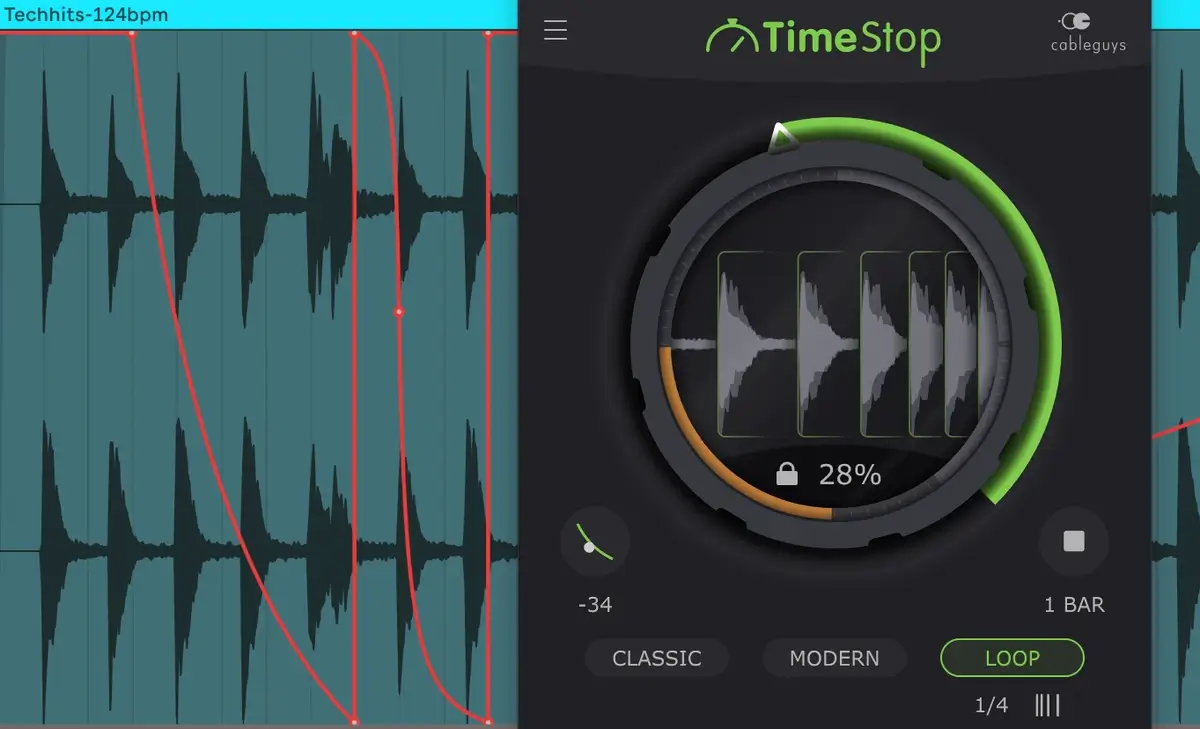
Instead of setting a button, choosing a fixed speed, and hoping the slowdown lands where the track needs it, TimeStop lets producers draw the slowdown directly in DAW automation. Any shape. Any length. That is the whole appeal. The tape-stop becomes part of the arrangement lane inside the DAW, not a separate little timing puzzle you keep revisiting until it finally behaves.
That is a smart move from Cableguys because their best products usually understand one thing very clearly: producers like visual control when it saves time. ShaperBox works because it lets movement be drawn. TimeStop takes that same philosophy and points it at a smaller, more specific problem.
This is not a giant plugin pretending to replace half your effects folder. It is a fast little transition tool for a very familiar production move.

Drawing the Slowdown Is the Feature
The main difference with TimeStop is that the Pitch knob is fully automatable.
That sounds simple, but it changes the way you use the effect. A tape-stop is all about the curve. A fast pull-down feels aggressive. A lazy spindown feels nostalgic. A short dip can give a fill some attitude. A longer drop can clear space before a chorus, breakdown, or edit point.
When the curve is stuck behind a timing slider, the producer has to think in plugin logic. When the curve is automation, the producer can think in arrangement logic.
That is where TimeStop feels very Cableguys. It sells a better way to perform a gesture producers already use. Drop it on vocals, drums, synths, or even the master bus, draw the move, and then adjust it until it plays with the track instead of fighting it.
The plugin includes three timing modes: Classic, Modern, and Loop. Classic gives the familiar pitch-and-time drag, closer to vinyl slowing down. Modern drops pitch without pulling the beat out of time, which will probably get a lot of use in current electronic production. Loop turns the tape-stop into more of a stutter-fill tool for edits, transitions, and DJ-style moments.
That split is helpful because not every slowdown needs the same behavior. Sometimes you want the whole track to feel like it is falling off the table. Sometimes you just want the pitch to move while the groove stays locked.
TimeStop gives those choices without turning the plugin into homework.
TimeStop Is Built for Producers Who Edit Fast
TimeStop feels like Cableguys taking one familiar trick and making it less annoying to execute.
That is enough.
It does not need to reinvent creative FX.
It does not need to become another giant modulation environment. It needs to let producers draw a slowdown, pick the right timing behavior, and get back to the track. Based on the feature set, that is exactly what it is trying to do.
The price helps too. At €14 / $16, this is not a major decision for producers who already use transition effects, vocal edits, or drop tools regularly. It is the kind of plugin that can live in the folder for those moments when a section needs a quick pitch fall, spindown, fill, or dramatic pull into silence.
Cableguys TimeStop is available now, and the company’s Black Friday sale is running alongside the launch.

Magnetic byline note: This byline is used for staff produced updates and short announcements, often based on press materials and official release information. Editorial responsibility: David Ireland (Editor in Chief) and Will Vance (Managing Editor). About: https://magneticmag.com/about/ Masthead: https://magneticmag.com/masthead/ Contact: https://magneticmag.com/contact/