SVNX builds techno that lives in the cracks between grit and control. The Utrecht-born producer came up on hip-hop, then carried that obsession with texture into a darker electronic lane where distortion, grain, and space are instruments of their own. His new Otium Records EP, Beneath It All, locks into that world with three heavy originals and remixes from Kabay, DJ SUN, and Rødig.

The title cut is a pressure system of low-end and uneasy atmospheres, the kind of track that swells in a room and never lets up. You hear the fingerprints of a producer who treats sound design like sculpting, carving movement into loops and roughing up clean layers until they breathe. That approach threads through Creature and Energy Emanation as well, each built for long, head-down moments.
For this How It Was Made, SVNX opens the session and walks through the tools that shaped the EP. Granulator II for restless tone, Thermal for animated drive, Valhalla VintageVerb for controlled depth, and RC-20 for the worn edges that make everything feel lived in. It is a playbook for turning simple parts into a living, shifting system.
Granulator II
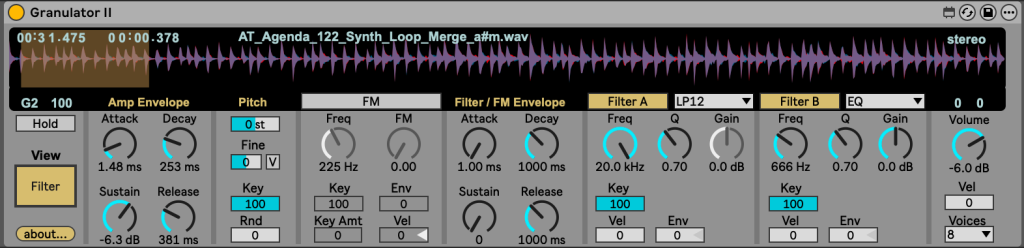
Granulator II is one of my favorite tools for sound design in Ableton. It’s a granular synthesizer developed by Robert Henke (also known as Monolake), and what it does is take a sample and break it down into tiny pieces called grains. These grains are then played back in different ways – stretched, overlapped, reversed, or scattered to create entirely new textures. It’s a really creative way to reshape sounds and rearranging them into something fresh.
I often use Granulator II to stretch and warp samples, which can give them a gritty, textured feel. In this particular session, I used it for the two main synth growls, as well as for the synth that comes in after the break. For the growls, I stretched the sample out and played back some grains to add extra grit and movement. For the synth after the break, I chopped a small piece of a synth loop and ran it through some effects to give it a nice tone and a bit of distortion.
One thing I’ve learned while working with Granulator II is that the input sample makes a huge difference. If you start with a clean, high quality sample, you tend to get a cleaner and more controllable result. That way, you can push the processing in Granulator quite heavily without things turning muddy or harsh.
Thermal
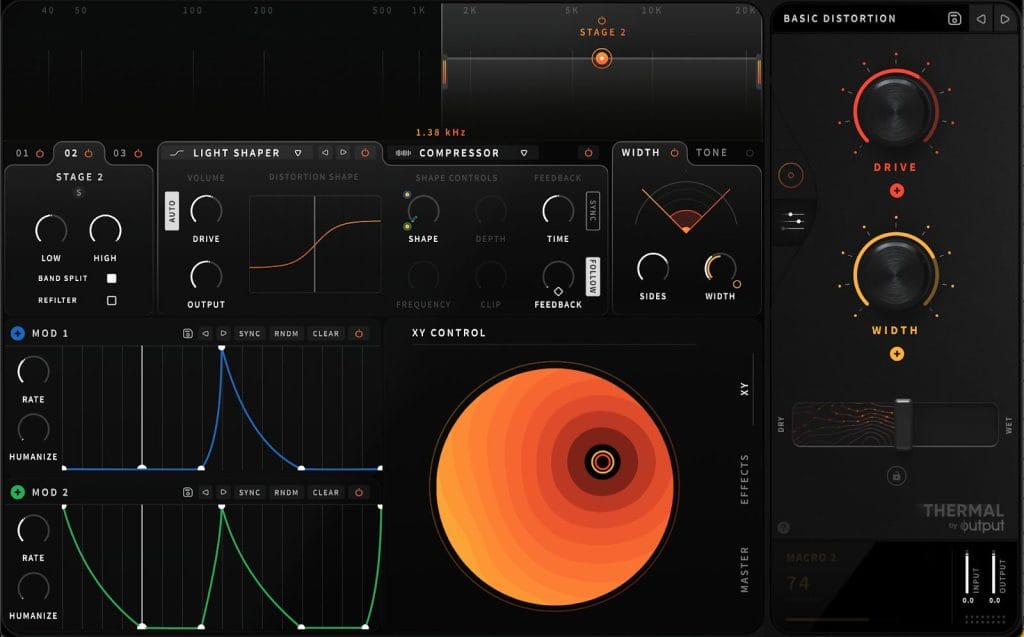
Thermal by Output is one of my go-to plugins for adding distortion and character to sounds. What makes it stand out isn’t just the drive itself, but the effects engine underneath. It’s like a full modular distortion lab packed with filters, modulation, and multi-band control. The interface is nice and visual, which makes it easy to see how your signal is being shaped, and the built in LFOs let you add subtle movement or go completely wild with modulation. There’s also a massive library of presets that cover everything from gentle saturation to full on destruction, so it’s easy to find something inspiring fast.
In this track, I used a very simple preset I built myself, it pushes the Light Shaper just a bit on the high end for the synth after the break, with the built-in LFO modulating both the drive amount and the stereo width. I used the heavy shaper with a slight modulation for the mid/lows in the synth, while also adding some compression to glue it together. I also like to automate the XY pad inside Thermal, recording my movements to get natural variation and movement throughout the section. The result adds energy without overloading the mix, and the plugin’s visual feedback really helps me finetune how far I can push it before it gets too aggressive.
I’d highly recommend experimenting with Thermal on anything that needs a bit more body or presence especially leads, bass growls, or percussive hits. One trick I’ve found is to isolate the high bands and go heavy on modulation there, while leaving the low end relatively untouched for a cleaner mix. Don’t be afraid to dive into the modulation section or record some manual movements on the XY pad; that’s where the most interesting textures come from.
Valhalla VintageVerb

Valhalla VintageVerb is one of my absolute go-to reverbs and has been for years, even back when I was making hip-hop before moving into techno. It’s a super versatile reverb that can go from lush, vintage style ambience to modern, clean spaces depending on the mode and color you choose. What makes it great is the balance between simplicity and depth: the interface is minimal, but each control has a huge impact on the tone and feel of the sound. With different modes, color options, and an easy workflow, it’s one of those plugins that just fits anywhere in a mix.
For this example, I used Valhalla VintageVerb on my closed hat. I like to switch up my reverb processing between tracks to keep things fresh, and especially with hats, it helps avoid that repetitive, static sound. I played around with the Pre-Delay, Shape, and Decay parameters to get the reverb to sit rhythmically with the groove. I usually apply a low cut around 200–500 Hz to keep the low end clean and avoid muddiness, and sometimes a high cut to tame the highs a bit. My favorite color mode is Now, because it adds more clarity compared to the older modes, but I also use the vintage ones on synths when I want something warmer or more washed out. For synths, I usually keep it around 0.7s decay and 10–20% mix, and for drums I go shorter, 0.2 to 0.5s decay and 0–10% mix, to keep them tight and natural.
Valhalla VintageVerb is amazing for creating space and movement without overwhelming your mix. Try using shorter decays and subtle pre-delay on percussive elements to add groove and realism, or automate the mix and decay over time to build tension in breakdowns. The different color modes are also great for shaping the overall vibe. Now for a crisp, modern sound, or 70s/80s for a softer, more atmospheric feel. And as with most reverbs, a little goes a long way; focus on complementing your elements rather than drowning them, and it’ll instantly make your track sound more professional and polished.
RC-20 Retro Color

RC-20 Retro Color by XLN Audio is one of those classic plugins that never really leaves the toolkit. It’s designed to bring the warmth, noise, and character of vintage analog gear into modern productions. The plugin works by combining six effect modules: Noise, Wobble, Distort, Digital, Space, and Magnetic, each adding its own flavor of imperfection, like tape flutter, vinyl crackle, or tube style saturation. What makes RC-20 so fun is how easy it is to blend subtle vintage vibes or completely degrade your sound into something crunchy, wobbly, and full of character.
In this track, I used RC-20 on a texture sound that plays throughout the entire track, giving it a bit of movement and grit. I used some Wobble, Magnetic, Distortion, and a touch of Noise to make the texture feel more organic and less static. It gives that impression of something imperfect and alive, almost like a vinyl record playing underneath the track. I started using RC-20 back when I was producing hip-hop and I loved its ability to emulate that dusty, analog feel and I’ve carried that habit into my techno productions. The plugin’s EQ section also helps shape the tone nicely, and the built-in presets are a great starting point when you want to explore different flavors of warmth and saturation.
RC-20 is an amazing tool for adding subtle character and movement to otherwise clean sounds. Try using it on background textures, synth layers, or even vocals to give them a more human, imperfect feel. My favorite modules to play with are Wobble, Magnetic, and Distortion, especially when you automate them slightly over time to introduce randomness and groove. If you’re chasing that analog, worn-out tone that still feels modern, RC-20 is a must. Don’t be afraid to push it and experiment with how far you can take the degradation before it breaks in the best possible way.
Fast Tips About Making Music

Tip 1
Keep your low end clean and powerful. Layer your kick and bass carefully as they’re the main element of the track, not just the foundation.
Tip 2
Use movement to keep your loops alive. Automate filters, reverbs, and modulation so nothing feels static.
Tip 3
Textures are everything. Add grit and character with tools like RC-20 or Granulator II to make your sounds feel raw and organic.
Tip 4
Space creates energy. Use short, tight reverbs on percussion and longer, evolving verbs on synths to build contrast and depth.
Tip 5
Push your sounds to the edge. Distort, resample, and experiment.


Will Vance is a professional music producer who has been involved in the industry for the better part of a decade and has been the managing editor at Magnetic Magazine since mid-2022. In that time period, he has published thousands of articles on music production, industry think pieces and educational articles about the music industry. Over the last decade as a professional music producer, Will Vance has also ran multiple successful and highly respected record labels in the industry, including Where The Heart Is Records as well as having launched a new label with a focus on community through Magnetic Magazine. When not running these labels or producing his own music, Vance is likely writing for other top industry sites like Waves or the Hyperbits Masterclass or working on his upcoming book on mindfulness in music production. On the rare chance he's not thinking about music production, he's probably running a game of Dungeons and Dragons with his friends which he has been the dungeon master for for many years.