Table of Contents
As many of you know, music production is only half of the battle when it comes to being a successful musician. The other half is entirely on stage.
The fact of the matter is that you’ve got to be as good of a DJ as you are a producer if you even want to consider being a touring act. There’s a lot that goes into that. Do you know how to use decks? Are you comfortable on stage? And, most importantly, can you put together a good, cohesive DJ set?
That last one is much harder than it sounds. When performing in front of a crowd, you could have an entire perfect tracklist prepared only to see people visibly bored by the third song. If you don’t prepare a setlist, you might accidentally transition between two songs that don’t have any business being next to each other. It takes a lot of work to put together a cohesive set that the crowd actually enjoys.
This is why Mixed In Key has been considered industry standard for a while now. The tool helps you determine keys and BPMs of tracks so you can prepare a set accordingly with near-scary accuracy. But, now, there’s a Pro version. If you thought Mixed In Key was helpful before, then just get ready for this.
Editor’s Choice Award
This program might just be the single most useful thing I have ever come across for set preparation. All you have to do is load your music library in, spend a little bit of time playing around, and boom: you could have as many as 5 sets ready to go, all at different energy levels. All you have to do at that point is load the tracks into Rekordbox (or whatever you may use), get them onto your USB, and go. I don’t often make a statement like this, but I fully mean it when I say that this will make your performances infinitely better. Preparation is everything, and Mixed In Key 11 Pro makes it easy (and fun!) to prepare for your shows. That’s why we’re giving it an Editor’s Choice Award.

A Familiar Look
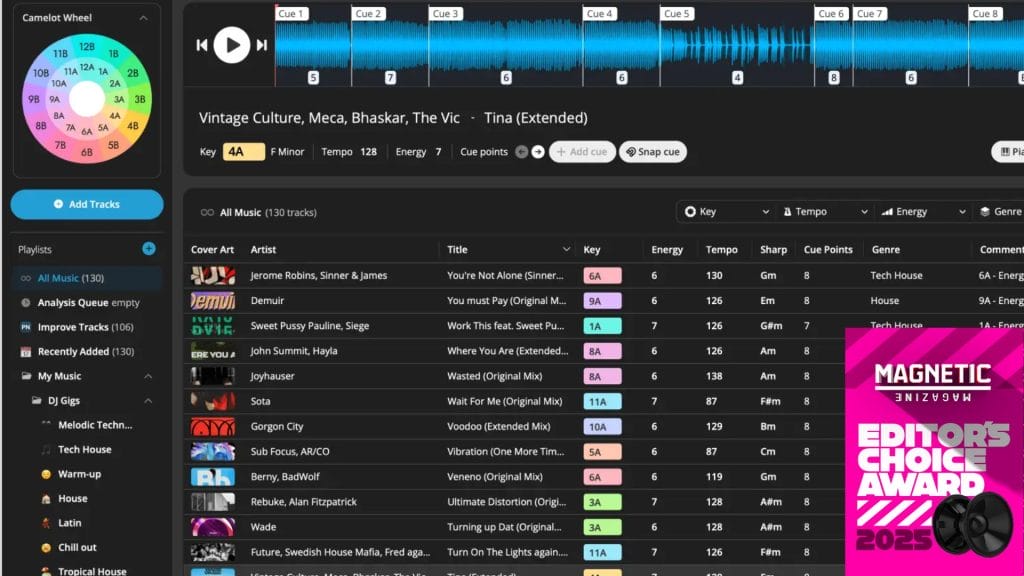
When you load up Mixed In Key 11 Pro for the first time, it looks pretty familiar. You can drag your tracks in, and it’ll instantly recognize the track’s key, BPM, and it’ll give it an energy level from 1 to 10, with 1 being calm and 10 being the highest energy possible.
The key wheel (known officially as the Camelot Wheel) at the top left is my favorite part of this page. Realistically, you want to mix into songs that are close key-wise to the song you’re mixing out of, and the wheel makes it easy to see what other songs are in your key, or close to it: just click on one of the segments and you’ll see what else you have to work with.

Note that the keys of the tracks are changed to numbers in the key wheel. While they do give you the key of each track (i.e. F# major) I find it a lot easier to go off the key wheel because you’re able to visualize exactly how close both keys are to each other. This tool makes harmonic mixing so easy.
And, by the way, for most every track I loaded in, they nailed the key and BPM. I’m not sure how they do it, but I don’t think the software made a single mistake.
You can also add tags to songs in a separate tab if you’d like to do that. But, that’s about it for the regular features. Now, let’s get into what you get with Pro.
Pro Bonuses
With the original version, you’re already looking at a worthy purchase. But, with these two features that you get in Pro, you’re looking at a game-changer.

The first major feature with Pro is a mashup idea creator. If you load a track into Deck A (on the left), a number of tracks will appear in Deck B for you to test mashups with at different cue points. By the way, those cue points were automatically added by Mixed In Key when I loaded the songs in.
Just click through the track and play them at the same time by hitting the blue button in the center. Keep playing around, and when you find a mashup you like, you can save it by hitting the “Save Mashup” button. If you want to get a close eye on what kinds of songs are suggested for these mashups, open up the Idea Filter. It’s pretty incredible how easily this thing dreams up mashups.
However, my favorite part of the Pro feature is the DJ Mix creator.

This feature is exactly why Pro is getting an Editor’s Choice Award. After you load a track into Deck A, it will quite literally bring up songs that you have in your library that will mix into that song well in a set based on energy, key, and BPM. You can play both songs at once to see if they’ll transition well, then save to a playlist. You can do this several times until you’ve saved enough songs for however long of a set you’ll need.

It is really that simple. It has never been easier to build sets. It took me about five minutes to build an hour-long melodic house set that transitions well and keeps the energy up. Loading these songs onto my USB will take longer than it did to create the playlist. That’s unbelievable.
Pros and Cons:
Pros:
Less time preparing, more time practicing.
This takes out all of the hard work you’ll have to do to actually prepare your tracklist. Because of this, you can spend more time preparing your actual performance – transitions and whatnot. This will absolutely lead to a better show.
Scary accuracy.
As I mentioned, I loaded in 100+ songs and it got most of, if not all of, the keys and BPMs right. I’m not sure how they do it.
Cons:
It’s a little pricy.
You’re getting a great product, but $99 USD might be hard to find sometimes for a lot of upcoming DJs. It’s definitely worth saving up for. In fact, for what you’re getting, it’s a bargain, and I think you’ll benefit in the long run from a purchase. But, I do understand that this isn’t the most lucrative pastime a lot of the time.
You have to load 100 songs into the software to access the Pro features.
I’m lucky and have a massive folder of songs I could play live, so it didn’t take me long at all to load up 100 songs. In fact, if you’re buying this, you probably have more songs loaded up to play than I do. It’s just a little bit of an inconvenience, is all.
Conclusion: Should you get it?
If you’re looking to level up your DJ skills, then I think this is just about the best purchase you could make right now. This is the best product yet from the Mixed In Key team, and I cannot wait to see what’s next from them.
Buy Mixed In Key 11 Pro here.

Ben Lepper is a music producer and journalist from Boston, Massachusetts.