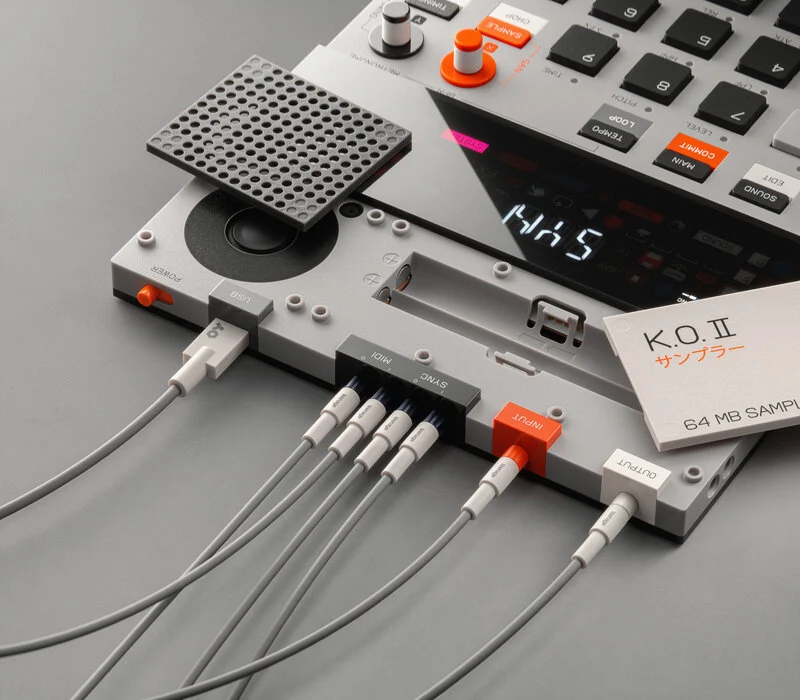
Teenage Engineering, known for its unconventional approach to marketing and branding, has once again caught the attention of music enthusiasts with its latest surprise launch: the EP-133 K.O. II. This new addition to their lineup is a portable sampler/groovebox that marries a sleek design with feature-rich capabilities, all at an accessible price of $300.
Straying from the toy-like image of its previous Pocket Operator portable synthesizers, the EP-133 K.O. II is a more severe workstation reminiscent of Akai’s standalone machines. The EP-133 K.O. II, positioned as a bridge between novice and professional realms, offers a blend of simplicity and power with its polyphony capabilities, built-in effects, and sampling tools. It’s a bold step for Teenage Engineering, offering a relaxed, futuristic twist to music production tools.
So whether you’ve already gotten your hands on this sampler or are desperately refreshing the products page waiting for them to come back in stock, here are a few of our favorite tutorials for the EP-133 K.O. II that show you what this sampler can do and how to do in your next track.
Looking for the best drum samples? Dive into ‘The Ultimate Library of Free Drum Samples: 7k+ Percussions and Drum Loops for Every Genre’ – access your free sounds here.
Get started with the new EP-133 K.O.II
It teaches you how to leverage the EP-133 K.O.II’s ability to adjust pattern lengths, offering unparalleled creative freedom. Dive into its unique features, like recording directly from vinyl players and splitting samples across different pads, to add distinctive flavors to your tracks. Integrating keyboards into the EP-133 K.O.II enhances the natural and intuitive playing experience, broadening the sound creation possibilities.
What makes this tutorial indispensable is its focus on the EP-133 K.O.II’s versatile sound manipulation capabilities, including an array of effects like delay, reverb, distortion, and more. It guides you through detailed and spontaneous jamming sessions, showcasing the device’s ability to line up different patterns and navigate various pattern constellations, adding a new level of creativity and control.
Additionally, it covers how to create and play polyphonic midi notes over extended bars without timing restrictions, allowing for complex and evolving musical compositions.
Does this $299 sampler live up to the HYPE?!
This tutorial dives deep into the EP-133 K.O II’s advanced features, such as its flexible quantization and note repeat functions, which give you unprecedented control over rhythm and timing. Furthermore, it covers the extensive range of sound manipulation options available, including effects like delay, reverb, distortion, and more, opening up a world of creative possibilities.
What sets this tutorial apart is its focus on unique features like the KO2’s time-stretching algorithm, which allows polyphonic playback of samples across multiple octaves – a feature not commonly found in samplers like the Digitech and Circuit Rhythm. It also guides you through efficient ways to scroll through sounds, record MIDI to the sequencer, and leverage the sampler’s ease of use for immediate and impactful music production.
Sampling on the KO2 is easy and quick, making it a standout choice compared to more complex samplers. Additionally, the tutorial highlights how to adjust BPM and play in different pitches with the EP-133 K.O II, adding another layer of versatility to your musical toolkit.
Need expert tips on choosing monitors for beat-making? Read ‘Choosing the Right Monitors for Beat-Making and Hip Hop Production: Scott Storch Shares Advice for Creators’ – find his insights here.
First Beat Tutorial
The tutorial goes beyond basic features, delving into the flexibility of the K.O. II. You’ll learn to add and modify bass sounds, adjust trigger behaviors, and independently control pattern lengths for instrument groups like basslines and drums.
This level of individual control is crucial for crafting complex and layered compositions. Moreover, the tutorial covers the output stage, teaching you how to manipulate compression and saturation for the overall mix, adding richness and texture to your music.
The real game-changer discussed in this tutorial is the expressive use of effects. Learn how to add the impact easily by combining the fader with effect buttons, sending sounds to main effects like delay. This is enhanced by the ability to use pressure on the pads for dynamic effect parameter changes, adding a new dimension of expressiveness to your music. Finally, the tutorial emphasizes the impact of send effects, particularly the delay, in adding depth and character to the beats created on the K.O. II.
Uploading Samples to the EP-133 K.O.II
Organizing samples efficiently is crucial, especially when categorizing different types like drums and synths. This tutorial shows you the best practices for arranging samples on the KO2, leading to a better workflow and increased efficiency in your music-making process.
A standout feature of the EP-133 K.O.II, as highlighted in the tutorial, is its built-in memory system. It’s optimized and compressed by the utility tool, allowing you to store many samples without overloading the device. This means you can maintain a diverse and expansive sound palette without worrying about memory constraints.
Additionally, the tutorial covers the convenience of plugging the USB into a computer to power the unit, bypassing the need for batteries. This feature is handy for sample testing and tweaking, ensuring your production setup is flexible and efficient.
Nick-Hook Makes A Beat From Scratch
The tutorial delves into using independent patterns and fader effects to sculpt your sound precisely as you envision. It encourages quick beat creation, highlighting the KO II’s capability to morph and transform these beats profoundly.
Experimentation is a key theme of this tutorial, urging you to play with different bar lengths and understand the creative potential of varying your music production. The KO II’s features for creating sample groups and manipulating auxes add another layer of depth and versatility to your work. Perhaps the most intriguing aspect covered is the use of pressure-sensitive pads on the keyboard. This feature opens up innovative ways to manipulate rhythms and effects, offering a unique experience in music production.
Are you looking for top-quality hip-hop samples? Explore ‘Thousands of Free Hip Hop Samples and Packs for Producers and Beatmakers to Download’ – grab your free downloads here.

Magnetic byline note: This byline is used for staff produced updates and short announcements, often based on press materials and official release information. Editorial responsibility: David Ireland (Editor in Chief) and Will Vance (Managing Editor). About: https://magneticmag.com/about/ Masthead: https://magneticmag.com/masthead/ Contact: https://magneticmag.com/contact/