Discover Spotify’s latest: the ‘Enhance’ feature. Unveiled in late 2021, this playlisting tool is designed to ease the pressure on creators, introducing them to fresh and resonant tracks. Here’s how it stands out in 2024.
With its advanced algorithms, ‘Enhance’ ensures premium users are constantly updated with fresh, undiscovered tracks. But given the evolving music scene, is this tool still a game-changer for 2024 playlists?
“The world today pulls us in a million different directions,” said Co-President and Chief Product & Technology Officer Gustav Söderström. “So the most important thing we, at Spotify, can do for creators is to reduce the distance between their art and the people who love it . . . or who would love it as soon as they discovered it.”
Let’s find out by unpacking everything you’ve ever wondered about this powerful Spotify feature by using it to breathe new life into our Fresh Cuts playlist below.
Looking For The Best Handmade Playlists In 2024? Look For Further
What does the “Enhance” feature do on Spotify?

The “Enhance” button located at the top of the playlist deck is a feature that allows you to instantly bolster up your playlist with algorithmically generated song selections that Spotify assumes match the vibe of the rest of the songs that you’ve already selected for the playlist.
We will be diving a bit more into details of exactly how to use this feature here shortly, but for the time being, what’s important to know is that when you tap that button, 1/3 of the playlist (every third song that is) is instantly populated with a handful of fresh and new music that Spotify thinks are relevant to the playlist. Telling which ones they added is easy to see, as a new column is introduced that tells you whether you are the one who added the song to the playlist or if Spotify did.
But the work isn’t done yet, as the songs still haven’t technically been added yet…
From here, you have to give the songs a final pass-through by telling Spotify whether or not to add them to the playlist officially. If you dig one of the songs that Spotify added and think it would make a good addition to the playlist overall, tap the “+” button to add it to the playlist for good. Oppositely, clicking the “-” will remove the selection from the playlist.
When you are ready to make all the recommendations live, click the “Enhance” feature at the top again and everything will be locked in and live.
How To Use The “Enhance” Feature On Your Spotify Playlist
Let’s break down how to use this feature into a handful of easy-to-follow steps so that you can start getting the most out of this feature and pumping up your playlist ASAP.
Step 1: Open The App

First and foremost, you will need to bust open the Spotify app on your computer, phone, or tablet and load up the playlist you are looking to stock with more music.
If you’ve been living under a rock for the last few years and don’t know where the playlist tab is on your personal profile, playlists are accessed through the “Library” tab on the left side of the desktop app.
Step 2: Click The “Enhance” Button

The ‘Enhance’ button is situated directly at the top of your playlist, and all you have to do is press on the button to have Spotify start populating your playlist with fresh recommendations.
Step 3: Filter Through The Recommendations

Spotify will do its best to place as many recommendations as possible that match the vibe and sound of the songs you added. But it’s a computer, and you’re a passionate curator and naturally, not all of Spotify’s recommendations will match what you would select.
Use this opportunity to remove any unwanted songs that you wouldn’t have chosen yourself, leaving only the best of the best for the playlist to make life in the next step.
Step 4: Keep The Good Ones
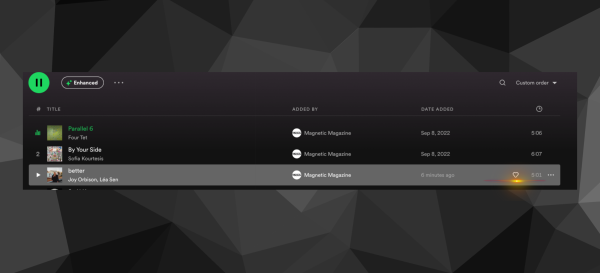
Once you click the “+” button, the Spotify logo will disappear, and it will be as if you were the one who found that hidden gem of a track all along. None will be the wiser, and all your friends and family will assume that your magic touch as a curator is what found these undiscovered gems of songs as your playlist becomes packed with amazing music that matches your sonic aesthetic.
Step 5: Make It Live!

The final step is to tap that “Enhance” button one more time at the top of the playlist and Spotify will update the entire playlist and make it live for all your adoring fans to see all the hard work you’ve done curating this fresh batch of tunes.
It’s that easy! Now you’re done.
Is “Enhance” available for all Spotify users?

The “Enhance” feature is only available to premium users, and free users of the platform do not have access to the playlist enhancer. While this might come as a bit of a bummer, it’s undoubtedly one of the premium features paid users have access to that warrants hiding behind Spotify’s paywall.
Should You Use The “Enhance” Feature?
This can be a tricky question since many curators consider their job a sacred art form and respect the hand-selecting process to be an actual work of art. If you are a passionate curator, then shying away from this feature.
But if you are a casual music lover trying to keep a playlist up to date and active, this is an invaluable feature that can often remove hours of work crate digging for new music on Spotify.

Will Vance is a professional music producer who has been involved in the industry for the better part of a decade and has been the managing editor at Magnetic Magazine since mid-2022. In that time period, he has published thousands of articles on music production, industry think pieces and educational articles about the music industry. Over the last decade as a professional music producer, Will Vance has also ran multiple successful and highly respected record labels in the industry, including Where The Heart Is Records as well as having launched a new label with a focus on community through Magnetic Magazine. When not running these labels or producing his own music, Vance is likely writing for other top industry sites like Waves or the Hyperbits Masterclass or working on his upcoming book on mindfulness in music production. On the rare chance he's not thinking about music production, he's probably running a game of Dungeons and Dragons with his friends which he has been the dungeon master for for many years.