For music producers, inspiration can arrive at any moment. A bassline might spark the beginning of a new track, a vocal chop might suggest an entirely different direction, or a synthesizer preset might provide the missing element that brings a production together.
The challenge is finding that sound before the creative moment passes. Speeding up what can be a cumbersome task like finding the right sounds for your project is something I have been trying to overcome in my own DAW workflow.
Music producers often have thousands of samples, loops, MIDI files, and synthesizer presets spread across external drives, sample packs, and multiple software instruments. Searching through all of that material can take time away from the actual process of making music.
Table of Contents
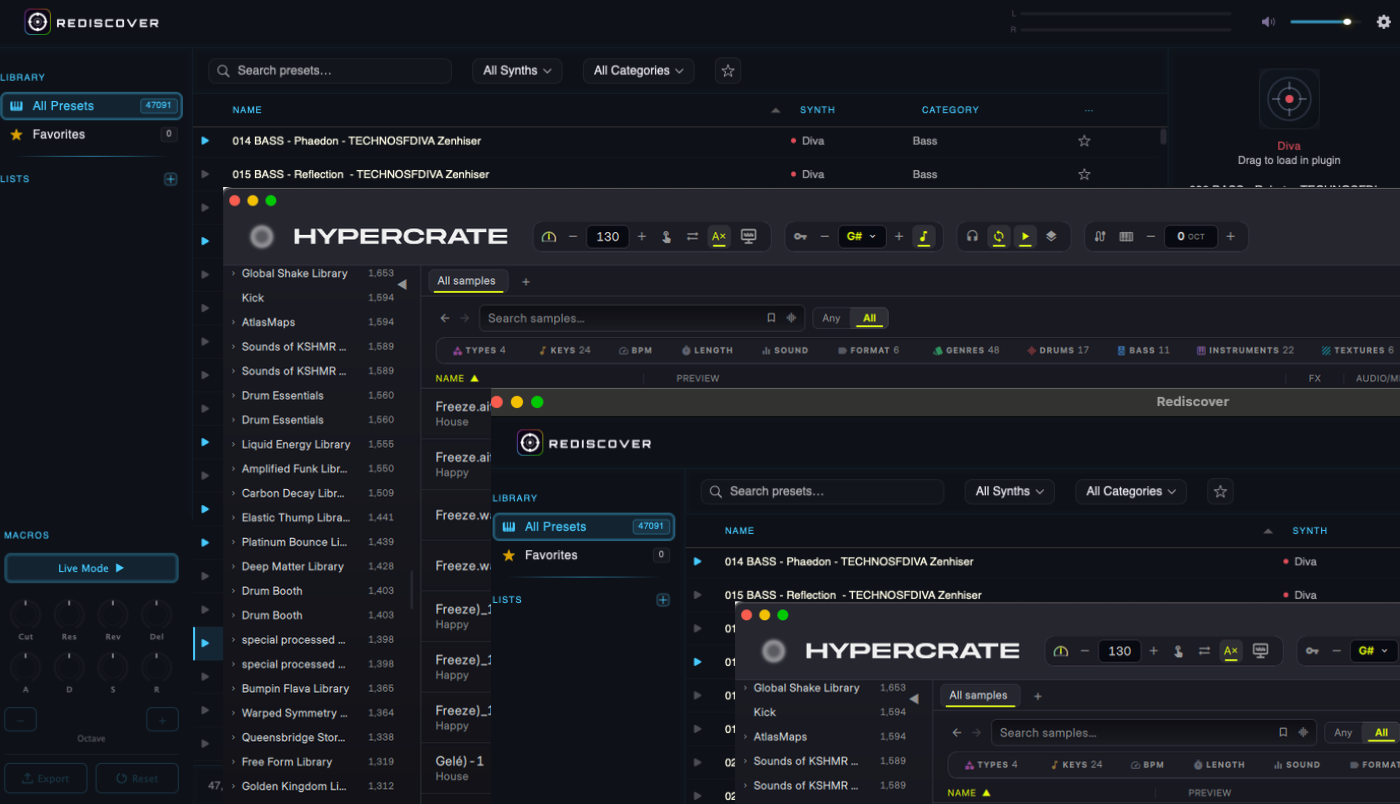
Two applications designed to address this problem are HYPERCRATE, developed by trance producer Luke Bond, and Rediscover, created by BadKork. Both aim to make sound discovery faster, but they approach the task from different directions.
HYPERCRATE focuses on organizing and searching an existing sample and MIDI library, with tools to sync sounds to a project and build layered arrangements.
Rediscover brings synthesizer presets into a unified browsing environment, letting producers search by name or sound, audition patches, and explore sounds across multiple synths.
Both offer compelling ways to improve a producer’s workflow. The right choice depends on where your sound library lives and what slows you down during a session.
I’ve spent time in my studio checking out both applications on my 2024 Apple Mac Mini M4 Pro. Let’s dive in, learn what each application does, and discuss how they improved my workflow almost immediately.
What is HYPERCRATE?
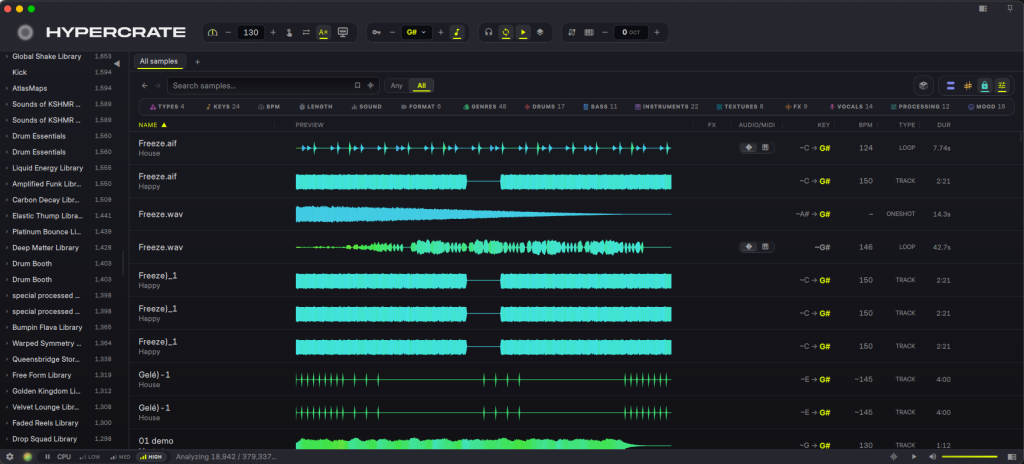
HYPERCRATE is a desktop application designed to make a producer’s existing sample library easier to search, organize, audition, and use. Rather than replacing a sample library or requiring users to purchase new content, it provides a central place to work with sounds they already own.
Developed by Luke Bond, a British DJ and trance producer whose releases include collaborations with Armin van Buuren and Aly & Fila, HYPERCRATE reflects a familiar challenge in electronic music production: maintaining a large collection of sounds while being able to find the right one quickly.
The application can organize and search samples, loops, one-shots, and MIDI files. Search and filtering options help narrow results by attributes such as sound type, key, tempo, genre, and other tags. It also analyzes samples to identify useful musical information, making it easier to find material that fits a particular production.
One feature I loved was auditioning sounds in the context of a track. Producers can synchronize compatible samples to their project’s key and tempo, reducing the need to manually adjust each file before deciding whether it works.
HYPERCRATE also includes sound-similarity and natural-language search tools. Instead of relying solely on filenames, users can explore their libraries by what a sound resembles or by describing the sound they want in plain language.
The Layer Deck expands the application beyond library management. It lets producers build up combinations of sounds, audition layers together, and export the resulting mix or individual lanes for use in a DAW. Recent feature additions include a step sequencer for one-shots and additional controls for shaping layers.

For producers who have accumulated years of sample packs, these features could make an existing library feel more accessible without requiring a new round of purchases.
In my time spent with HYPERCRATE, I was able to quickly find sounds in my library that I had no idea existed, and it felt great being able to make use of some things that may have sat on my hard drive collecting virtual dust.
What is Rediscover?
Rediscover was created by composer/producer/score-mixer Michael Badal whose credits include The Night Agent, The Equalizer, and S.W.A.T. among many others, and David Korkis professionally known as Young Mozart who has been behind much of the music in reality television such as The Challenge, Keeping Up With The Kardashians, and Below Deck.
They were both frustrated with one common issue when it comes to a different organizational problem: the growing collection of presets spread across a producer’s software synthesizers and how to quickly access much needed sounds on while working on tight production deadlines.
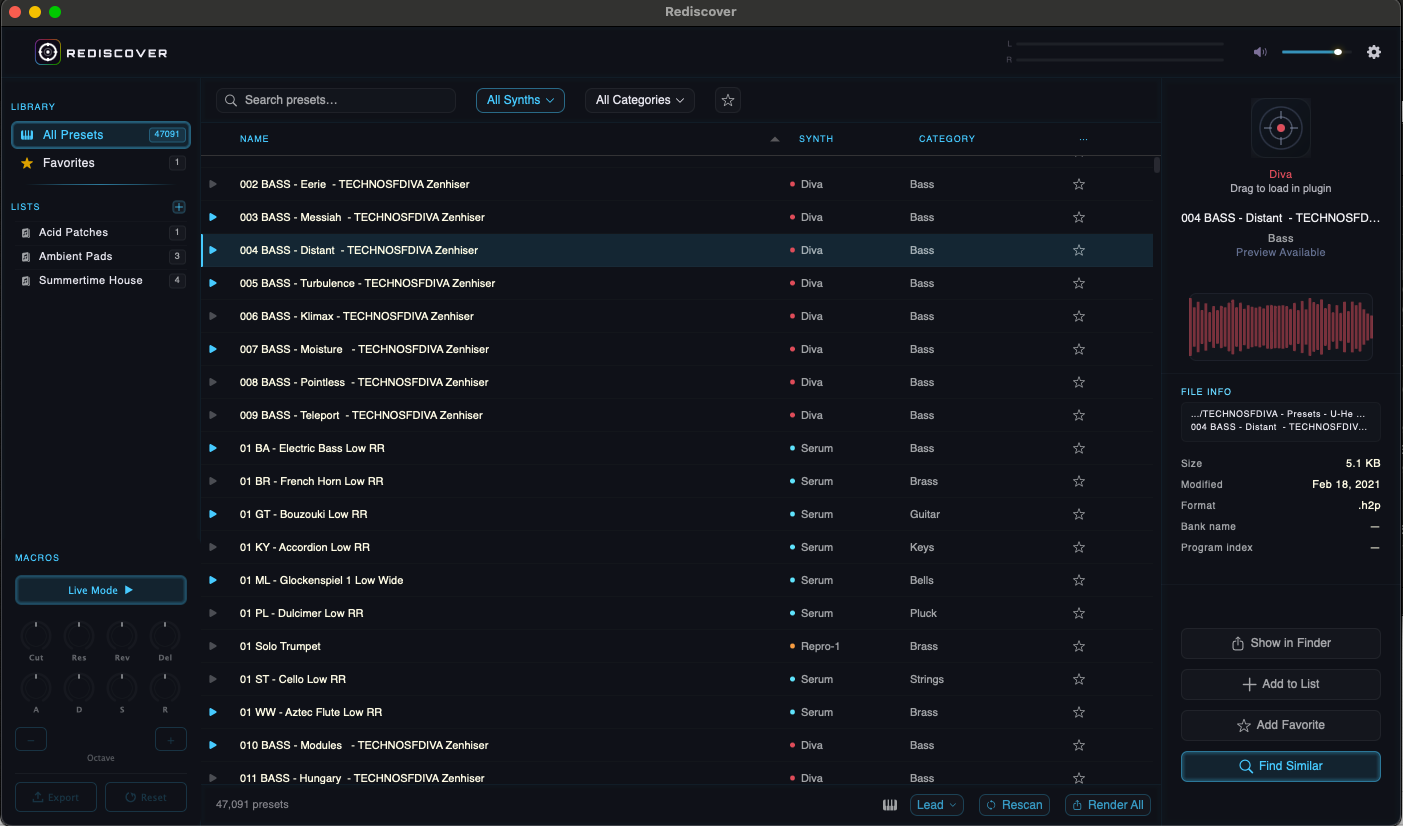
A typical electronic music producer might own several (or MANY, as I am quite guilty of this myself) virtual instruments, each with its own browser, preset folders, naming conventions, and interface. Finding a specific sound can involve opening one synth, browsing its presets, closing it, and repeating the process in another instrument.
Rediscover brings supported synthesizer presets into a single browsing environment. Instead of searching through each instrument separately, users can explore their collections in one place, preview sounds, and virtually move between synthesizers without repeatedly opening their individual preset browsers.
The list of supported software synths is ever growing and the user community can offer BadKork feedback on which synths they would like to see supported. According to the Rediscover website, they currently support thirty-one different engines including a few of my favorites: Xfer Records’ Serum 2, LennarDigital’s Sylenth1, U-He’s Diva, Native Instruments’ Massive, and Arturia’s Pigments. For the full list of currently supported synths, click HERE.
One of its features I found very helpful is Find Similar, which helps locate presets that sound like a selected patch. The search relies on sonic characteristics rather than matching names, letting producers explore related sounds even when they have no idea what the original preset was called.
Rediscover also generates audio previews using the actual synthesizers installed on the user’s computer. The first preview is rendered, and subsequent previews can be played instantly from a cache. This allows producers to audition patches without repeatedly loading and navigating their synths inside a DAW.
Another awesome feature is Live Mode, which allows users to loop a MIDI pattern while shaping a sound through a consistent set of controls. I appreciate that this encourages experimentation because the producer can hear changes as they happen rather than repeatedly stopping to open another interface.

The application also supports organizing presets into lists, filtering results by synth and category, and dragging compatible presets directly into their synthesizer windows.
One cool thing worth noting is that BadKork offers Rediscover Play, which is completely FREE.
It hosts supported synthesizers in a DAW, allowing users to stack multiple presets and control the resulting combination through a shared set of macros. This is particularly interesting for producers who enjoy layering a pad, pluck, bass, or lead from different instruments.
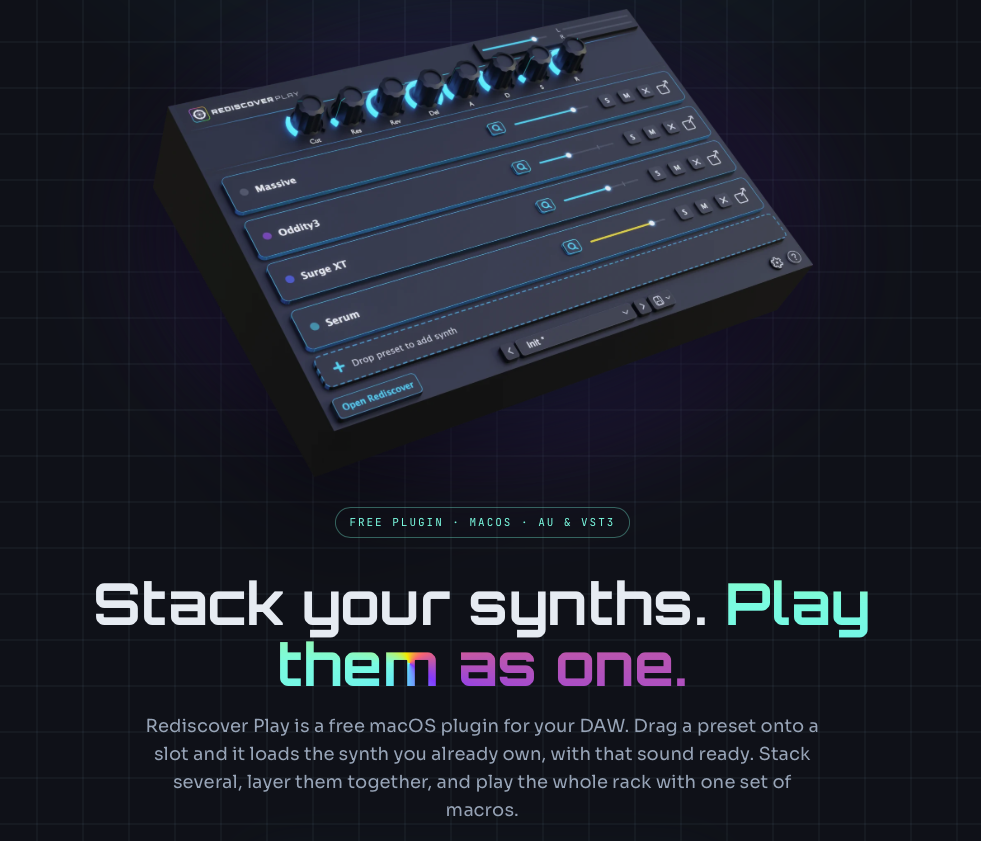
NOTE: It is worth distinguishing Rediscover’s Live Mode from its companion plugin, Rediscover Play. Live Mode lets producers audition and shape individual presets within the standalone application, while Rediscover Play brings supported synthesizers into a DAW, where multiple sounds can be layered and controlled through shared macros. Together, the two tools cover different stages of the process, from finding a sound to building a playable instrument around it.
DAW Integration and Creative Tools
The practical value of either application depends on how easily it fits into an existing production setup.
HYPERCRATE and the sample-to-arrangement workflow
HYPERCRATE supports dragging samples and MIDI material into a DAW, with additional companion plugins for compatible hosts. These provide options for synchronizing auditioning with a project and working with MIDI material.
Its sample processing features can help producers get sounds into the right musical context before importing them. Key and tempo synchronization can reduce repetitive preparation, while audio-to-MIDI conversion offers a starting point for turning certain melodic audio material into editable MIDI notes.

The Layer Deck is another important part of the workflow. Producers can build up combinations of samples, adjust the layers, and export a stereo mix or separate lanes. I found this to be very helpful when developing percussion arrangements, layering one-shots, or experimenting with combinations of loops.
Between the flexibility offered by the options to locate sounds based on key, tempo, genre tags, types of instruments, or simply typing in a description for the sound you want like, “aggressive trance lead,” and the fact that using HYPERCRATE has helped me find samples so much faster than manual browsing. I’m genuinely excited when I pop it open to start finding sounds for a project.
HYPERCRATE is available for Windows, macOS (M1 chip or higher using macOS 16 or higher), and Linux. Check out the specs by visiting https://lukebond.store/pages/hypercrate
Rediscover and the Preset to Sound Design Workflow
Rediscover takes a different approach to integration. It can preview supported presets through their actual synthesizers, then let users drag compatible presets into their instruments.
Live Mode provides a way to audition and shape sounds without constantly switching between plugin interfaces. The shared controls make it easier to experiment with presets from different synthesizers, since producers can work with familiar parameter types rather than learning a different interface for every instrument.

Rediscover currently supports macOS 12 or later on both Apple Silicon and Intel Macs and they just announced full Windows support (Windows 10 and higher). The standalone application browses VST3 presets, while Rediscover Play is available in AU and VST3 formats for compatible hosts. As previously noted, users still need the supported synthesizers themselves installed and licensed to generate the sounds.
Pricing and Where to Purchase
At time of publication, HYPERCRATE is available at https://lukebond.store/pages/hypercrate for a discounted introductory price of $79 US with a retail price of $109. Make sure to take advantage of the 14 day trial if you are on the fence about the purchase.
Rediscover is currently available https://rediscoverapp.com/#pricing for a retail price of $149 or you can take advantage of a pay over time option at $9.95 until you have paid for the license in full at a total price of $179.10. Don’t forget to snag your license for the FREE plugin Rediscover Play.
Which Application Is Right for You?
The best choice comes down to what you spend the most time searching for.
Choose HYPERCRATE if:
- Your sample library contains large collections of loops, one-shots, audio samples, and MIDI files.
- You regularly need to find sounds that match a project’s key and tempo.
- You want to search, audition, layer, and export sample material from a central application.
Choose Rediscover if:
- You are a running macOS 12 or later or Windows 10 or later.
- You own several software synthesizers and have accumulated a large collection of presets.
- You want to search for sounds across supported synths rather than browsing each instrument separately.
- You are tired of constantly having to search for synth patches one at a time and want to save yourself a lot of time.
Final Thoughts and Walk-Through Videos
I genuinely cannot say enough positive things about HYPERCRATE and Rediscover.
Luke Bond and BadKork have obviously spent a great deal of time and energy creating products that music producers will find great value in using. I’m excited about the massive time savings in my DAW workflow from not having to browse hundreds of folders or load synth patches or samples one at a time.
If you are still debating whether either application would be right for you, I strongly encourage you to watch the detailed walk through videos for both.
If you have a massive collection of synth presets and samples, I’m confident that picking up one or both of these fantastic applications is a great move.

Nick Wax is a producer, singer/songwriter based in Seattle, WA. He has more than 2 decades networking in the music business. He’s passionate about connecting people through their shared love of electronic music. Most people know him as the guy who makes that one mashup they like. When he’s not nerding out in the studio, you can usually catch him hanging out with his wife and cats.