Reverb is one of those essential tools that can shape the entire character of a production. It can help a vocal sit naturally in a mix, give a piano a sense of depth, or turn a simple synthesizer patch into something much more expansive. With so many reverb plugins available, though, finding one that delivers a convincing sense of physical space while still offering the flexibility needed for modern production can take some work.
KIT Plugins aims to address that balance with BB Chamber D, a plugin modeled after a real reverb chamber at Nashville’s Blackbird Studio. The software recreates the character of this well-known studio space and adds a collection of controls that let producers shape the sound without leaving the plugin window.
After spending time experimenting with BB Chamber D on synthesizers, vocals, and other musical elements, I found it to be a beautifully designed option for producers who want a more grounded, natural-sounding reverb that can still be pushed into creative territory.
Table of Contents
Bringing the Sound of Blackbird Studio D into your Daw
The plugin is designed to capture the chamber’s depth, smooth decay, and natural sense of space. It offers producers access to modeled microphones, source options, and dampening adjustments intended to reflect the way engineers work with a real chamber.

That approach makes the plugin interesting for both traditional recording applications and electronic music production. A chamber reverb can add dimension to acoustic instruments, drums, and vocals, but it can also help synths feel more integrated into a track.
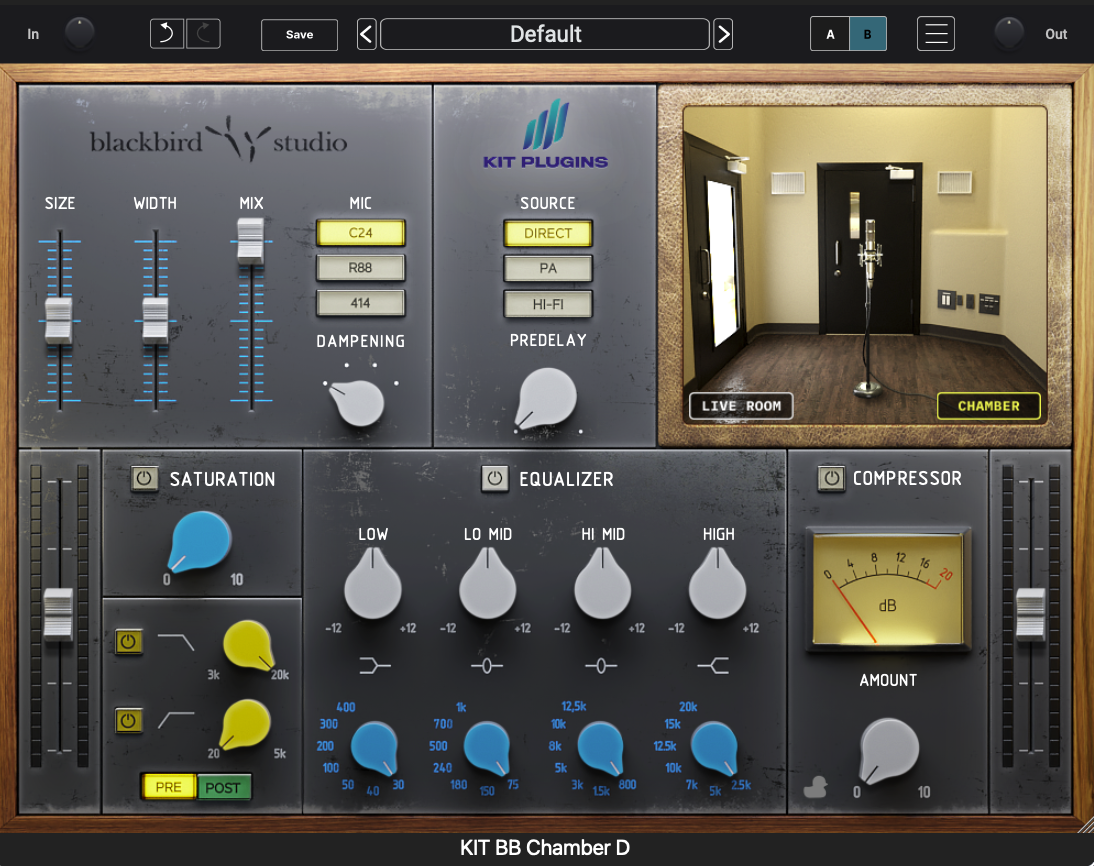
KIT Plugins has included several tools to make that possible, including adjustable size and stereo width, pre-delay, saturation, filtering, EQ, compression, and ducking. I really enjoyed the high quality of these additional processing options.
A User-Friendly Interface with Plenty of Control
One of the first things I noticed when opening BB Chamber D was how easy it was to understand the layout. If you have spent some time playing with Reverb plugins, the interface feels intuitive, so I found it easy to begin shaping the sound quickly.
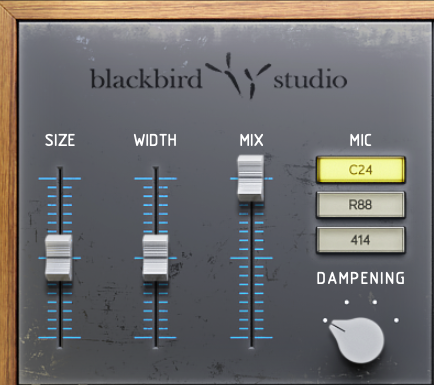
The Size, Width, and Mix controls provide a convenient starting point for determining how much space the reverb occupies and helps make your treated audio sit well within your mix.
Overall, BB Chamber D is approachable enough for producers who simply want to find a suitable preset and adjust the mix, yet offers sufficient control for those who prefer to build their own settings.
The plugin also includes an A/B system for comparing two settings. It’s enjoyed using this function for auditioning different presets or compare my own adjustments without having to recreate a previous setting manually.
Shaping the Sound: Microphones, Sources, and Dampening
Mic options give users another way to tailor the chamber’s character. Depending on the source material, a different mic selection can help emphasize the qualities you want to retain or change the way the reverb sits behind the original signal.
The Dampening section emulates the way acoustic treatment placed within the physical chamber, can alter its decay and tonal character. I love that provides a straightforward way to move between a more open, lingering sound and a more controlled response.
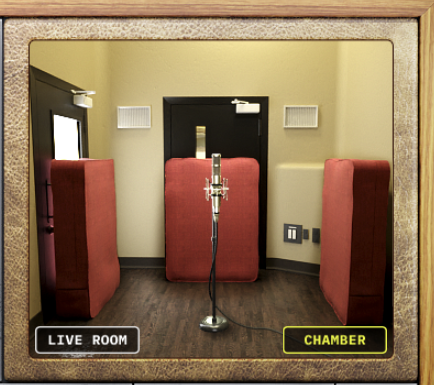
Another important feature is the Source selection. BB Chamber D offers Direct, PA, and Hi-Fi options. Direct places the source inside the chamber without speaker emulation, while PA and Hi-Fi recreate different ways of feeding sound into the space.
Pre-delay is also available, allowing you to control the interval before the reverb becomes audible. This is super helpful when working with vocals or other elements need to remain clear at the front of a mix. By adjusting the timing, you can give the original sound room to breathe before the chamber begins to fill in the space around it.
Built-In Processing for a Mix-Ready Reverb
A reverb can sound great in isolation and still create problems once it is placed in a full production. Low-frequency buildup, excessive brightness, and lingering reflections can compete with the dry signal or crowd other elements in the arrangement.
BB Chamber D addresses many of these concerns with a collection of processing tools built directly into the interface.
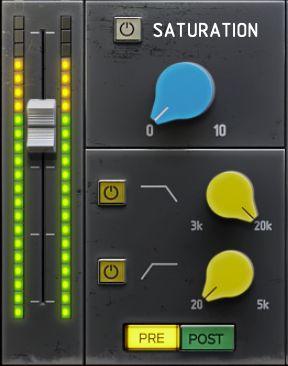
I was impressed with the pre and post-processing high-pass and low-pass filters, which allow uses to shape the signal before it enters the chamber and after the reverb has been generated.
The four-band EQ provides additional tonal control across low, low-mid, high-mid, and high-frequency ranges.
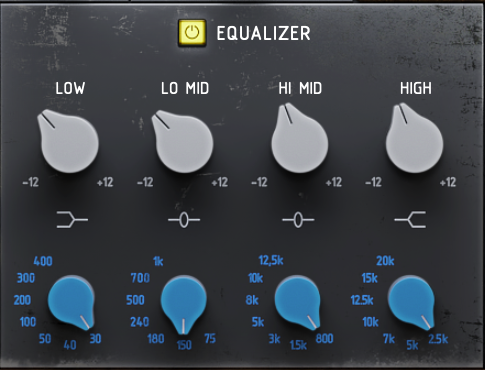
There is also a Saturation control, which draws on KIT’s A5 console emulation. It can add harmonic coloration and a little extra grit to the reverb. This is a great option for moving beyond a pristine acoustic response without adding another plugin to the chain.
Compression and ducking offer further control over how the effect behaves in a mix.
Having these tools in one interface makes my workflow efficient.
Presets that Help You Get Started
For anyone who prefers to begin with a ready-made sound effect, BB Chamber D includes factory presets organized around different instruments and applications.

Starting with an instrument-specific preset can help you get close to a usable sound quickly. From there, the size, width, dampening, source, and processing controls make it easy to adjust the result to fit your arrangement.
I also found the A/B functionality very useful in this context. You can load or create two different approaches and compare them while listening to the same musical passage.
During testing, I used BB Chamber D with synthesizers including Xfer Records Serum 2 and HahmoDSP’s SuperClassic. I also experimented with vocal processing and automation in the context of electronic music productions.
The results helped highlight the plugin’s strongest quality. It can provide a convincing sense of space without making every sound feel as though it has been placed inside an enormous virtual environment.
In contrast, if you want something for otherworldly / evolving sounds from a reverb plugin, Valhalla Super Massive (which is FREE), for example, is fantastic.
That distinction can be valuable in electronic music, where it’s easy to reach for a large reverb and have a mix that feels washed out.
When working with synths, I found BB Chamber D great for adding dimension while retaining a sense of focus.
The same approach works for more conventional musical elements. Piano, strings, and acoustic instruments can benefit from a chamber sound that provides depth without dramatically changing their identity. On vocals, the built-in EQ and ducking tools are especially practical because they let you shape the reverberated signal and keep it from competing too heavily with the dry performance.
I also found the plugin responsive and quick to adjust. The controls are easy to understand. The combination of visual feedback and accessible parameter placement makes experimentation feel straightforward.
Although the chamber is designed to produce a natural-sounding result, the available controls leave room for playing around to get some (intentionally) weird results.
Side note: For producers interested in SuperClassic, you can also read my earlier review of HahmoDSP’s SuperClassic.
Pricing, Compatibility, and Value
KIT Plugins lists BB Chamber D at a regular price of $120 as of the date of the publication of this review, however they are running their Black Friday sale right now and it is 50% off at $60.
The plugin supports macOS and Windows and is available in AAX, AU, and VST3 formats for compatible 64-bit DAWs. KIT’s download page lists installers for both Mac and Windows. An iLok account and iLok License Manager are required for activation, with options including iLok Cloud and supported hardware keys or machine activation. KIT also offers a 14-day trial for its plugins, so prospective users can check the current trial offer before committing.
At its regular price, BB Chamber D sits in a category where buyers have plenty of reverb options to consider. Its value comes from the combination of a modeled studio chamber and the built-in tools which have been designed with great attention to detail.
That may be particularly appealing if you want a reverb that can handle several jobs without building a separate processing chain around it. Rather than purchasing it solely for one signature effect, you can use it to add subtle ambience, provide depth to instruments, or create a more pronounced chamber sound when the arrangement calls for it.
Final Verdict
KIT Plugins BB Chamber D delivers a flexible chamber reverb built around natural space, straightforward controls, and practical studio processing. Its intuitive interface makes it easy to get started, while the microphone, source, and dampening options provide several ways to shape the result.
The integrated EQ, filters, saturation, compression, and ducking are meaningful additions, particularly when fitting reverb into vocals or dense electronic arrangements where uncontrolled reflections can become distracting.
In my own productions, I see BB Chamber D as a strong option when I want a sound to feel more present in a space without losing its identity. It can provide subtle depth or move into more characterful territory with a few adjustments.
There are countless reverb plugins available, and no single option will suit every production. However, if you value realistic chamber character, an intuitive interface, and enough built-in processing to shape the effect without unnecessary complexity, KIT Plugins BB Chamber D is well worth considering.
For more information, to try the 14-day trial, or to purchase BB Chamber D, visit KIT Plugins.

Nick Wax is a producer, singer/songwriter based in Seattle, WA. He has more than 2 decades networking in the music business. He’s passionate about connecting people through their shared love of electronic music. Most people know him as the guy who makes that one mashup they like. When he’s not nerding out in the studio, you can usually catch him hanging out with his wife and cats.