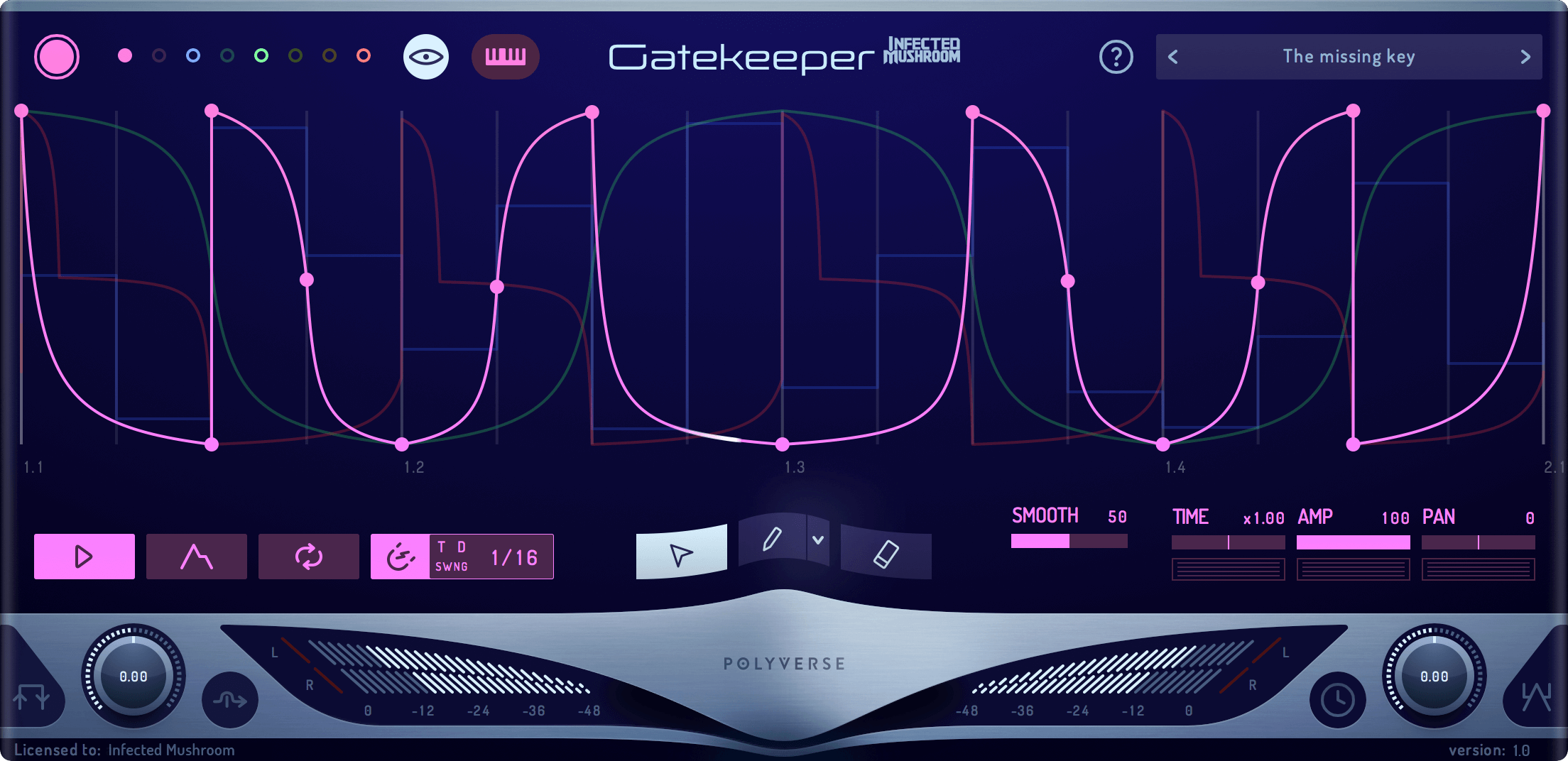
After running A&R at a record label and producing music myself for the better part of a decade, I’ve come to not only value, but also actively look for, how elements move and evolve throughout the song. Movement and life in a track are often the difference between a talented amateur and a seasoned professional; expectedly, implementing these essential qualities into your music is easier said than done.
This is why I’m always on the lookout for plugins that shape, morph, and chop a sound, especially prioritizing plugins that do all of this while ALSO including a dry/wet knob so that it can be automated right in front of my listener’s eyes (ears?*). This is why I anxiously jumped to check out Polyverse’s Gatekeep plugin.
But before I talk about my own experience with the plugin and what I loved most about it, show a couple of examples of how I used it, discuss the results you can achieve with it, and more, let’s take a second to break down the nuts and bolts of what this plugin does…

What Is Polyverse Gatekeeper?
Polyverse Gatekeeper distinguishes itself through its 100% sample accuracy, eliminating common issues such as sudden DC offsets. This precision enables aggressive volume control, setting Gatekeeper apart from its competitors. The plugin is equipped with eight envelopes, each featuring an on/off switch, a comprehensive background view for active envelopes; MIDI learn functionality for triggering envelopes with designated notes, and intricate control options, including Trigger and Grid controls, Smoothing controls, tools for envelope node creation, and Paint Tools with various brush shapes. This suite of features facilitates precise and creative volume modulation.
Further enhancing its utility, Gatekeeper integrates MIDI Modulation capabilities, allowing users to manipulate envelope modulation controls (Time/Amp/Pan) via MIDI note velocities or keyboard range. It also offers two additional modulation sources for dynamic parameter adjustments: alternating between minimum and maximum values and random parameter changes upon note triggers. Additionally, the plugin includes a stereo ping-pong Delay with host-synced delay times, basic Wet level and Feedback controls, and an Input/Output Control Bar featuring a Trigger button for envelope activation, Wet level adjustment, three clipping algorithms, and separate volume controls for input and output, broadening its application beyond simple volume gating.
Gatekeeper’s design supports extensive creative possibilities through its envelope capabilities and MIDI responsiveness. It allows for the transformation of sounds by enabling multiple parallel volume modulations, which is especially useful in stereo effect applications. The ability to automate envelope nodes via right-clicking and the provision for CV output with compatible hardware extends its functionality, making it a versatile tool for sound design and live performance integration. Despite wishing for individual inputs per envelope and the option to use its output as an external modulation source, the plugin’s unmatched sample accuracy and comprehensive control options establish it as a standout choice for producers seeking sophisticated volume modulation tools.
Now, with all this technical mumbo jumbo out of the way, let’s dive into some of my hot takes and favorite features alongside something I would have liked to see but didn’t in this plugin.
What I Liked Most About Polyverse Gatekeeper
Modulating Amounts
It’s not uncommon these days for different gate plugins to have a Dry/Wet knob on them, but I was stoked to see that Gatekeeper did have this feature. With so many other options having the ability to control (and, more importantly, automate) the amount of stutter being introduced to the sound, I consider this feature table stakes, but what’s cool is when you pair it with the other automatable points on the plugin.
You can then couple this with automating in tandem parameters such as the time or the smoothness of the curves, which can create some exciting interactions between all the modulation points to create great builds, fills, and more.
The Number Of Presets!
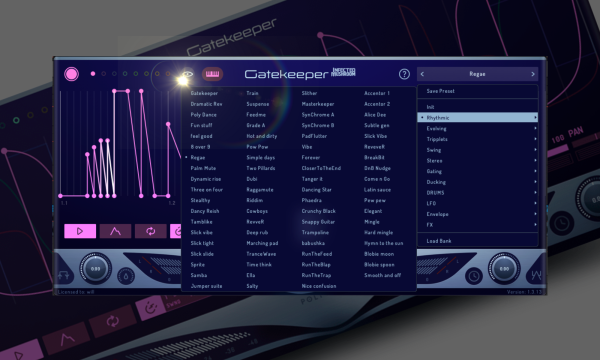
For having such an easy-to-understand layout, this plugin can be pretty damn overwhelming when you first crack it open. Lights are flashing, envelopes are snapping, and a few more sliders are goading you to dial in the chaos. If you had to start from scratch every time, it would be too daunting to want to start.
Luckily, you don’t have to…
Because there are hundreds (yes, multiple hundreds) of presets to scroll through, which would be equally overwhelming in its own right, save for the fact that Polyverse organized them all into 11 categories, which makes breezing through all the possibilities a breeze. Not only is navigating this plugin fun and exciting, but it also helps you get your bearing on what all the parameters do and what this plugin is capable of.
The Amount Of Control
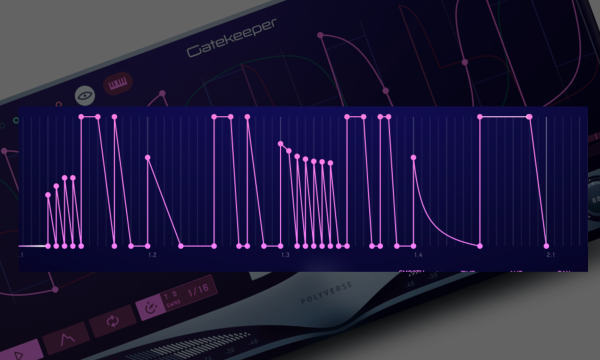
While Gatekeeper is at its best when all the movement’s envelopes are locked into the grid, this same grid offers an insane amount of customizability. I loved that you could paste in pre-made wave shapes just as easily as busting out the pen tool and drawing in your own custom envelopes and shapes.
Granted, drawing too crazy of automation lines led to some off-kilter movement in the sounds I was fiddling with, which quickly became distracting and threw off the momentum of the track as a whole. I found instead that saving these types of automation moves came into their own when doing either builds or fade-to-grey moments, leading to the breakdown where the arrangement becomes a bit more sparse and your listener has more headspace to devote to a crazier element.
It is hard to explain but easier to hear, so I made a quick and easy loop that begins its transition into a breakdown with white noise sweets as the core chord sequences get more heavily affected by the Gatekeeper once other elements fade to the background. It almost brings a new rhythm or pulse to the track, which Anjunadeep megastar Leaving Laurel says is an essential part of their process and helps move the track from one section to another.
What I Wasn’t Crazy About
The Visual Feedback Could Be Better
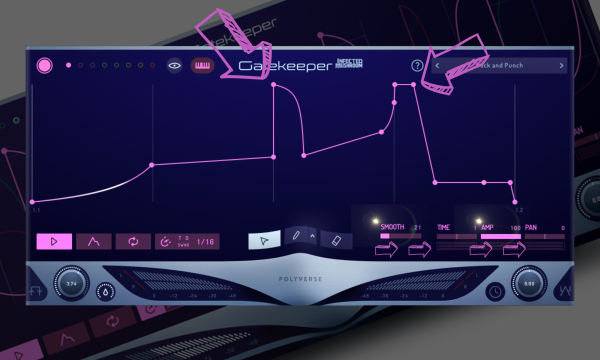
This is a minor gripe, I’ll admit. Still, with a plugin with such complicated modulation paths and envelopes as this one, I would have loved to see the visual representation in the windows move in accordance to the supplementary parameters like Smooth and Amp, which would have the envelope’s corners become rounder as the Smooth parameter is adjusted or less height to them when the Amp amount was reduced.
Doing it all by ear is far from the end of the world, but undoubtedly, it would have been a nice little quality-of-life feature.
How To Use Polyverse Gatekeeper
Adding Movement To Reverb
Adding reverbs and delays to fill the space between riffs and notes is the secret sauce to getting that coveted “less is more” aesthetic in your music. If you do it right, you can fill a space with just one or two instruments.
For the first eight-ish years of my production career, I assumed that just throwing a Hall reverb onto an aux channel would be enough. But it wasn’t until I took it a step further and started treating these spatial elements almost as instruments in their own right that my mixes became living, breathing entities. Gatekeeper proved to be a powerful tool for achieving this end.
I love throwing it on reverb and automating the amount so it gates the ambient space in the background of my mix at choice moments in the track. It doesn’t have to be obvious or done with a heavy hand. Just light amounts of gating and movement from the plugin can inject just the right amount of energy, nuance, and movement to your reverbs like you can hear on this chord pluck sound I have in this track I’m working on.
Making Better Builds
White noise sweeps are a staple in dance music production, but dropping in a Vengeance sample is cheesy, and getting white noise from a VST takes a fair amount of TLC to get the mix and brightness just right.
But Gatekeeper is like a Swiss army knife plugin for helping add movement, energy, and uniqueness to simple build effects like risers and sweeps. Whether used aggressively throughout the entire build to create stuttered synth patterns or used at precise moments to send the energy and excitement of a track up that extra little notch, similar to the effect Kamilo Sanclemente did in his fantastic remix (around the 5:19 mark), this is a killer tool for the job.
Final Thoughts
Gatekeeper by Polyverse redefines sound design with unparalleled precision and control, standing as a titan among VST plugins for aggressive volume modulation. With features like 100% sample accuracy, eight versatile envelopes, and MIDI modulation, it offers an unmatched depth of sound manipulation. Its user-friendly interface, bolstered by a vast array of presets, makes exploring its capabilities a breeze, allowing for intricate soundscapes previously unimaginable.
Despite its complexity, Gatekeeper remains accessible, inviting producers to dive deep into sound design. While it could benefit from enhanced visual feedback, the sonic results are undeniable. Gatekeeper isn’t just a plugin; it’s a revolution in audio production, offering unmatched creative freedom at an unbeatable price, proving essential for anyone exploring new audio frontiers.

Will Vance is a professional music producer who has been involved in the industry for the better part of a decade and has been the managing editor at Magnetic Magazine since mid-2022. In that time period, he has published thousands of articles on music production, industry think pieces and educational articles about the music industry. Over the last decade as a professional music producer, Will Vance has also ran multiple successful and highly respected record labels in the industry, including Where The Heart Is Records as well as having launched a new label with a focus on community through Magnetic Magazine. When not running these labels or producing his own music, Vance is likely writing for other top industry sites like Waves or the Hyperbits Masterclass or working on his upcoming book on mindfulness in music production. On the rare chance he's not thinking about music production, he's probably running a game of Dungeons and Dragons with his friends which he has been the dungeon master for for many years.