Magnetic Magazine is thrilled to present insights directly from the creative mind of Enamour, the masterful artist behind the captivating remix of ‘Close’ by Felix Raphael. As Enamour takes the pen, he unveils the intricate processes and innovative techniques underpinning his unique sound.
Dive into his world as he shares his approach to remixing, revealing the tools and methods that transform a track into a sonic masterpiece. The following words are a window into Enamour’s artistic vision, providing a rare glimpse into the workings of one of the most talented and prolific producers at the top of their game.
Suppose you like the information Enamour shares in this post and want to learn from one of the most talented and prolific producers at the top of their game. In that case, he’s got a Patreon page where he posts production tips, detailed track breakdowns, start-to-finish videos, demo feedback, and much more here .

Starting a remix can sometimes feel daunting, especially when aiming to put a creative spin on the vocal or another signature element. It’s all about striking the right balance between your unique vision and the essence of the original. Your approach to remixing can be greatly influenced by the tools at your disposal.
In this guide, I’m focusing on five of my favorite tools (mostly) in Ableton Live that are not just about enhancing your technical capabilities but more importantly, about sparking that initial burst of inspiration crucial when you begin remixing. These tools can be excellent catalysts for creativity, helping to jumpstart your remix with innovative ideas.
Quick Pro Tip: When dragging a group of remix stems into Ableton, holding Ctrl or Cmd will bring each audio file on to a separate track (rather than having them back to back on a single track). It’s also useful to first set the project tempo to the original track’s tempo and have auto-warp off. Then you’ll be starting without any accidental off-time warps.
1. M4L Granulator II
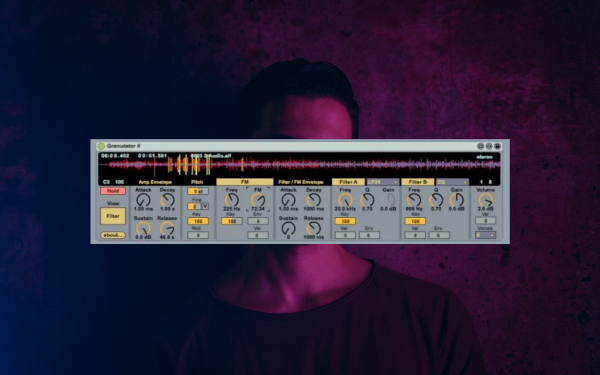
The Granulator II Max4Live device is often my go-to for remixing due to its ability to transform samples into new textures completely. This tool is handy when dealing with vocal chops or melodic parts of a track you’re remixing, allowing you to stretch, pitch, and morph these elements into something entirely new yet familiar to the original.
I like to keytrack the grain start point (“FilePos”) and randomize the Grain size so I can use my entire keyboard to audition potential vocal chops across the entire vocal part. And that’s just scratching the surface of what this thing can do.
Looking for outstanding Max4Live plugins? Dive into ‘The Best Max4Live Plugins: Aera Shares the Tools He Used to Write ‘Versions” – discover essential tools here.
2. Cecilia5

Cecilia5 is a lesser known, standalone software with advanced sound processing capabilities; it’s ideal for taking a standard element of the original track and turning it into something completely different. Its use of granular, spectral, and other algorithms makes it useful for creating unique ambient drones or leading elements that differ significantly from the original. I used the Beatmaker module for the vocal chop pattern in my latest remix of “Close” by Felix Raphael and Fabian Sprung.
3. Ableton Sampler

Ableton’s Sampler is an incredibly powerful yet often overlooked tool for remixing. Its deep sampling capabilities allow you to manipulate and repurpose any sample into something new. You can play with pitch, timing, shape, modulation, and filtering to transform a straightforward sample into a unique component of your remix, and the modulation panel opens up a world of possibilities.
There’s so many lesser known features too, like crossfading between two samples, or modulating the sample start point or loop length. If you’re in need of inspiration, I highly recommend experimenting inside Sampler rather than manually chopping up audio.
4. Ableton BeatRepeat
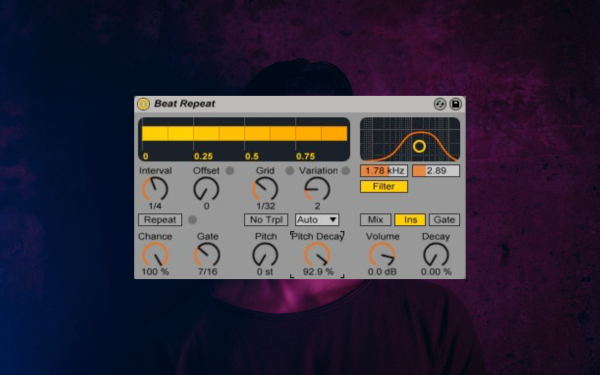
Ableton’s BeatRepeat is great for remixing due to its ability to create variations and stutters in loops and rhythmic elements. It allows you to loop, scramble, or repeat segments of audio in real-time, giving a fresh take to signature loops of the original track, which is a common strategy in remixing.
5. DS Tantra 2

DS Tantra 2 is a multi-effect plugin that can inject creativity into an existing sound or loop. It has layered modulation across multiple effects like distortion, flanger, bitcrushing, and delay. Its standout feature is the ability to create complex rhythmic patterns and textures, thanks to its custom modulation shapes and an FX sequencer. Its versatility makes it a powerful tool for transforming static elements of a track into pulsating, evolving components.
I hope these tools can help you revamp and reimagine existing sounds in your remixes. Sometimes they may only serve as the initial inspiration—a jumping off point that provides the bigger idea for what your remix will be. These tools aren’t just utilities, but creative partners in your production process!

Will Vance is a professional music producer who has been involved in the industry for the better part of a decade and has been the managing editor at Magnetic Magazine since mid-2022. In that time period, he has published thousands of articles on music production, industry think pieces and educational articles about the music industry. Over the last decade as a professional music producer, Will Vance has also ran multiple successful and highly respected record labels in the industry, including Where The Heart Is Records as well as having launched a new label with a focus on community through Magnetic Magazine. When not running these labels or producing his own music, Vance is likely writing for other top industry sites like Waves or the Hyperbits Masterclass or working on his upcoming book on mindfulness in music production. On the rare chance he's not thinking about music production, he's probably running a game of Dungeons and Dragons with his friends which he has been the dungeon master for for many years.