Your audio interface profoundly impacts the quality of the sound your computer produces and that you record into your DAW. Many producers need to learn this in their audio journey and instead choose to cut corners by purchasing cheap and sub-quality audio equipment.
But we wanted to right that wrong and educate the community on the importance of having a solid interface for your audio production work. So whether you’re a beginner or an advanced producer looking for portable audio interfaces to produce music on the go, this article has something for you. We will dive into a short list of the only entry-level audio interfaces beginners need to know about, along with a brief justification about why these interfaces made a list. By the end of this article, you’ll have a solid understanding of the major players in the space and the X-Factor that makes each unique and worthy of your consideration.
But before we dive into the list, let’s discuss some basic things to consider regarding audio interface selection.
Critical Considerations for Purchasing an Audio Interface: 5 Factors to Keep in Mind

Choosing the correct audio interface is crucial when building your studio, as it is the hub for all your audio input and output. It is the central point through which all your microphones, instruments, speakers, and headphones are connected. The exemplary audio interface can significantly affect your ability to make critical mix decisions. To help you find the perfect one, here are five essential factors to consider when buying an audio interface.
Your I/O Needs
Ensure that your future audio interface has the necessary inputs and outputs. A small, bus-powered interface like the Audient iD4 may suffice for a singer-songwriter on the go. For larger studios, it’s essential to have plenty of line-level inputs and outputs to use outboard effects.
Consider getting an interface with digital inputs if you have gear that has digital I/O, which is perfect for more demanding recording sessions. Future-proof your purchase by choosing an interface with a few extra inputs and outputs to expand your setup later.
Your Budget
When investing in your studio, you must consider your budget and prioritize your spending accordingly. While it’s tempting to cut corners on specific pieces of equipment, such as an audio interface, to save money, this can ultimately negatively impact the quality of your recordings.
Investing in a high-quality audio interface may require spending more money upfront, but it can significantly impact the overall sound quality of your recordings. In the long run, this can save you time, money, and frustration that would otherwise be spent trying to fix or improve subpar recordings. Additionally, it’s worth considering the potential for future expansion when selecting an audio interface. Spending more on an interface with more inputs and outputs than you currently need can save you from having to replace it down the line when your setup grows.
The Gear’s Build Quality
Regarding the build quality of an audio interface, there are a few things to consider. Durability and reliability are essential because you want your interface to last long and not break down during an important recording session. A metal chassis and knobs can provide better protection against knocks and bumps than plastic or other materials, which can crack or break easily.
Additionally, the feel of the knobs and switches is essential because these are the controls you will be using regularly. If they feel good in your fingers and are easy to use, it can make your recording experience more enjoyable and efficient. On the other hand, if the knobs are stiff or difficult to turn, it can be frustrating and make it harder to achieve the sound you are looking for.
The Gear’s X-Factor Features
When it comes to purchasing an audio interface, there is a multitude of features to consider. However, some key elements to consider include monitor controls and low-latency mixing.
Low latency monitoring is essential, as it allows performers to hear themselves without any annoying delay, which can be distracting and make it harder to perform well. Comprehensive monitor control is also essential, as it allows you to easily monitor your mixes and set up artist foldback mixes without relying on external boxes.
Many more extensive interfaces come with software that helps you control this, so choosing an interface with intuitive and user-friendly software is essential. The software should be easy to use, as you’ll want to set up your routing quickly at the start of a session so you can spend more time tracking, mixing, and recording.
Some interfaces also offer basic ways of controlling your digital audio workstation (DAW), allowing you to easily manipulate your levels and plugins without using your mouse.
The Gear’s Sound Quality
Dynamic range is the difference between the loudest and quietest signals that an interface can process. A more extensive dynamic range is generally better, indicating that the interface can handle a wide range of input levels without distortion or noise. However, it’s important to remember that most modern music has a lower dynamic range than the theoretical maximum of an interface, so a high dynamic range is only sometimes necessary.
Frequency response refers to how accurately an interface can process frequencies across the audible spectrum, which is the range of sound the human ear can hear. The ideal frequency response reproduces all frequencies evenly without any boosts or cuts in volume at any particular frequency. However, most interfaces will have slight variations in frequency response. It’s essential to look for an interface with a frequency response that has as low a figure as possible between 20Hz and 20kHz, as this is the range of frequencies that are most important for music production.
When checking an interface’s technical specifications, ensure that the quoted specs are real-world specs you would get if you used the interface. Some manufacturers may quote specs that don’t consider real-world scenarios, which can be confusing. To ensure that the specs are accurate, check that they conform to the AES17 standard, which outlines conditions under which the specs must be measured to reflect real-world usage. Good manufacturers will mention this in their technical specifications.
Apogee BOOM 2×2
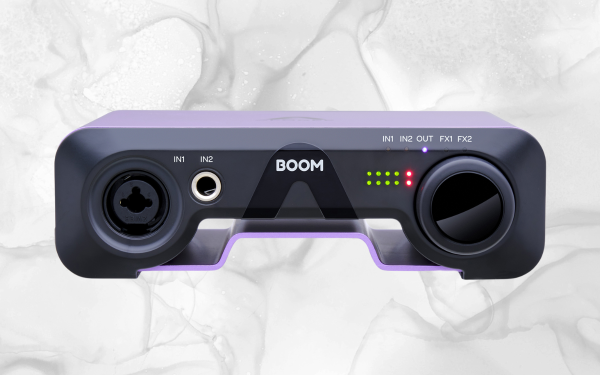
What Is The Apogee BOOM 2×2?
Since 1985, Apogee has been globally recognized as the gold standard for conversion quality. With the release of the BOOM USB-C Audio Interface, Apogee continues to exceed expectations by providing exceptional conversion quality at an affordable price. This 2-in/2-out interface is versatile enough to connect a mic, instrument, or stereo source. At the same time, its hardware DSP-powered Symphony ECS Channel Strip enables you to enrich your sound with EQ, compression, and drive. With zero latency at the input stage, you can achieve real-time enhancements without any time lag.
In addition, the BOOM interface also comes equipped with a loopback feature, making it an ideal choice for live streamers who need to incorporate multiple audio sources seamlessly. The compact interface boasts a sturdy steel chassis, making it an excellent choice for mobile recording or when you need an audio interface for home studios. If you want to capture your audio with unparalleled clarity and precision, look no further than the remarkable Apogee BOOM. It’s the ultimate tool for any music producer looking to elevate their sound to the next level and is widely considered one of the best audio interfaces on the market.
Why It’s Good For Beginners
The X-Factor here with the Boom interface is that out of the many audio interfaces on the market today, this one allows for phantom power which means you don’t need a power source to use it to its full effect. This is amazing for beginners and budget audio engineers because you often produce music on the go and record sounds in the fields instead of in a super-established creative space. This allows you to make crystal-clear, professional sounds wherever you’re at.
Another unsung benefit of the Apogee BOOM 2×2 is that it’s a powerhouse for streaming and content creation overall. Why does this benefit newer producers looking for their first audio interface? Because at the earliest stages of your career as a producer, you need to wear countless hats to get your music out there. You’ll likely have to do some streaming, podcasting, and other clever content strategies to expose your music to as many people as possible. The Apogee can help you all along the way.
Learn More About This Interface While Supporting Our Small Team Of Writers Through Our Partnership With Sweetwater Here
Specs
- Computer Connectivity: USB 2.0
- Form Factor: Desktop
- Simultaneous I/O: 2 x 2
- Number of Preamps: 1 x mic
- Phantom Power: Yes | 1 channel
- Effects: Apogee Symphony ECS Channel Strip
- Analog Inputs:1 x XLR-1/4″ combo (mic/line), 1 x 1/4″ TS
- Analog Outputs:2 x 1/4″ TRS
- Headphones:1 x 1/4″
- USB:1 x USB-C
- Software: Apogee Control 2, Ableton Live Lite
- Compatibility: Mac, PC, iOS
- Bus Powered: Yes
- Power Supply: USB bus powered
- Height: 2.95″
- Width: 9.84″
- Depth: 7.48″
- Weight: 2 lbs.
Universal Audio Volt 276
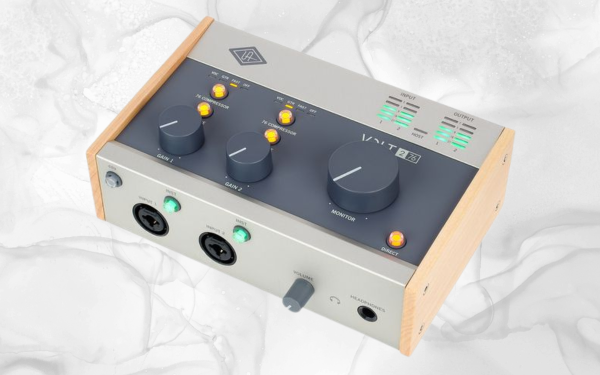
What Is The Universal Audio Volt 276
Universal Audio has a longstanding legacy of analog expertise and has continued to exceed expectations with the Volt 276 USB-C audio interface. This top-of-the-line interface boasts superior analog circuitry and 24-bit/192kHz AD/DA conversion, making it the perfect choice for producing professional-quality music, live streams, and podcasts.
The Volt 276 is a bus-powered audio interface with two microphone preamplifiers, switchable 610-style analog sound, and convenient input metering. The show’s real star, however, is the built-in 1176-derived FET compressor with three push-button application modes, allowing you to add depth and nuance to your recordings.
Moreover, this interface has stereo analog outputs and a headphones output, providing easy and direct monitoring for seamless zero-latency operation. The Volt 276 comes with MIDI I/O for your synths and controllers. The Volt 276 has a rugged, retro-inspired industrial design that is as visually appealing as it is functional. It also comes bundled with cutting-edge native software, enhancing your creative possibilities.
Choose the Universal Audio Volt 276 for an unparalleled audio experience that only UA’s analog expertise can deliver. This audio interface lets you quickly produce outstanding recordings and take your music production to new heights.
Why It’s Good For Beginners
The X-Factor with this interface is its internals, which arms newer producers with powerful analog compression to help color and drive their inputs without spending thousands on expensive outboard gear like compressors and saturators. This might sound like a small benefit, but it’s a game-changer. The Volt series of audio interfaces have been popular even among the pro audio community, who, out of sheer curiosity, have purchased these interfaces to dissect how Universal Audio packed hardware compressors into such a small and budget-friend interface (with pristine audio quality as well).
Another significant benefit of the Volt interface is that it has a ton of free software. It’s commonplace nowadays for devices to come with a trial version of Ableton Live. Still, Volt’s software bundle went far beyond this, arming you with all the audio recording software you need for your home studio. It’s got guitar processing software, vocal tuning software, and Ableton Live Lite.
The amount of added value you get with this interface makes it an easy recommendation for the best budget audio interface available for beginners.
Learn More About This Interface While Supporting Our Small Team Of Writers Through Our Partnership With Sweetwater Here
Specs
- Computer Connectivity: USB 2.0
- Simultaneous I/O: 2 x 2
- Number of Preamps: 2 x mic
- Phantom Power: Yes
- A/D Resolution: 24-bit/192kHz
- Analog Inputs: 2 x XLR-1/4″ combo (mic/instrument)
- Analog Outputs: 2 x 1/4″ (L/R)
- MIDI I/O: In/Out
- OS Requirements – Mac: macOS 10.14 or later, iPad/iOS 14 or later
- OS Requirements – PC: Windows 10 or later (64-bit)
- Bus Powered: Yes
- Height: 2.55″
- Width: 7.28″
- Depth: 5.11″
- Weight: 1.74 lbs.
Native Instruments Komplete Audio 6 Mk2
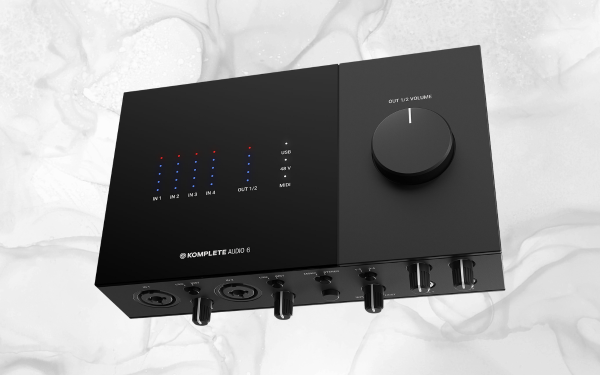
What Is The Komplete Audio 6 Mk2
The second-generation Native Instruments Komplete Audio 6 is an excellent front end for stage and studio performance setups, featuring more excellent resolution, more comprehensive I/O, and a sleek new tabletop design. This 6×6 USB audio interface offers the connectivity, functionality, and tools you need to achieve stunning live and recording results, all in a compact size that will only take up a little space on your desk or mobile rig.
The Komplete Audio 6 Mk2 is bus-powered and offers four analog ins and outs and two channels of digital S/PDIF I/O and MIDI capability, allowing you to interface with all your instruments and sequencers. If you’re a music producer, you’ll appreciate the generous software suite that comes with the interface, including Native Instruments’ world-class instruments effects and the performance-savvy Ableton Live 10 Lite DAW/performance software.
The Komplete Audio 6 Mk2 features a rock-solid USB 2.0 connection and dual 1/4″ headphone outs, making it easy for you and your bandmates to monitor your recordings. Overall, the Komplete Audio 6 Mk2 is a powerful, affordable, low-profile USB interface that will impress.
Why It’s Good For Beginners
Like the Volt interface, the Komplete Audio 6’s beast features are its added value props. This interface will give you excellent audio and a suite of powerful music-making tools in the form of the Native Instruments plugin bundle. Where Volt’s added value came more into powerful mixing plugins, the Komplete Audio 6 comes stacked with music production plugins that help you shape and create high-caliber sounds right out of the box. Because you can’t mix audio without having the audio in the first place, and the plugins offered in this bundle, entirely free, will set you off right on your production journey.
Learn More About This Interface While Supporting Our Small Team Of Writers Through Our Partnership With Sweetwater Here
Specs
- Computer Connectivity: USB 2.0
- Simultaneous I/O:6 x 6 (4 x analog, 2 x digital)
- Number of Preamps: 2
- Phantom Power: Yes
- A/D Resolution: Up to 24-bit/192kHz
- Effects: Native Instruments Plugins; Modulation Effects, Replika, Maschine Essentials
- Analog Inputs: 2 x XLR-1/4″ combo (mic/line), 2 x 1/4″ TRS (line)
- Analog Outputs: 4 x 1/4″ TRS (DC coupled)
- Digital Inputs: 1 x Coax (S/PDIF)
- Digital Outputs: 1 x Coax (S/PDIF)
- Headphones: 2 x 1/4″
- MIDI I/O: In/Out
- USB:1 x Type B 2.0
- Software: Native Instruments Suite, Ableton Live 10 Lite
- Height:2.18″
- Width:7.87″
- Depth:5.37″
- Weight:1.87″
Solid State Logic SSL2+

What Is The Solid State Logic SSL2+
The SSL 12 is an excellent, affordable option for those needing a home or project-based studio control room centerpiece. It has four SSL-designed microphone preamplifiers, including Mic/Line and HPF, and two Hi-Z instrument inputs for guitars, bass, or vintage instruments. The device also has two professional-grade headphone outputs and next-generation 32-bit/192 kHz AD/DA converters, ensuring exceptional audio quality. The SSL 12’s advanced routing and monitoring options, combined with ADAT input that supports eight additional channels of digital audio, offer 12 tracks of simultaneous recording and eight playback channels, all packaged in a rugged, portable design.
In addition, the SSL 360° software mixer features a customizable SSL control room, allowing users to receive instant feedback from detailed I/O metering and assign functions to the three front panel switches. Users can also create up to 4 independent near zero-latency foldback mixes quickly and intuitively using its SSL console-style routing and recall sessions via a Save/Load function. Moreover, users can choose between modes (Standard, High Impedance, High Sensitivity) to suit different headphone types or re-purpose the headphone outs to create additional line outputs.
Why It’s Good For Beginners
This audio gear comes with solid build quality, heavy-duty chassis, Neutrik connectors, Alps pots, and an intuitive front panel design with easy-to-read meters, making it an excellent choice for newer music producers.
Solid build quality is crucial in an audio interface because it provides durability and reliability, ensuring the interface can withstand the rigors of everyday use. Heavy-duty chassis and Neutrik connectors offer sturdy construction that can withstand wear and tear, providing peace of mind to newer music producers. Alps pots are also reliable and long-lasting, ensuring consistent performance over time.
In addition to its sturdy construction, the intuitive front panel design with easy-to-read meters is an excellent advantage for newer music producers. This design makes it easy for producers to navigate the interface’s features, providing a straightforward and intuitive workflow. The easy-to-read meters offer an excellent visual representation of the audio signal’s level, ensuring accurate recordings and preventing distortion. The ease of use of the interface’s design also saves time. It allows producers to focus on their creativity and productivity rather than struggle to use their equipment.
Learn More About This Interface While Supporting Our Small Team Of Writers Through Our Partnership With Sweetwater Here
Specs
- Computer Connectivity: USB 2.0
- Form Factor: Desktop
- Simultaneous I/O: 2 x 4
- Number of Preamps: 2
- Phantom Power: Yes
- A/D Resolution: 24-bit/192kHz
- Analog Inputs: 2 x XLR-1/4″ combo (mic/line/Hi-Z)
- Analog Outputs: 2 x 1/4″ TRS (L/R), 2 x Dual RCA Stereo (2 x paired out/1-4)
- Headphones: 2 x 1/4″
- MIDI I/O: In/Out
- USB: 1 x USB-C
- Software: SSL Production Pack, 3rd Party Bundled Software
- Height:2.75″
- Width:9.21″
- Depth:6.18″
- Weight:1.98 lbs.
- Manufacturer Part Number:729704X1
Mackie Onyx Producer 2.2
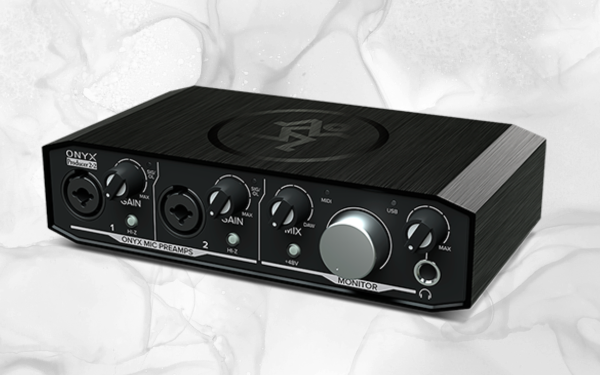
What Is The Mackie Onyx Producer 2.2?
The Mackie Onyx Producer 2-2 offers an excellent solution for singer/songwriters and content creators looking for high-quality sound. With 24-bit/192kHz converters and premium analog circuitry, the Onyx Producer 2-2 delivers top-notch sound quality. The boutique-sounding Onyx mic preamps provide excellent fidelity and dynamic range, while the XLR/TRS combo inputs accommodate a variety of instruments.
You can also use the hi-Z switch to DI your guitar or bass on each channel. Direct monitoring with zero latency and a headphone output makes tracking a breeze. The built-in MIDI connectivity makes connecting your synths, controllers, and other hardware easy. And with bus-powered portability, the Onyx Producer 2-2 is a great way to capture any performance.
Why It’s Good For Beginners
For newer music producers seeking an audio interface with excellent sound and reliability, the Mackie Onyx Artist 1-2 is a great choice. It boasts superior build quality, ensuring durability, while the Onyx preamps deliver outstanding audio fidelity and dynamic range.
In addition to these features, the audio interface includes a full-featured DAW, allowing you to record, edit, and mix your music easily. Whether you’re recording instruments or vocals, the Onyx Artist 1-2 offers zero-latency direct monitoring and a headphone output for tracking. This audio interface is a reliable, high-quality tool for capturing any performance and producing professional-grade music.
Learn More About This Interface While Supporting Our Small Team Of Writers Through Our Partnership With Sweetwater Here
Specs
- Computer Connectivity: USB 2.0
- Form Factor: Desktop/Portable
- Simultaneous I/O: 2 x 2
- Number of Preamps: 2
- Phantom Power: Yes
- A/D Resolution: 24-bit/192kHz
- Effects: FX plugins
- Analog Inputs: 2 x XLR-1/4″ combo (mic/line/Hi-Z)
- Analog Outputs: 2 x 1/4″ (monitor out)
- Headphones: 1 x 1/4″
- MIDI I/O: In/Out
- USB: 1 x Type B
- Software: Waveform OEM Production Software, DAW Essentials Collection plugins
- OS Requirements – Mac: OS X 10.9 or later
- OS Requirements – PC: Windows 10 or later
- Bus Powered: Yes
- Power Supply: USB Bus powered
- Height: 2.0″
- Width: 7.4″
- Depth: 4.5″
- Weight: 1.4 lbs.
Audient iD4 MKII
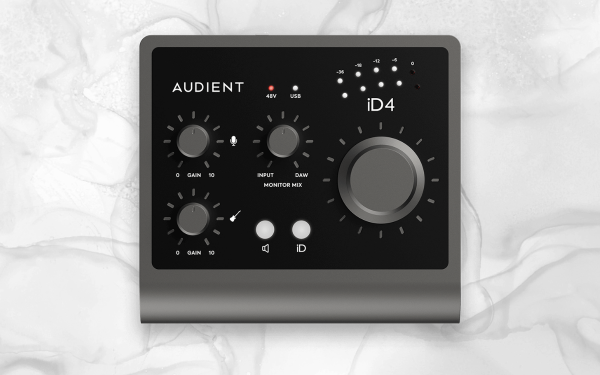
What Is The Audient iD4 MKII?
The Audient iD4 MKII represents tremendous value for new music producers, with a design that packs the power of large-format console performance into a compact desktop chassis. Featuring one of Audient’s highly regarded Class-A console mic preamps, along with an analog JFET DI stage to capture the richness and depth of your guitar or accompaniment instrument, this updated version of the iD4 now boasts even better audio conversion, speedy USB 3.0 transmission, and a USB-C connection for enhanced compatibility with modern laptops and tablets.
The interface also includes:
- Two high-quality headphone outputs.
- Console-style monitor control for reliable track monitoring.
- An intuitive virtual scroll wheel for easy tweaking of DAW and plugin parameters.
With Audient’s fully loaded ARC software suite, which includes instruments, cab sims, plugin FX, and Steinberg’s Cubase/Cubasis LE3 desktop and mobile DAWs upon registration, the iD4 MKII is an excellent choice for new music producers looking for high-quality performance and versatility.
Why It’s Good For Beginners
For new music producers, the choice of an audio interface can significantly impact the quality of their recordings, turning a decent recording into some genuinely great audio. The AudioBox USB 96 from PreSonus offers ultra-low noise recording, which means you can capture clean and professional-quality audio without worrying about background hiss or noise. Regarding audio interface speed, the USB connectivity is compatible with modern devices, making it easy to connect to your computer or tablet without additional drivers.
The AudioBox USB 96 also boasts pro-quality mic preamps and AD-DA converters, ensuring your recordings sound crisp and detailed. And with the volume knob doubling as a parameter controller in your DAW/plugins, you can quickly and easily adjust your settings to achieve the perfect sound. The AudioBox USB 96 is an excellent option for new music producers who want an affordable yet reliable and high-quality audio interface for their home studio.
Learn More About This Interface While Supporting Our Small Team Of Writers Through Our Partnership With Sweetwater Here
Specs
- Computer Connectivity: USB 3.0
- Form Factor: Desktop
- Simultaneous I/O: 2 x 2
- Number of Preamps: 1 x mic
- Phantom Power: Yes
- A/D Resolution: 24-bit/96kHz
- Analog Inputs: 1 x 1/4″ (instrument), 1 x XLR-1/4″ combo (mic/line)
- Analog Outputs: 2 x 1/4″ (L/R)
- Headphones: 1 x 1/4″, 1 x 1/8″
- USB: 1 x USB-C
- Bus Powered: Yes
- Power Supply: USB bus powered
- Height:2.36″
- Width:5.23″
- Depth:4.72″
- Weight:2.20 lbs.

Will Vance is a professional music producer who has been involved in the industry for the better part of a decade and has been the managing editor at Magnetic Magazine since mid-2022. In that time period, he has published thousands of articles on music production, industry think pieces and educational articles about the music industry. Over the last decade as a professional music producer, Will Vance has also ran multiple successful and highly respected record labels in the industry, including Where The Heart Is Records as well as having launched a new label with a focus on community through Magnetic Magazine. When not running these labels or producing his own music, Vance is likely writing for other top industry sites like Waves or the Hyperbits Masterclass or working on his upcoming book on mindfulness in music production. On the rare chance he's not thinking about music production, he's probably running a game of Dungeons and Dragons with his friends which he has been the dungeon master for for many years.