The past six months have been a more exciting time in the music production community than the previous nine years I’ve been producing. New technology has created plugins that open up new creative doors and potential never before heard of or considered by even the most innovative producers throughout previous generations.
But between MIDI generators, AI plugins, and more, the market seems to be equal parts innovation and snake oil.
Samplab 2 seems like a game-changing plugin on the surface level, and after doing a bit more surface digging, we had to learn more about what it can do. So after getting our hands on their new plugin and using it extensively in the studio for the last few weeks, these are our final thoughts on this plugin.
Learn More Here
What Is The Samplab 2?
Sample 2 is a brand new plugin that acts similarly to Melodyne but for samples instead of predominantly for vocal recordings. The company’s founders got tired of using samples only to feel constrained that they couldn’t perform simple functions like individual pitch notes in the chord, adjust the minute timing details, and more.
Melodyne could handle this with no problem with vocals but fell apart when using more complex samples found on sites like Loopcloud and Splice. And the founders knew there must be a solution. After years of development, they seem to have cracked the code.
Samplab 2 comes packed with many features that go above and beyond even the functionality of Melodyne. You can mesh the notes of two samples together so that they blend seamlessly together to unlock a world of creative potential; you can split the music into stems so that you can convert a single channel of your favorite track into a MIDI file; it integrates effortlessly as a VST3 & AU device into all of the world’s popular DAWs, and so much more.
Top producers like KSHMR and ill.Gates are big proponents of this device, which means Samplab must be doing something right.
My Favorite Things About The Samplab 2
While there is a lot to write home about in this small and effective plugin, these are my two favorite qualities.
Convert Your Favorite Songs To MIDI
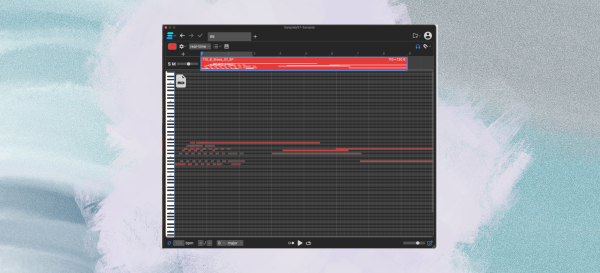
Samplab 2’s ability to convert just a single channel at a time into MIDI for you to then fine-tune is an absolute game changer. Once something like a chord progression or guitar solo is converted into the plugin, you can either bounce just that channel’s audio to MIDI to play in your other synths, or you can start adjusting the plugin to make minor changes to the channel so that it better fits into your track.
This alone opens up a world of creative potential and is one of those rare pieces of technology whose true power likely hasn’t been discovered yet and is just waiting for a producer to find new and innovative ways to use this functionality to achieve truly remarkable results.
It’s Easy To Use

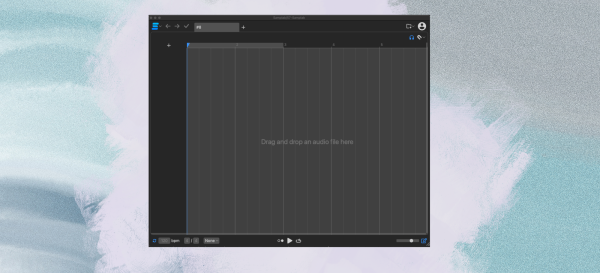
I was pleasantly surprised at how simple and easy this plugin is to use. Without hyperbolizing the point, you drag and drop your audio file into the plugin, where it is analyzed in a matter of seconds and then is free to adjust however you see fit.
Melodyne, at least the version of Melodyne that I used at my studio internship years ago, required you to record the audio you wish to manipulate and print it into the plugin itself before you can start messing with it. This extra step adds a sneaky amount of potential for user error, often enough for newer users to abandon the plugin entirely.
But that is not the case with Samplab 2, which is easy to use and starts getting the most of its potential with just a few clicks.
What I Wasn’t Crazy About With Samplab 2
I will be the first to admit that the Samplab 2 is far from a magic bullet for sample manipulation, and it has an Achilles heel that might deter some potential producers looking to snag this plugin.
It Doesn’t Work On All Samples
While finding samples and sounds that take to the plugin well is far from a crapshoot, the algorithm isn’t perfect either. I tried using it on several acoustic guitar tones and other densely-timbre instruments. The notes I adjusted suffered from severe formant-like artifacts that made them almost unusable.
But this was only the case for instruments with dense timbres and rich tones, and vocals, mono-synth samples, and many other leads could be manipulated to great effect.
You Need An Internet Connection To Use
I’ll start by saying that I have no gripe with this, and I never once, in the month that I familiarized myself with this plugin, had this become an issue. But I should note that an internet connection is required to upload samples into the plugin for analysis.
After the sample is uploaded into the plugin, it can be loaded and manipulated further without a connection. But the initial step needs a web connection!

Will Vance is a professional music producer who has been involved in the industry for the better part of a decade and has been the managing editor at Magnetic Magazine since mid-2022. In that time period, he has published thousands of articles on music production, industry think pieces and educational articles about the music industry. Over the last decade as a professional music producer, Will Vance has also ran multiple successful and highly respected record labels in the industry, including Where The Heart Is Records as well as having launched a new label with a focus on community through Magnetic Magazine. When not running these labels or producing his own music, Vance is likely writing for other top industry sites like Waves or the Hyperbits Masterclass or working on his upcoming book on mindfulness in music production. On the rare chance he's not thinking about music production, he's probably running a game of Dungeons and Dragons with his friends which he has been the dungeon master for for many years.