Once I started keeping several synthesizers and effects connected in my studio, I became less interested in choosing an interface based on sound quality alone, because the connections and controls started affecting how often I used the equipment.
I wanted to leave things plugged in, change recording sources without reaching behind the rack, and adjust headphones without opening another menu.
I covered that in my Arturia AudioFuse 16Rig review, and it explains what interests me about the Focusrite ISA C8X.
At Focusrite’s listed price here in the United States of $2,299.99, the C8X needs to justify its place with recording facilities I will use regularly, and the combination here is convincing: two ISA transformer preamps, six additional microphone preamps, dedicated inserts, twelve balanced line outputs, and recallable settings in a 2U USB-C interface. The ISA channels are also something that I could see some of you out there would consider a massive X-factor even if they are a bit niche, but the separate microphone and line connections, headphone controls, and monitoring options were far more defining factors for my own socks to be knocked off with this thing.
My take is that this interface kncoks it out of the park for studio recording of instruments and vocals alongside connected hardware, provided that you know what you’re doing enough to maximzie the potneital of everything that the ISA C8X brings to the table.
Front Panel Design And Recording Controls

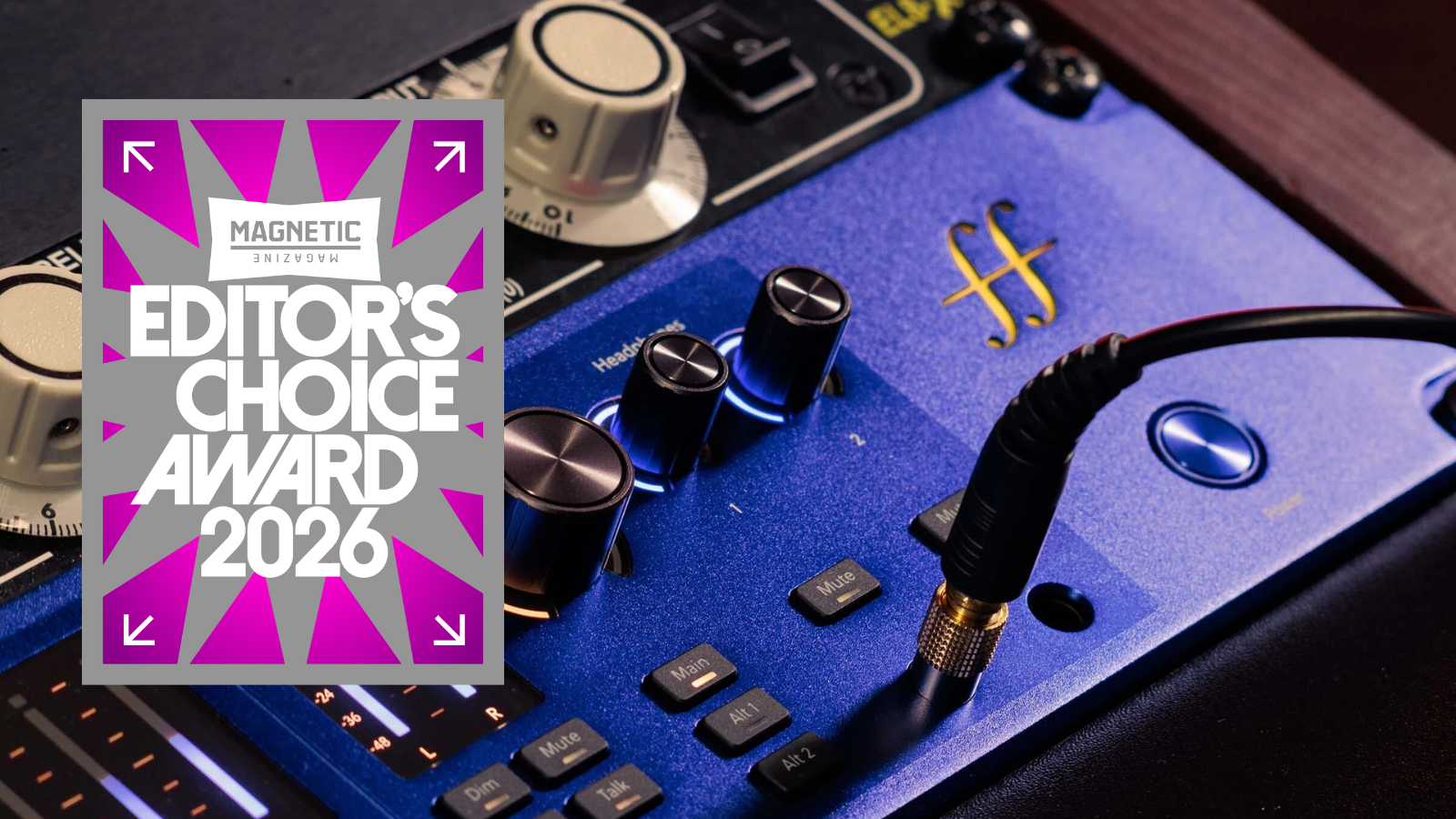
I LOVE the blue aluminum finish and amber illumination, and the layout gives each part of the interface enough distinction that I can see why Focusrite chose a 2U enclosure and it looked super fresh inside my small little “desktop” size rackmount holder as well.
The ISA controls sit on the left, the six additional preamps take up the next section, and monitoring sits on the right, with meters and status indicators for each recording channel.
That makes the front panel appealing to me for reasons beyond its appearance, because the controls I expect to reach for are directly accessible.
The ISA pair uses stepped gain in 10dB increments and fine gain in 1dB increments, with the fine encoder advancing the larger setting automatically when necessary. I particularly like that detail, because I can continue making small adjustments without changing controls, and exact numerical settings are easier to document than approximate knob positions. These are two adjustments for the same preamp gain, so they should not be confused with a gain control followed by an independent output trim.

Dedicated channel-select buttons also suit the way I want to record, since I can go straight to the channel I need while still seeing the meters for the others. Stereo linking supports fixed pairs 1 and 2, 3 and 4, 5 and 6, or 7 and 8, making paired microphones easy to match.
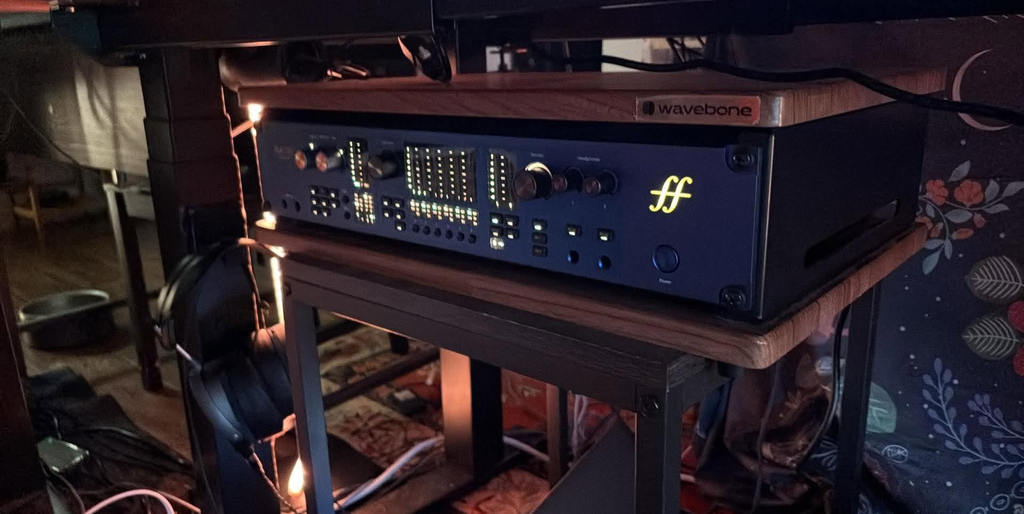
I appreciate the physical control here, though a few functions, particularly Console and 430 Air, need explanation before their labels make sense.
ISA Preamps Console Mode And 430 Air
The first two channels use Lundahl LL1538 transformers and provide a 79dB gain range, with microphone impedance choices of 800 ohms, 1.4 kilohms, 2.4 kilohms, and 7 kilohms. I like starting with the 1.4-kilohm ISA 110 setting and comparing the alternatives with the microphone connected, because the response depends on that combination rather than behaving like four predictable EQ presets.
I usually prefer a relatively transparent recording with some coloration, and impedance switching gives me another adjustment before I decide whether I need a bit more processing.
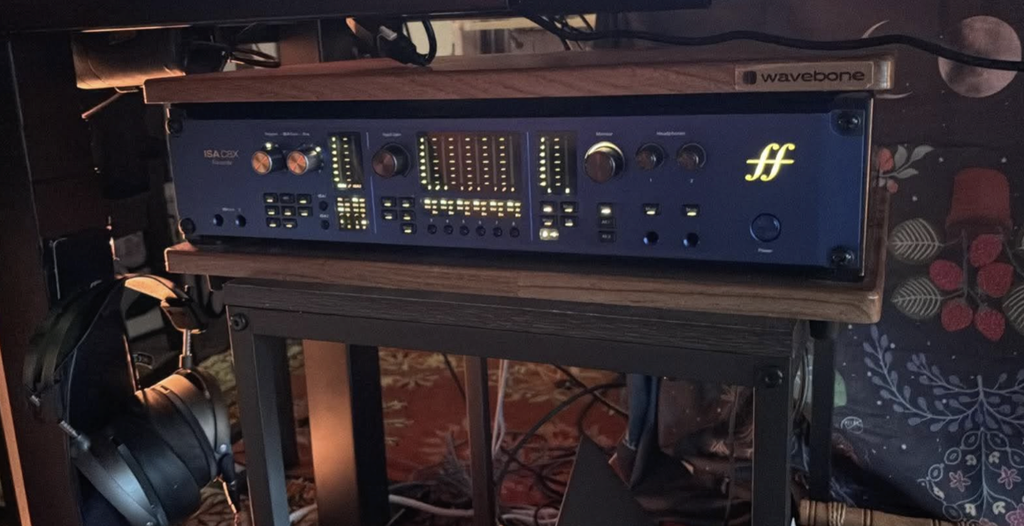
Console adds adjustable analog soft-clip saturation before conversion, and I am most interested and was loving the sounds in its subtler applications, like adding low-mid fullness to a vocal or harmonics to direct bass. The effect depends on the source level and gain as well as its amount setting, so I prefer matched listening levels when comparing it and still leave headroom before digital overload (again, this is not a beginner interface, so if these types of notes overwhlem you a bit I would recommend more approachable interfaces like UA’s rcently revamped Volt series).
It also serves a different role than a compressor, which is pretty damn similar to the recording decisions I discussed in my Universal Audio Volt 876 review: I like choosing a tone while recording when I know I want to keep it. I’v been a longtime Volt fan and it’s only when Focusrite’s flagship interface hit my studio that I was pulled away from the Volt ecosystem for the first time in nearly 5 years.

430 Air provides an analog high-frequency lift derived from the ISA 430 MkII Mic Air design, while the ISA section’s high-pass filter is fixed at 75Hz with an 18dB-per-octave slope.
The front instrument connections retain the transformers and tonal options, with 400-kilohm or 1.2-megohm impedance for guitar and bass pickups. I appreciate those choices, though an already bright acoustic guitar may not benefit from additional high frequencies, and removing low-frequency content or printing saturation needs to be a deliberate decision because you can’t disable the recorded processing afterward.
Six Additional Preamps And RedNet Conversion

Channels three to eight provide a 69dB gain range, and I see them as an important part of the recording setup rather than channels reserved for less important sources. A relatively neutral recording can be preferable when the microphone or instrument already has the balance I want, especially when several microphones contribute to the same recording.
These channels have analog Air and variable DSP-based Drive, which work differently from the 430 Air and Console on the ISA pair. I like having coloration available across the interface, especially for room microphones or drum recordings where a more audible treatment can suit the track, and I don’t automatically prefer analog saturation over the digital option.
Holding Drive for one second lets the gain encoder adjust, so the extra channels still give direct access to tonal changes which was pretty cool and little things like this bring a lot more funcitoanlity to the table for sure.

The converters come from Focusrite’s RedNet range and support up to 24-bit/192kHz, though the 125dB figure belongs to the analog line outputs, while rear line recording is specified at 120dB and the microphone paths have separate figures. Those specifications deserve accurate reporting, and they don’t show that the C8X will sound better than an interface I already own.
For me, inserts, monitoring, and recall are more persuasive reasons to upgrade than a small perceived conversion difference that a careful comparison hasn’t established.

Line Connections And Inserts For External Hardware
Separate rear microphone and line sockets are one of my favorite decisions here, because microphones and synthesizers can remain connected while the selected source changes at the interface.
That suits a patchbay or permanent installation, and it solves the cable swapping that gets frustrating as a studio accumulates equipment. The extra sockets provide alternative connections for eight analog recording channels, so you can’t connect a microphone and synthesizer to the same channel and record them simultaneously.
The rear line connections are fixed-gain and bypass the microphone preamp, ISA transformer, Air circuitry, impedance selection, and high-pass filter, which is essential to understand before buying the C8X primarily for synthesizers. Console and the inserts remain available on line channels one and two, while DSP Drive remains available on channels three to eight.
I appreciate being able to connect an external preamp without adding another microphone amplification stage, though you must manage a rear-connected synthesizer’s recording level at the source or with suitable external attenuation.
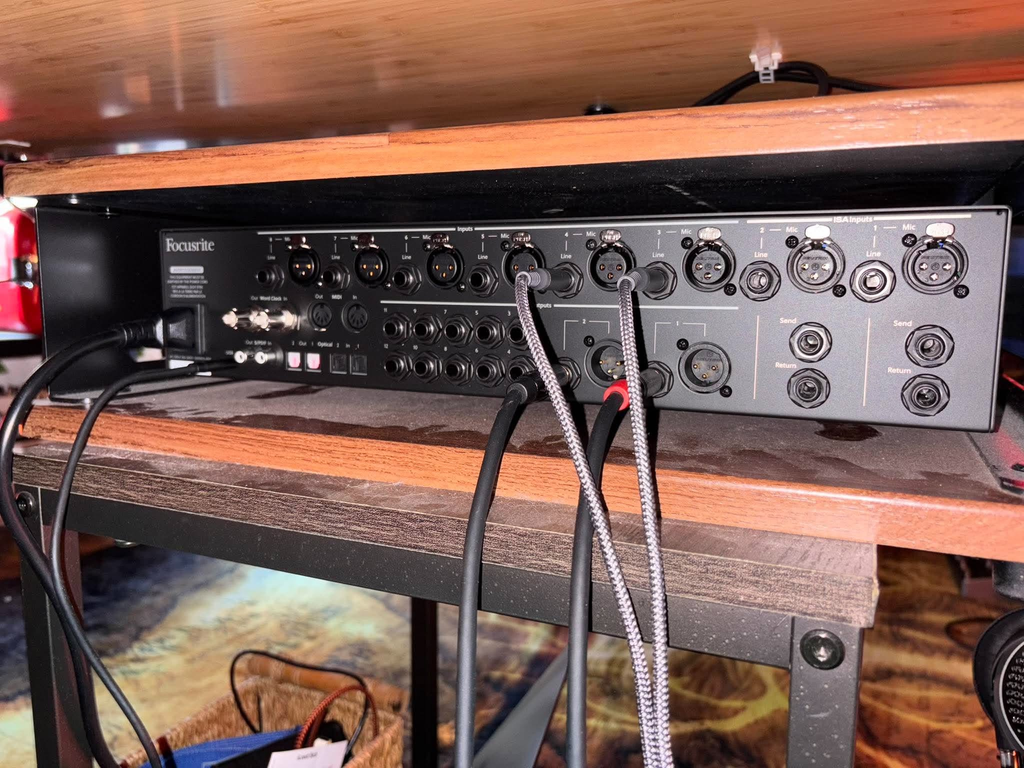
The ISA channels’ balanced inserts are particularly appealing for vocal recording, since you can place an external compressor or EQ before conversion while keeping the chosen preamp in use. Separate send and return sockets avoid a combined insert cable and preserve general-purpose recording channels and outputs for other equipment.
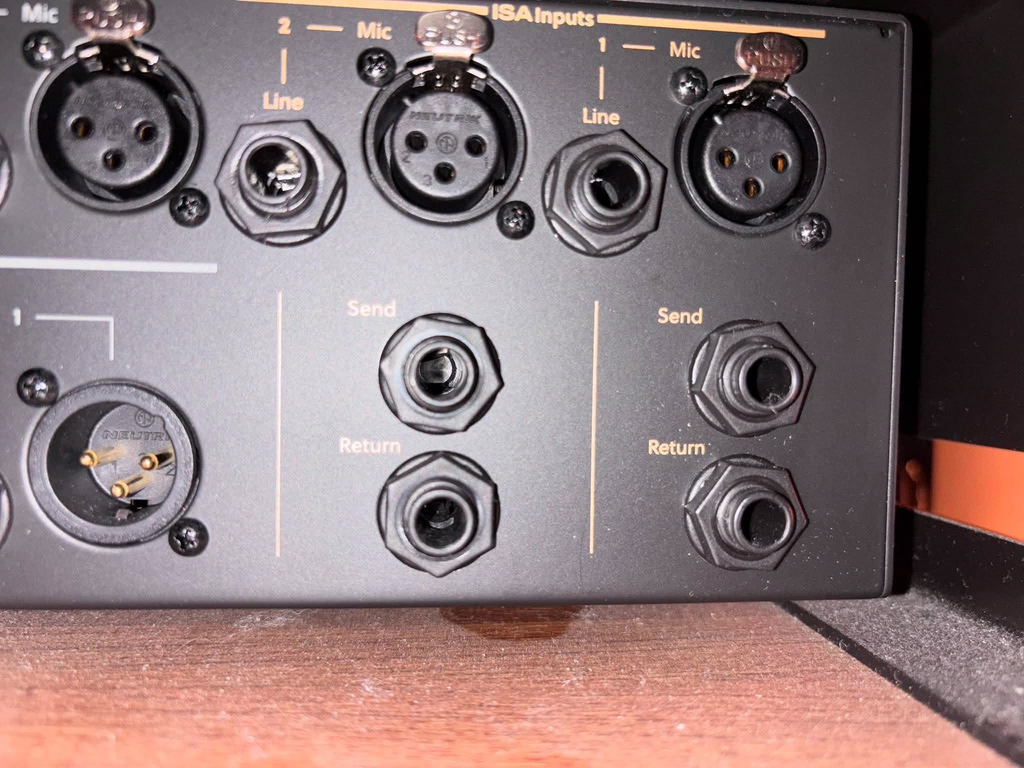
I also like being able to compare the complete recording setup before committing, with one level distinction worth remembering: the insert return accepts up to +16dBu, compared with +24dBu on the rear line connections.
Headphones Talkback And Speaker Monitoring
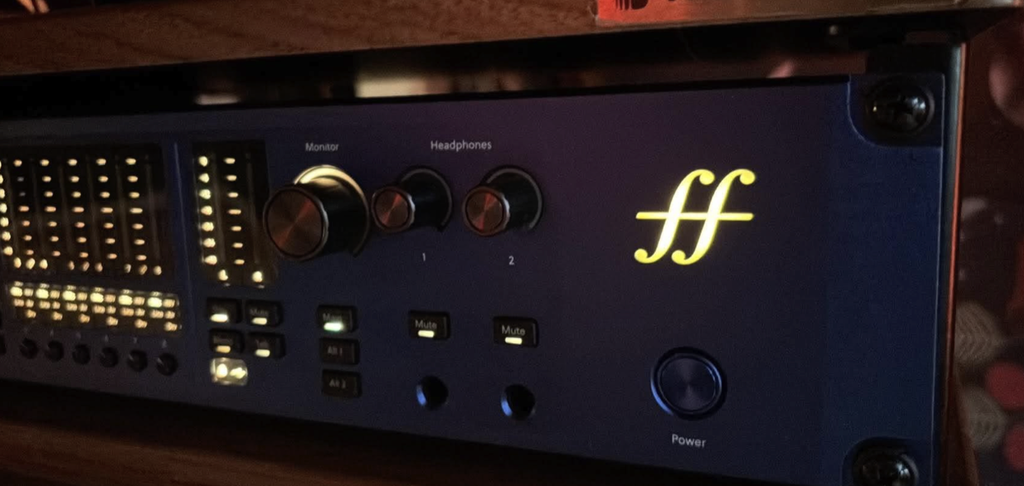
Two headphone outputs with independent level encoders, mute buttons, and configurable mixes are the arrangement I prefer when recording with one other person, because the artist’s level should be accessible without reassigning my own control.
My main criticism is the halo display, which shows audio level before the headphone volume adjustment rather than a persistent indication of the listening-volume setting. I like having an audio meter, though I also want to see where the headphone volume is set without consulting software.

Main, Alt 1, and Alt 2 monitor groups, together with dim, mute, and mono controls, make the monitoring section convincing for a stereo studio. The twelve balanced line outputs also support a 7.1.4 speaker arrangement, and I appreciate that the same speakers can belong to different groups when changing listening formats.
Outputs one and two offer XLR or TRS connections, though these are connector choices for the same channels, and the mono button applies to a group containing exactly two outputs.
Built-in talkback is relevant even without a separate booth, because a performer wearing headphones can still have trouble hearing an instruction. It routes to the headphone outputs by default and dims the other mix outputs when active, with destinations configurable in Focusrite Control 2.
That completes a capable recording-monitoring arrangement, but speaker delay and room-EQ correction still need separate consideration, because adjustable output levels and twelve speaker connections do not provide a complete calibration system.
Focusrite Control 2 Presets And Auto Gain
I prefer physical controls for ordinary recording adjustments, though Focusrite Control 2 becomes especially appealing when the rack is outside easy reach or I am recording alone beside an instrument. Its mobile app controls the desktop application, which must be running on a computer connected to the same Wi-Fi network, rather than communicating independently with the C8X.
Preset recall is the software feature I care about most, because gain, Air, Console, mixes, routing, and monitor groups can be saved for repeated recording setups. The presets live on the computer, while the interface retains its current settings for standalone operation or use with another computer, and microphone placement and external hardware still need separate notes. I also appreciate numerical entry for individual output levels, since matching speakers should not depend on approximate mouse movements.
Auto Gain analyzes a ten-second performance and can set selected preamps or multiple channels, after which manual adjustment remains available. I see it as a convenient starting point for someone recording drums alone, since playing at the intended level can establish initial settings without repeated trips between the kit and rack.
My preference is still to check the result and leave recording headroom, and the function does not apply to the fixed-gain rear line connections…
ADAT Expansion MIDI And Standalone Operation
Okay now let’s get into the real real realy nitty gritty… the sexyness stops here (unless you like this ‘in the weeds’ stuff).
The 26-channel recording count includes eight analog channels, sixteen ADAT channels, and two loopback channels, giving me twenty-four external recording channels at 44.1 or 48kHz in Dual ADAT mode. S/PDIF is unavailable in that configuration, so its two channels cannot be added to the full ADAT allocation. I like the expansion capacity, especially if additional microphone preamps become necessary, though the digital mode needs to match the channel count the studio actually needs.
Dual ADAT falls to eight channels at 88.2 or 96kHz, and all digital audio connections are disabled at 176.4 or 192kHz, so the highest sample rate can remove the expansion capacity a purchase depends on. Word clock connections help synchronize compatible external digital equipment, while standalone operation allows the interface to pass audio using its retained configuration without a computer. The built-in mains supply is another decision I appreciate for rack equipment, because it avoids allocating space for an external power adapter.
Conventional five-pin MIDI connections are welcome for hardware that still uses them, although one connection in each direction serves a different need from the larger arrangement in my Black Lion Audio MIDI Eight review.
Why The ISA C8X Earned Editor’s Choice

For me, the Focusrite ISA C8X earns its price when a studio regularly records vocals and instruments, keeps hardware connected, and uses external processing. I like the combination of two ISA channels and six additional preamps because it gives me tonal choices and enough microphone channels for larger recordings.
The balanced inserts, separate line connections, and physical monitoring controls make that combination convincing at $2,299.99. A producer primarily recording line-level synthesizers should still consider the transformer bypass, and someone recording one microphone at a time may not need this much interface.
That complete recording setup is why the Focusrite ISA C8X earned Magnetic Magazine’s Editor’s Choice Award for 2026.
I emphasized the dedicated headphone controls, preset recall, and access to external processing because those details address tasks I want to handle quickly while recording. The headphone halos could communicate the listening-volume setting better, though that criticism does not change my assessment of the overall design.
The award also reflects how the ISA microphone and instrument recording options sit alongside fixed-gain line connections, speaker switching, and ADAT expansion. I can see a reason to use each of those facilities when recording musicians and hardware in a studio, and the interface supports that work without making basic adjustments dependent on software.
That combination earns the C8X my recommendation, with the ISA pair providing a specific reason to choose it.

Will Vance is a professional music producer who has been involved in the industry for the better part of a decade and has been the managing editor at Magnetic Magazine since mid-2022. In that time period, he has published thousands of articles on music production, industry think pieces and educational articles about the music industry. Over the last decade as a professional music producer, Will Vance has also ran multiple successful and highly respected record labels in the industry, including Where The Heart Is Records as well as having launched a new label with a focus on community through Magnetic Magazine. When not running these labels or producing his own music, Vance is likely writing for other top industry sites like Waves or the Hyperbits Masterclass or working on his upcoming book on mindfulness in music production. On the rare chance he's not thinking about music production, he's probably running a game of Dungeons and Dragons with his friends which he has been the dungeon master for for many years.