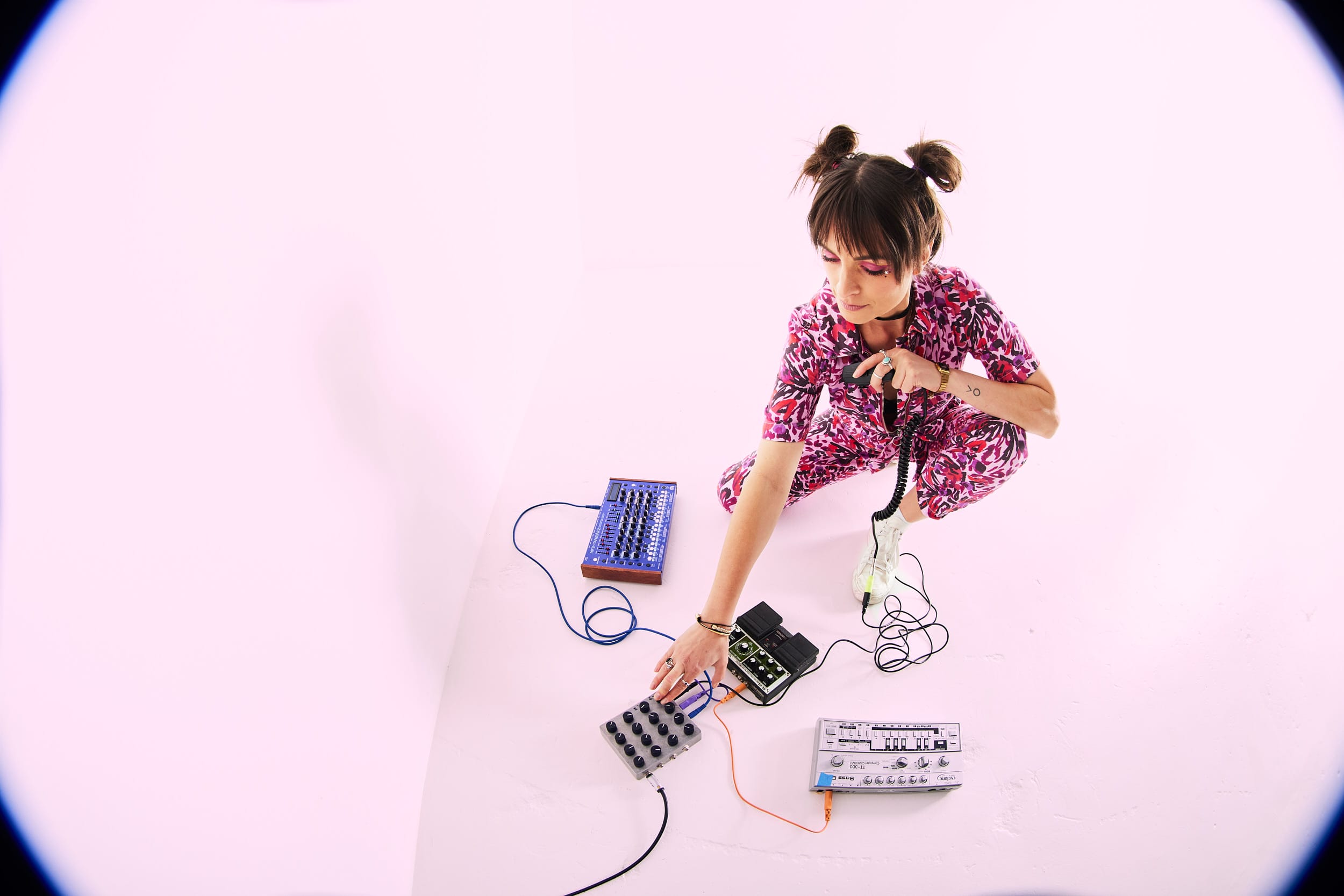
Eluize has long been a trusted name in underground circles, releasing on labels like Running Back, Craigie Knowes, Let’s Play House, and Funnuvojere while also running her own imprint, Night Tide. Now based back in Australia after years in Berlin, she continues to balance life as a producer, DJ, and parent, with her latest release “Momentary Distraction” landing on Unknown to the Unknown. The EP dives into acid and trance territory, highlighting her love for hypnotic textures and emotionally charged grooves.
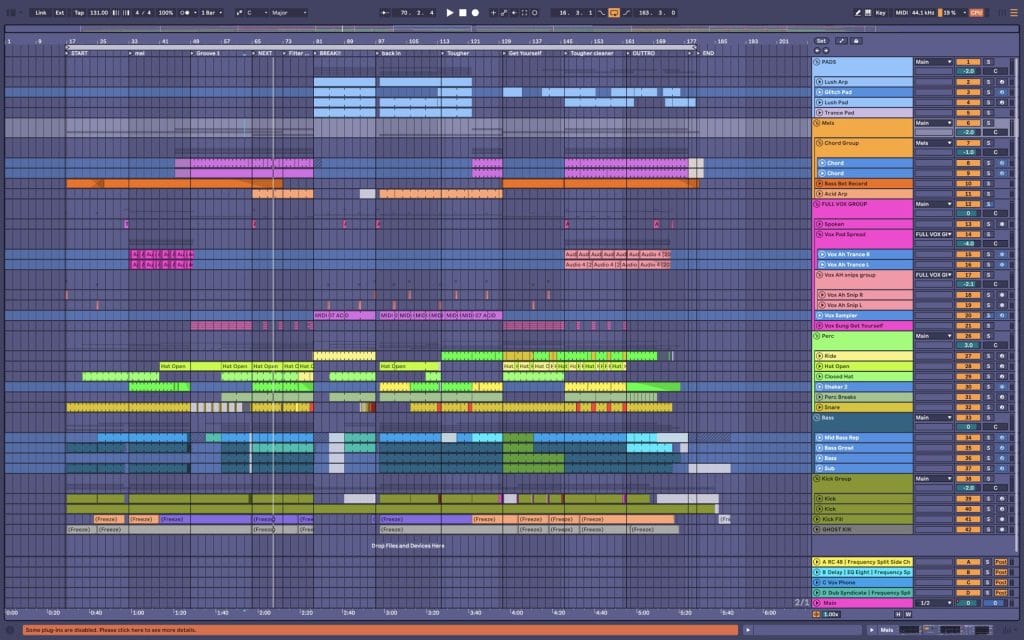
Beyond the studio, Eluize remains a versatile figure in dance music—testing products for Beatport and performing across Europe. She’s slated for appearances at Panorama Bar, Pikes Ibiza, and KOKO London, with sets that mirror her productions: precise, psychedelic, and rich in detail.
For this How It Was Made, Eluize breaks down the plugins, techniques, and creative processes behind “Momentary Distraction,” offering insight into the tools that shaped its acid lines, trancey pads, and rhythmic flow.
Sylenth1 by Lennar Digital
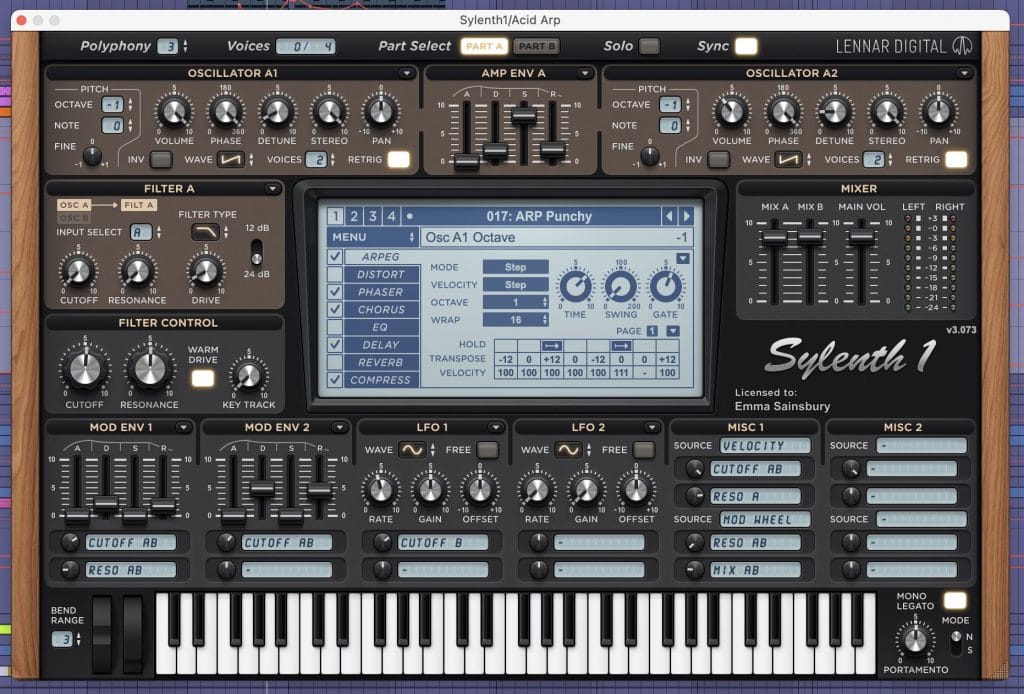
I’ve been getting right back into the Sylenth1 by Lennar Digital. I bought it years ago, and hadn’t used it much for a little while, but have fallen back in love with it. It’s at polyphonic, stereo, soft-synth, with 4 unison oscillators that generate analog shaped waveforms. There’s a tonne of great presets as places to snatch a bit of inspiration. I love it for sparkly, trancey or acid type tones into for my pads and leads. There’s inbuilt FX which add depth to the sounds, and an arpeggiator also works as as an intuitive step sequencer. I find it fun to write melodies in, and then automating the “WRAP” feature which changes the number of steps in the sequence, you can get some fun polyrhythms going or add variations to phrases in a happy accident kind of way.
I’ve used it on 4 tracks here. Three pads, one glitchy, eery thing (tweaked preset of PD Sample Hold), another more washy string type sound (tweaked preset of PD Noise Pad) and a “gated” pad based on the preset GAT Future Is Now. The track it’s on is called “trance pad”, in the screenshot you can see the preset was set up to use the built in arpeggiator giving it that trusted trancey gated effect. The pattern of the notes is programmed into the sequencer and then a lot of the inbuilt reverb and delay has been applied. The nice thing about this is you can write chords in the midi and get this lovely rhythmic pattern while the sound develops. Gorgeous. On this track I’ve automated the filter cut off frequency of the synth to give movement to the track and build and relieve tension throughout the track.
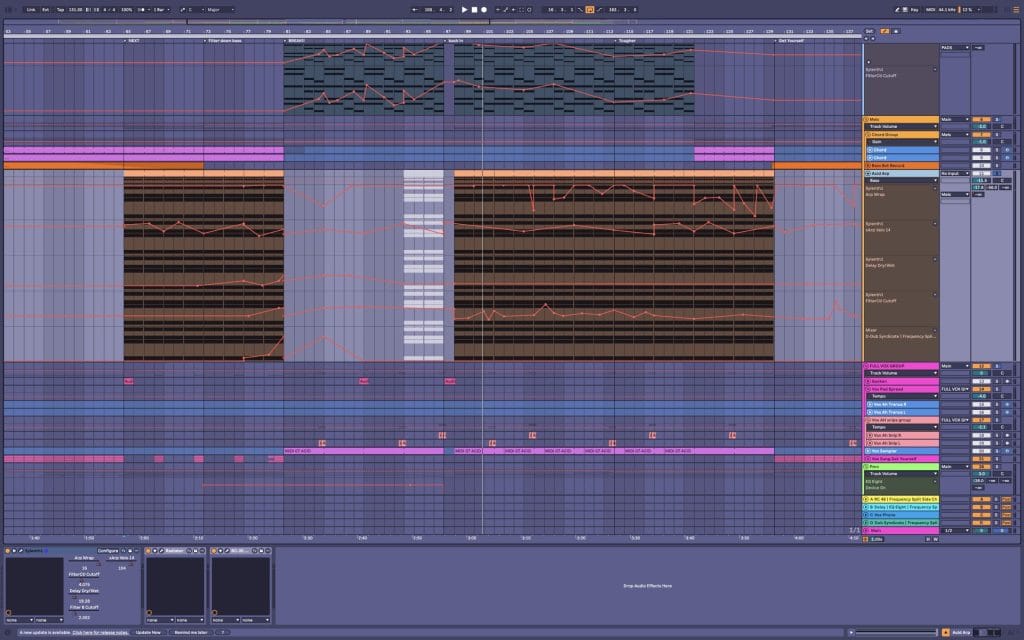
The fourth instance is the acid arp that comes in as something of a lead. I’ve used the sequencer again in this one, starting with their ARP Punchy preset and changing the melody. I’ve automated a lot of parameters on this one, especially WRAP, which changes the number of steps in the patter. This builds in melodic variations that sound natural. I’ve also automated the arp velocity, as this was mapped to the cut off and resonance of the filters in Sylenth1. This means, when the velocity of the note hits are higher, the edge and grit of the sound increases. Again, great for building and releasing energy and helping the melody cut through in places and recede more into the background in others.
I think for trance or acid based genres this plug in is super intuitive and fun, I’d suggest playing around with the arpeggiator for sure, the being able to adjust the gate, timing and swing and also automate so many parts of it really make for quick melody and lead generation. The gate use case for the arp is interesting to me as well. I typically add gates last, but the ability to so naturally adjust the pattern and intensity of the “hits” in the pattern is a cool little play idea. I find the filters on this to be gritty and to add lots of colour if you give them a nudge. The synth is clean and can be super sparkly without sounding flat or hollow. A great all rounder.
Kilohearts Trance Gate
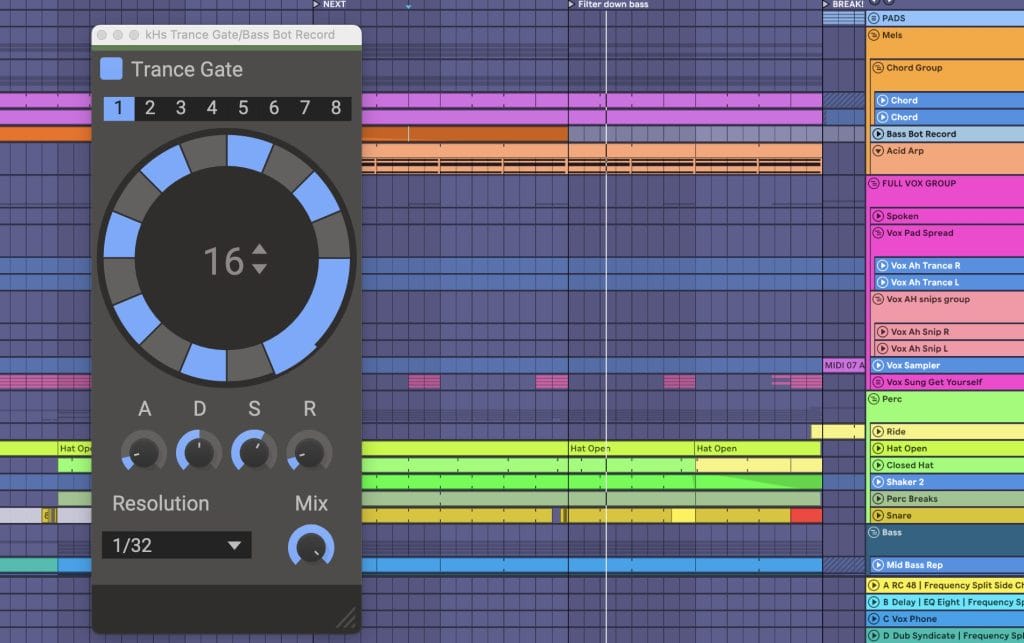
A free plug in that puts the basics of rhythmic gating at your fingertips. It’s got a clean design and is easy to use, you can select the number of steps, the beat division and have ADSR control to shape the sound that comes through. This accompanied with a reverb creates a washy, stuttery effect on pads, and can help give rhythmic punch to other sounds in a pattern that compliments your groove.
On this track, I used it less on pads than I usually do, and it’s main use was on the acid lead. I’d recorded it form a hardware synth, (my fav little 303 clone from cyclone anagogic), but I’d let the notes be quite long, and when it was in the mix it was a bit constant and draggy and I wanted it to have more punch. So I added the gate, as seen in the screen shot with the pattern so the hits were a bit more bouncy and separated. This also meant I could add some reverb and delay to the part, so it blended in with everything, but didn’t become muddy. Also on this part I’ve got a Panman from Sound Toys, to add some movement and add to the tension building and energetic escalation of the sections it was in.
Honestly, just slap it on and play around, I think for trance, techno and house, adding rhythm to your pads, or even melodies is a great way to include movement and add accents without detracting from your groove. Sidechaining is used really commonly and it’s kind of the reverse of that because it lets sound through rhythmically rather than cutting it, so combining the two can make for interesting results. The presets in Trance Gate are a great starting point and the interface is clear and easy to use.
Ableton Effects Rack (Frequency Split Side Chain)

Years ago someone showed me how to build a frequency split side chain in an ableton rack and I’ve used it aggressively ever since. I love the effect it has. Mostly I use it on bass lines, when you put it on, it splits the signal in the line to upper and lower frequency parts. Then there’s a side chain compressor listening to the kick drum on each. On the low parts, the side chain is listening to the low end of the kick, on the upper split the side chain is listening to the higher frequencies in the kick, essentially the click.
For the low part, I side chain it pretty aggressively. This way I know my bass is moving RIGHT out of the way in the very bottom end where things can get muddy. If you have separation of hits below 100 hz or so it makes sure that there’s clarity, and the chest thumping feeling you want in the club, or I do anyway, is really clear. This is the sound you hear from outside the club, I want definition between every kick and bass moment. Then above 100hz (or whatever I’ve set my cross over to, this depends on the track) I just notch a little bit out where the click of the kick wants to cut through. The great thing about this is you can make lots of room for your bass without getting that sucky feeling a standard side chain gives. Creatively sometimes that’s what I want, but this is great for subtlety and for when I want to maintain a bit of growl or delay in the basses upper end without losing it to the kick.

I used it on the bass in this track, and gently on the drum group as well, I keep the settings the same on all channels in one track, to make sure the groove stays the same. I usually set it on the bass, as this is where it’s acting the most, paying close attention to attack and release times, and keeping an ear out for any clicking which can sometimes happen if it’s activating to fast and hard, or if it’s being re-activated before it’s fully released.
I use this in mixing a lot when I want to make lots of room for my kick, lock my bottom end in, and save speaker energy without the listener feeling like they’re losing anything. I think it can be used in most genres, take your time getting the settings right on the bass, ratio, attach and release are the big ones, it can change the groove and feel of your bass and track dramatically so good to really use your ears and bod and see how it effects things.
RC-20 Retro Color
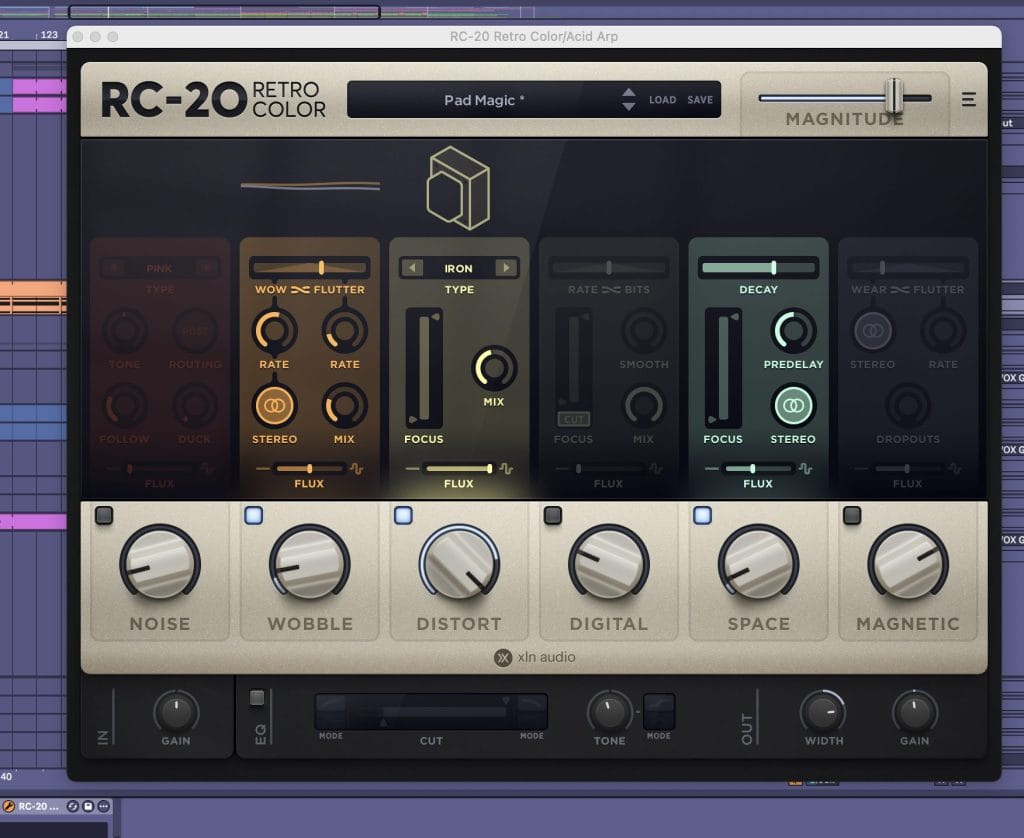
Shouts out to Jasper Tygner who got me onto this plug in. It’s a colouring plug, that can add grit, verb, resonance, distortion, delay and tape wobbles or dropouts. It can be as tame or as wild as you like, and you can turn on and off sections. It’s also got a built in EQ and tone adjustment. Again, a very clear interface with presets that give you good starting points to add extra dimensions to your sounds.
I’ve used this plugin on the secondary acid line that was played by Sylenth1, I found that in contrast with the hardware synth it sounded too digital and clean so I wanted to roughen it up a bit. I started with a preset called Pad Magic, and turned on and off sections and adjusted the amounts of each thing I landed on. Wobble is kind of like a tape wobble or delay, the stereo element gives the sound more width, I only touched this a bit though because I felt too much was a bit distracting and as it was on a lead I wanted it to cut through consistently. Distortion, I chose a metallic one, and gave it a pretty big push, this contributed most to matching it closer with the hardware sound pallet. Space, added a little bit of verb, I was careful not to use too much because I didn’t want to add mud and I’ve also got reverbs on my send channels that match to all other parts, this did add a nice bit of colour and width though, so was happy to include it.
I’ve also used this plug on a couple of the vocal tracks with the distortion on AIR rather than iron. Again, to add colour, width and some extra sparkle.
I think this is very much a place for experimentation. I like trying a couple of new settings on resonance, colour or distortion plugs on parts that are feeling a bit lacklustre, digital, or clean. I like a bit of grit and bite to sounds, and it can sometimes help them cut through without having to have a loudness battle. Sometimes a tape plug or similar can be a great way to pull drums together especially if the sounds are samples from all over, then it gives them a consistent colour. Or, like I’ve done here, adding some extra mess and width to a digital sound can blend it in with your hardware or less crispy bits.
I’m always careful with “noise” setting son these though, I don’t like artificial vinyl crackle or hiss personally, I find it distracting. If you do go with noise, I think less is more and keep an eye on it, if you have 4 or 5 different plugins all adding noise, it adds up really quickly and takes up space in your mix. Also, some of these are CPU hungry so freezing or bouncing in place can take some of the load off. Recommend keeping your dry audio somewhere just in case you want to go back later, sometimes I find when it comes to mixing down, I want to reduce distortion a bit after all if the sound becomes too dominant.
Hardware pedals are also great for roughening up digital sounds, I like sending signal out from my DAW to hardware to give it soft colour too. Again, mess around and find out, the playfulness of these parts is so joyful and you can end up with so many weird and wonderful results!
Quick Fire Tips For Making This Genre
Tip #1
Get into gates! I love using them to turn pads or vocals into rhythmic trancey washes, to add timed texture to drum hits or to pump up impact and groove on melodies.
Tip #2
Step into sequencers – write tuned patterns in sequencers, switch up the instruments they trigger and play around with step lengths for polyrhythmic joys and melodic inspiration.
Tip #3
Layering different textured pads, vocals and long or frozen reverb tails, while utilising chorus, phasing and panning creates width and a lush landscape for leads to live in.
Tip #4
Creative colour – resonance, distortion, tape delays +++ are your friend! Experimenting with plugs and pedals (hardware) can add wild dimensions to lacklustre sounds.
Tip #5
Keep bass lines locked into the groove without sacrificing growl by using a frequency split side chain. This way you can slam the low bass and sub, while subtly notching out the upper range. Giving full body, mud free, club thump, without sacrificing grit.


Will Vance is a professional music producer who has been involved in the industry for the better part of a decade and has been the managing editor at Magnetic Magazine since mid-2022. In that time period, he has published thousands of articles on music production, industry think pieces and educational articles about the music industry. Over the last decade as a professional music producer, Will Vance has also ran multiple successful and highly respected record labels in the industry, including Where The Heart Is Records as well as having launched a new label with a focus on community through Magnetic Magazine. When not running these labels or producing his own music, Vance is likely writing for other top industry sites like Waves or the Hyperbits Masterclass or working on his upcoming book on mindfulness in music production. On the rare chance he's not thinking about music production, he's probably running a game of Dungeons and Dragons with his friends which he has been the dungeon master for for many years.