Being a producer is hard. Being a software developer is hard. Now, imagine how difficult being both must be.
There’s a good chance that you’ve heard of longtime Armada artist Mason. He boasts a few million monthly listeners and his track “Perfect (Exceeder)” from 2007 has over 100,000,000 streams on Spotify, and has been re-worked several times. He’s pretty much done it all at this point; with several successful albums, and an innate ability to create music on his own terms.
So, it’s not surprising to see him launch into a new journey: FX plugins.
In collaboration with Armada Music and Armada University, Mason has just launched the Critter FX series – three plugins focused on bringing character and movement to your music. The three plugins each serve a different purpose: Critter Crunch is described as an overdrive mixed with a bitcrusher, Critter Splash adds rhythmic reverbs and delays to your sound, and Critter Flush “creatively disrupts time and space” – which just sounds fascinating.
These three plugins don’t sound like anything I’ve really seen before – they all combine different functions to create entirely new processing techniques. You already know I had to get my hands on this bundle.
Below is my review, and before we get into it, I suggest you check out this 10 minute video from Mason on the Armada Shop page where he details how to use each plugin. I always like sharing these videos, because the creators of these plugins definitely know how to explain what their products do better than I can!
On to the review.
Critter Crunch: Time-Based Distortion

This is now the cutest plugin I own, no question.
I think the best way to describe Critter Crunch is to call it a distortion LFO. You can manage the direction the sound moves in with the arrow (a left facing arrow forward, a right facing is in reverse) – the orange light will move in the same direction. You can also drag either node to determine the depth of the LFO (closer together nodes will sound fuller, while the effect will pulse if the nodes are all the way out). The button at the bottom determines how fast the sound moves – whether in time or in beat divisions.
Note that these effects only apply to the processing. If the mix volume is letting original signal through, you’ll be able to hear it the entire time while the processing of the sound moves. This can lead to some pretty cool sounding rhythmic distortion effects that you can make pretty easily. You can also adjust the shape and color of the distortion by switching to one of the 3 items in drive, crush, and curve. You can do everything from light saturation that pops up every quarter note to full-on sound destruction. It’s easy to use, and the distortion itself sounds pretty great.
Below is a quick demonstration of critter crunch on a guitar. You’ll hear the normal loop first, then the processed one, which sounds more like a super distorted LFO’d synth now.
This probably won’t replace your favorite static distortion just because of the LFO-y nature of the plugin, but it can create some really cool textures very quickly. If you’re looking for easy distorted movement, this is a great option.
Critter Splash: Instant Rhythm
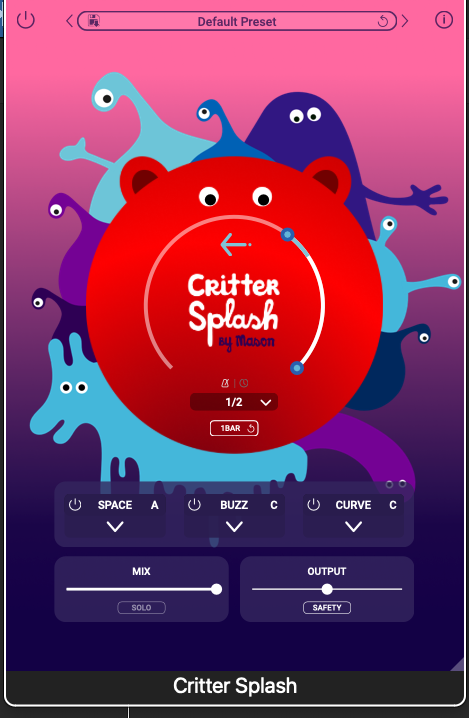
Once again, great design. Huge props to whoever designed the artworks for this series.
This plugin functions essentially the same except it adds rhythmic delays and reverbs to your sound. Again, this will not replace your reverb or your delay: there are only three options for space here, as well as buzz, which affects the delay type. However, what this does do is pretty much the same thing: add instant rhythm and movement to your instrument.
You can have stuttery effects every eighth note or completely wash out an instrument, turning it into melodic pulses. Specifically, buzz option B sounds really cool to have playing at random intervals – it almost reminds me of the way granular synthesis sounds.
The example below is how I re-processed my guitar sample. You can hear how eerie it gets. And note that this was after about thirty seconds of dragging and clicking – these plugins are seriously easy to use.
Once again, this won’t replace your reverb or your delay plugins, but it will open up a lot of new sound design opportunities, as you can clearly hear.
Critter Flush: In Reverse
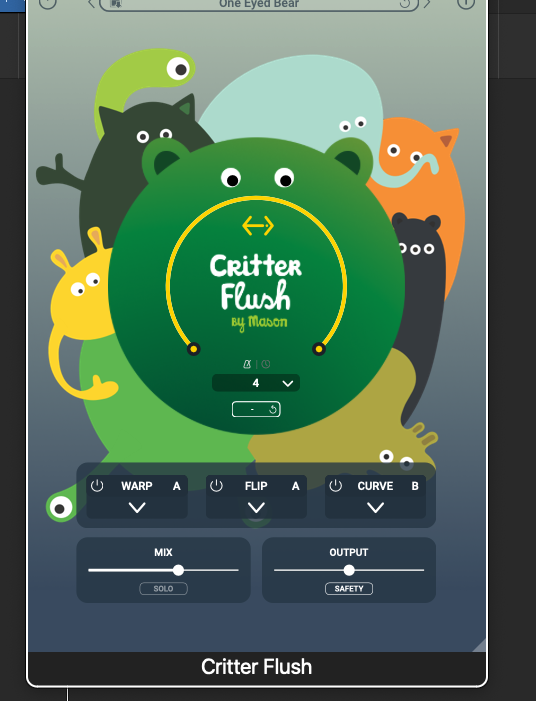
So, this one. I have to be honest and say that I can’t quite figure out exactly how to describe what it does. The best way I can describe Critter Flash is as a reverser with a twist. It’ll play back pieces of the sound as it plays in real time in unexpected ways.
This one’s probably the most unique out of the three, and probably my favorite. You can get instant melodic textures and unpredictable motifs just by slapping this on an instrument and seeing what happens. Just note that things can get a little loud with this one – you should have the output down and the safety button on.
Flush would be really cool to throw on an atmosphere or sustained note to see what kind of movement it can create. It’ll take some playing around, but the results can definitely be worth it. Take a listen to the guitar sample below: it sounds like some notes are reversed and others are normal.
Whereas I have other distortion plugins and other reverbs and delays, this one doesn’t quite have an equal in my expansive plugin library. If I ever want reversed, warped tones in my music, I know which one I’m reaching to.
Pros and Cons:
Pros:
Instant life and movement.
The point of these plugins are to add movement and life to your tracks. They will certainly do that, and you’ve got a lot of control over the movement; what direction it goes in, how fast it goes, the depth, et cetera. It just works and it works smoothly, and it’s easy to use. Not bad for a first-time plugin dev!
It’s CHEAP!
Get ready for this one: at full price, these three plugins are FIFTEEN EUROS. That is not a typo. You’re getting three really cool and fun tools for a RIDICULOUS price. That is IRRESPONSIBLY cheap – they might as well be giving these away for free. Props to Mason for pricing these tools conservatively while also providing a product worth buying.
Cons:
They’re a bit of a one-trick pony.
Granted, it’s a good trick. But as I’ve said, these plugins are not going to replace your reverbs or distortions. They serve a purpose, and can’t really go further than that. This is not a huge problem (in fact, I think them being so unique is a big plus), but if you’re looking for a new main reverb or distortion, I’d suggest going elsewhere.
Things are a bit limited, processing wise.
You’ve really only got three options in each processing parameter. If you don’t like all three of the curves or warp options or drive options, you’re out of luck. In future updates, I’d love to have greater control over the actual processing rather than just the movement. But, this is a good start.
Conclusion: Should you get it?
The price alone should be the selling point. And, for that price, you’re getting three plugins that can make your music sound more alive with the click of a button, which is awesome. Even though they’re a bit limited, I’d recommend checking out the Critter FX Series, and I’m looking forward to whatever Mason cooks up next.
Buy the entire Critter FX series here.

Ben Lepper is a music producer and journalist from Boston, Massachusetts.