Table of Contents
If you haven’t been able to tell by some of my latest articles, I’ve been in a delay mood recently.
I’ve been thinking about how producers could really push the boundaries of delay plugins for sound design purposes. We did an interview with the BLEASS team recently that really opened my eyes on that. So, I’ve been on the hunt for more delays, figuring out just how to push the limits of the time-tested production method.
This is about when I stumbled upon Analog Drift by Phantom Sounds. This one caught my eye for one main reason: the emulation of analog delays in a digital setting. In the melodic house scene especially, analog anything has become hugely popular. There’s this sense of subtle warmth and near-nostalgia I get whenever I use something that emulates an analog synth. But, I haven’t quite come across an analog delay yet.
And, now I have. Analog Drift offers three different delay options, which can create everything from traditional, crisp delays, to something called “Vaporwave Bliss” – and if the name is any indication there, that setting might just be a one-way trip to nostalgic goodness. Needless to say, I need to get my hands on this plugin.
Here are my thoughts on Analog Drift.

A Traditional Layout
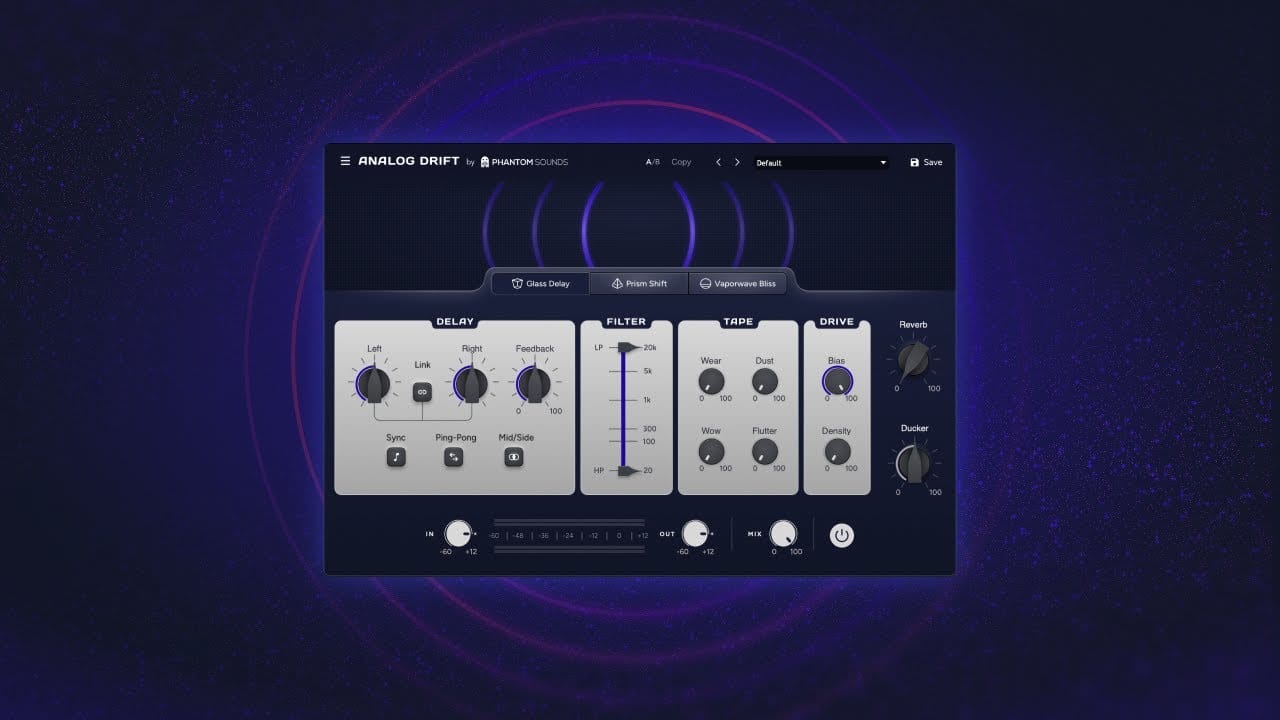
This looks really similar to a lot of delays I’ve used in terms of its layout, which is a good thing. No real surprises.
For example, everything on the left is really self-explanatory. You can link the left and right delay channels if you want both ears to hear the same thing, or you can make them wildly different. Either way, those two knobs are how you control how often the delay plays after the initial sound; e.g. 1/4 note, 1/8 note.
Sync connects the delay to the track’s BPM, ping-pong adds a bouncy stereo effect, and mid-side allows you to add delay to the mid and side channels of your track separately. So, already, you’re seeing just how creative you can get with this plugin before we get into the fun stuff.
The filter works as expected; you’ll only hear sounds within the frequency range that’s between the two arrows. I really like the design of it, by the way. You can really visualize just how the filter is affecting your sound with it.
The drive kind of works like a saturator, with the bias amount affecting the tone and clarity of the delay, while the density affects the harmonics. The reverb and ducker work as expected too: use the ducker to make your delay duck out whenever a sound plays on the track, and add reverb using the reverb knob.
The new thing here is the tape segment. This is really where it becomes an analog emulator: by turning all four of those knobs, you can add things like small crackles, roughness, and other glitches to really make it sound like you’re using magnetic tape to create your delay. This, to me, is one of the biggest things that sets this delay apart from other delays.
Lastly, you can select exactly what engine you want at the top while keeping the parameters on the below knobs the same. As I mentioned earlier, each engine sounds a little different, with Glass Delay being the most traditional and Vaporwave Bliss being the most nostalgic-sounding. Definitely try out all three.
There are also some presets to help get you started. And, that’s about it.

Endless Analog Goodness
It has never been easier to give your music an analog tinge than it is with this plugin.
The delay function is great. It’s easy to use and manageable. I specifically love Vaporwave Bliss; playing anything out of it even on the init preset just sounds so good. It detunes the output just a little bit, but not enough to sound weird. I’m a big fan of The Midnight, and the Vaporwave Bliss engine sounds a lot like some of the effects they use. It’s great, especially if you’re making synthwave.
If you aren’t, you can still get a lot of use out of this plugin. It’s inherently a great delay, with crystal-clear output and simple controls. You can even use it as an analog reverb if you’d like. Just in general, it’s one of the best analog emulators that I’ve ever used.
Here’s a quick demonstration of what each engine is capable of. I found a really nice piano chord from the KOAN SOUND sample pack to use the delay on. I’m using the “Basic” preset, and just flipping through all three engines in a row: starting with Glass Delay, then Prism Shift, and finally, Vaporwave Bliss.
The chorus, the detune, the crackle, everything about it: it’s pure analog goodness. Even the traditional delay sounds great.
Pros and Cons:
Pros:
Analog emulation has never been easier.
If you love analog synthesis, this is your plugin. I said it once, I’ll say it again: this plugin is about as good at emulating analog effects as any other plugin I’ve ever used.
It doesn’t overcomplicate things.
If you know how to use a delay, then you can use Analog Drift. You don’t have to do anything crazy to get those awesome analog effects; just turn on the engine, twist the tape knobs, and have fun.
Cons:
It’s pretty expensive for a delay.
Now, I’ve mentioned several times that you can use Analog Drift as more than just a delay. While you have to have the delay actually on to get any of the analog effects, you can play around and use it as an analog reverb, or a tape machine emulator, or even a saturator. But, if you only use Analog Drift as a simple delay, then you definitely aren’t getting your money’s worth: it retails for $79 USD.
If you’re in the market for a delay and only a delay, you can find cheaper options with similar results. However, if you want something that’s more than just a delay, this is absolutely a worthwhile purchase.
There are also free trials available, and Phantom Sounds frequently has sales on their website.
Conclusion: Should you get it?
If you love the character and warmth of analog synthesis, then this is a great purchase for you. It says it’s a delay, but just calling it a delay isn’t giving it enough credit. It’s an outstanding product from Phantom Sounds that I can see myself using frequently in my projects.
Buy Analog Drift here.

Ben Lepper is a music producer and journalist from Boston, Massachusetts.