’m going to speak for all producers for a second: searching for samples absolutely sucks.
You can have a massive sample library with thousands of files in it, and most of those files are probably sounds you will never use. Then, when you actually need the right snare, clap, vocal shout, percussion loop, texture, or transition sound, you end up clicking through folder after folder while the track sits there waiting for you to come back.
That was the thing that made Output Co-Producer interesting when it first showed up. The pitch was simple: load a plugin, have it listen to your track, type in what you want, and let it pull up royalty-free samples that fit the session.
That still sounds like something that should be too good to work. And yet, in 2026, Co-Producer is still one of the more convincing tools in this category, especially now that Output has added Re-Imagine, partner sounds, saved lists, dragged-sample history, auto key detection, and Output One support.
Quick answer: Output Co-Producer is still worth it in 2026 if searching for samples slows you down. It listens to your track, reads the harmonic and rhythmic content, lets you add a text prompt, and returns samples that can be previewed in key and tempo before you drag them into your DAW.
Editor’s Choice Award – What Is The 2026 Verdict On Output Co-Producer?
Not to spoil the rest of the review, but Co-Producer still earns the recommendation.
The original review was very positive, and that mostly holds up. The reason is simple: the plugin solves a problem that almost every producer runs into. It does not try to write the track for you. It does not replace your taste. It just gets you to usable samples faster than most normal browsing workflows.
That matters. Sample searching can break the flow of a session. You might have the chords, bass, and drums working, then lose the next fifteen minutes trying to find a top loop or vocal texture that fits. Co-Producer cuts that part down.
The recommendation in 2026 is a little more specific, though. I would call this a must-try for producers who use samples in almost every session. I would not call it mandatory for every producer. If you already have a tight local library, hate subscriptions, or prefer to build every part from scratch, this may not be your thing.
For everyone else, this is still a very convincing production tool.
The Layout

This is it. Seriously.
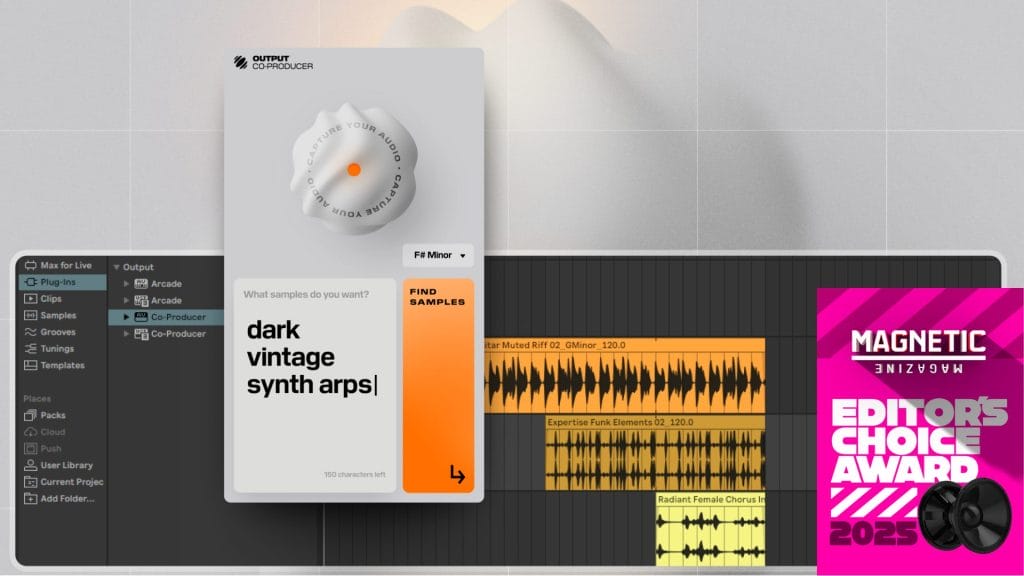
Here’s what you need to know: hit the button at the top center while your track is playing and it’ll analyze the track’s melodic content to ensure that it gives you the best possible samples. You also want to make sure you select your track’s key.
After you let it run for a few bars, it’ll be ready to go. You can then type in a prompt and be met with samples that you can just slot in like you would any other sample.

In this instance, I was looking for a nice, tight kick drum. All I did was type in “Tight kick drum” to that text box, hit “find samples”, and I was greeted by all of these wonderful options. They’re all loops here, but it’s easy to extract a single sound from a loop by cutting it down (if you’re like me and enjoy placing all your kicks manually, that is). I found one that I liked very quickly and dragged it in.


After that, I kept searching for more and more samples to fill out my demo track using prompts like those above me. A good practice when using this plugin, according to Output, is to include the instrument you want, the vibe you’re going for, and the genre you’re using when searching for samples. But, also note that I didn’t exactly do that in my prompt generation, so you’ll get great samples either way.
By the way, all the samples I’ve heard from this plugin are high quality and inspiring: there is truly something for every kind of music producer here. Never once did I think “oh, this doesn’t sound too great” – even if the sample I checked out didn’t exactly fit what I was looking for, I could have seen myself using it in a different context.
I also, to be fully transparent, forgot to have the plugin listen to the track I was working on while making this demo track. I had already generated several samples before I actually had it analyze my song, and it STILL gave me samples that fit, even before that!
Also, just to make sure it’s clear, if you want the plugin to work the best way that it could, make sure to put it on the master track of your Daw. Below is what that looks like in my DAW, Logic Pro. Doing this allows the plugin to listen to your track and find the absolute best samples.

Results
Below is a demo track that I’ve made, using my actual production process.
I usually start my tracks with piano chords, a sub bass, and a sidechain compressor. Then, I build around that. I’ve done the exact same thing in this demo track. Every sound that’s not a piano or sub is from Co-Producer’s sample library. I did some light EQ and processing on some of the samples, but nothing too out of the ordinary.
This, in no way, is meant to resemble a finished product. It took me about ten minutes, from start to finish. But, it’s still pretty impressive to see what Co-Producer can do in that short amount of time.
Not a bad start, right? With some more time (including all the time I would’ve spent searching for samples) and effort, this could be a pretty sick melodic/organic house tune! And, remember, all of those sounds came from text prompts. I’m so excited to continue using the plugin and see what else I can have it come up with.
What Has Changed Since The Original Review?
The first review focused on the thing that made Co-Producer feel so wild at launch: it could listen to a track and return samples that fit. That is still the core idea, but the plugin has expanded since then.
The first big update is the sample pool. I covered this in the piece on Output’s Co-Producer sample-library partnerships, where Output added partner sounds from Zenhiser, Black Octopus Sound, Minimal Audio, Cinesamples, Wavetick, and Touch Loops. That helps the tool feel less locked into one company’s source material.
The second update is Re-Imagine. I also wrote about that in this feature on Output’s Re-Imagine update for Co-Producer. The idea is that you can find a sample, then generate new royalty-free versions from Output’s source library. That is the sort of feature that makes Co-Producer feel less like a search tool and closer to a production assistant.
The third update is the subscription context. I covered this from a wider angle in the article on Yamaha Creator Pass, where Co-Producer appears as part of Yamaha’s Pro tier. That does not replace Output’s own pricing, but it does show how Co-Producer now sits inside a larger conversation around production subscriptions.
What Are The Main Specs And Compatibility Notes?
Co-Producer is a DAW plugin, not a standalone sample manager.
Output lists support for 64-bit AAX, AU, and VST3 formats. On macOS, the latest version supports macOS 10.15 through macOS 15. On Windows, it supports Windows 10 and Windows 11 with 64-bit AAX and VST3 formats.
Output lists 8GB RAM as required and 16GB as recommended. Co-Producer works with major DAWs, including Ableton Live, Logic Pro 11.1 or higher, FL Studio, Reason, Reaper, Pro Tools, Cubase, Studio One, and GarageBand.
You should load it as a stereo audio effect on the Stereo Out or master channel. That part matters. If the plugin is supposed to listen to your whole track, it needs to hear the whole track. Putting it on one channel limits what it can analyze.
Unsupported systems include iOS, iPadOS, Android, ChromeOS, macOS 10.14 and older, Windows 7, Windows 8, Windows 8.1, Linux, 32-bit operating systems, and 32-bit DAWs. Windows users should also check display scaling, since Output notes that screen resolution can affect whether the plugin fits correctly.
How Does Output Co-Producer Work?
The layout is still the best part. It is simple.
Load it on the master channel, play your track, let it capture four or eight bars, choose the key or use auto key detection, then search. You can search through audio alone, text alone, or audio plus text.
In the original review, the test was as simple as typing “tight kick drum” into the text box and letting the plugin return options. That is still the point. You can ask for a tight kick, a short vocal phrase, a clean bass loop, a percussion layer, a melodic texture, or a transition sound, then listen through results without leaving the session.
Output recommends using descriptive details when searching. A good prompt can include the instrument, the genre, and the general feel you want. You do not have to overthink it. Something direct like “short organic percussion loop” or “minor key vocal phrase” is usually better than a long paragraph.
After that, you preview the samples, pick one, and drag it into the DAW. The samples preview in the session key and tempo, which is the part that keeps the workflow moving.
What Is Re-Imagine?
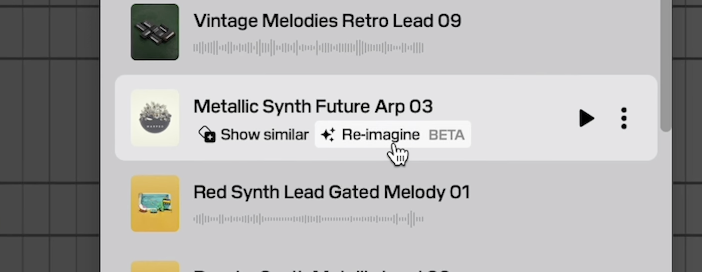
Re-Imagine is the biggest reason this review needed a 2026 update.
The basic sample search already worked. Re-Imagine adds a second step. Once you find a sample you like, you can generate new versions based on that source. Output says the results are royalty-free, created from its own sample library and selected Creative Commons licensed material.
That solves a real issue with sample libraries. Sometimes you find something that fits, but it feels too familiar, too close to the source, or too likely to show up in another producer’s track. Re-Imagine gives you a way to get a new version without leaving the plugin.
I would still treat the result like any other sample. Chop it, pitch it, filter it, EQ it, reverse it, resample it, or arrange it in a way that fits your track. Co-Producer can get you closer to the right starting point, but your own choices still matter.
What Are The Pros And Cons?
| Pros | Cons |
| It saves a lot of time when searching for samples | It runs on a subscription |
| The layout is simple and easy to understand | There is no one-time purchase option |
| Samples can preview in the key and tempo of your session | It is not built to manage your own local library |
| Audio search, text search, and audio plus text search are available | It depends on account access and internet connection |
| Re-Imagine creates new versions from Output’s source library | It will not appeal to producers who avoid AI-assisted tools |
| Partner sounds have expanded the library | Some systems and older DAWs are unsupported |
| Output One adds Arcade, Portal, Thermal, and Movement | The full bundle may be too much if you only want one tool |
Output Co-Producer is the better fit when you want software to analyze the track and recommend matching audio from a written prompt. Its main limitation is that the system centers on Output’s search process and subscription model, so producers who prefer conventional browsing may want to compare it with a larger sample platform before choosing.
Browse Loopcloud’s premium sample catalog here if you want manual search filters for tempo, key, genre, and instrument alongside DAW-based auditioning. My article on the Loopcloud Flip Sample update explains how the platform can turn selected audio into new patterns. You can also compare additional sources in my list of the best websites for royalty-free samples.
Get Output Co-Producer here if its track analysis, text prompts, and Re-Imagine system match how you prefer to search for audio.

Ben Lepper is a music producer and journalist from Boston, Massachusetts.