Table of Contents
2026 update: I rechecked each product from the original article for availability, pricing, version status, operating-system support, and fit by use case. RX 9 has been replaced by RX 12 Standard, LALAL.AI now uses monthly plans, and current DAWs may already include stem separation without another purchase.
Stem separation has become much easier to access since I first published this article in 2024. Producers can now split vocals, drums, bass, and remaining instruments inside a DAW, in a standalone editor, or inside a browser. The main buying question concerns where the audio is processed and what happens after the initial split.
Some producers need a vocal for a private remix. Others need spectral repair, MIDI extraction, DJ transitions, or detailed pitch editing after the stems have been created. Paying for the wrong software can leave you with features that overlap with your DAW or fail to address the artifacts in the exported audio.
Quick answer: The best stem separation plugin for most producers in 2026 is Acon Digital Remix because it runs inside a DAW, costs $49, and separates five groups in real time. RX 12 Standard suits repair-heavy work, RipX DAW Pro suits detailed note editing, while Fadr and StemRoller cover free browser and local options.
What are the best plugins for stem separation in 2026?
| Product | Checked price | Processing | Best fit | Main limit |
|---|---|---|---|---|
| Acon Digital Remix | $49 | Local, real time | DAW-based stem control | Limited repair after separation |
| iZotope RX 12 Standard | $399 | Local, offline or real time | Stem extraction with audio repair | High price for occasional use |
| RipX DAW Pro | $198 | Local | Detailed pitch, note, and stem editing | Separate editor with a learning period |
| Steinberg SpectraLayers Pro 13 | $359.99 | Local | Spectral unmixing and manual repair | Advanced feature set |
| Serato Sample | $129 or $9.99 per month | Local | Sample-based production inside a DAW | Designed around short sample manipulation |
| Simple Stems | $70 | Local | Fast drag-and-drop separation | Four-stem output |
| LALAL.AI | Free, $9.99 or $19.99 per month | Cloud | Occasional browser-based separation | Files must be uploaded |
| Fadr | Free or $10 per month | Cloud, with a paid plugin option | Free stems, remixes, and MIDI extraction | WAV export and plugin access need Plus |
| StemRoller | Free | Local | Free offline four-stem separation | Slower processing on older computers |
| DJ.Studio | Live plan pricing | Local application | Mashups, DJ mixes, and Ableton export | Wider DJ application may be unnecessary for simple extraction |
VIXSOUND
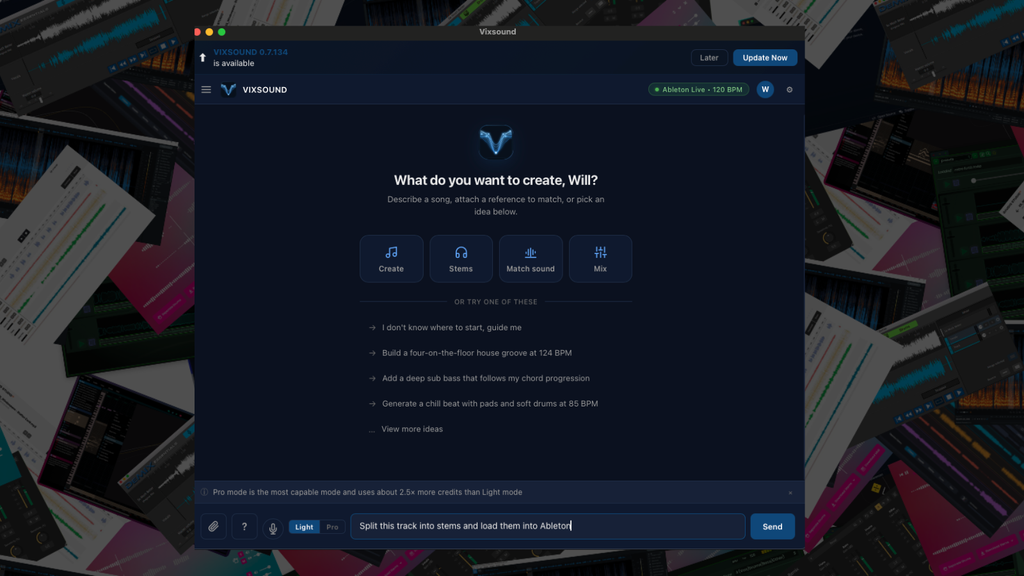
VIXSOUND brings stem extraction directly into Ableton Live as part of a wider AI production assistant. From its chat window, you can ask it to split an audio file into vocals, drums, bass, and remaining musical elements. The processing runs locally on your computer, so the source audio does not need to be uploaded to an external server before you can begin working with the extracted parts.
Its Ableton integration is the main reason to consider it for stem extraction.
Once the parts have been created, you can continue editing, arranging, routing, and processing them within the same Live project. VIXSOUND can also detect tempo, key, time signature, and song sections, which helps when preparing extracted material for remixes, edits, reference analysis, or new arrangements.

Stem extraction represents one part of the VIXSOUND feature set. The assistant can generate editable MIDI, convert melodic audio into MIDI, load Ableton devices, adjust mix parameters, and carry out DAW commands entered by text or voice. It supports Ableton Live 11 and 12 on macOS, while the Windows edition is currently in public beta. Subscription plans begin at $9 per month and operate with monthly credit allowances.
Learn More Here
DJ.Studio

DJ.Studio is the clear winner here for me. It started off as software that aims to be a DAW for DJs, but it’s since evolved and upgraded about 100 different times over the year that I’ve been using it, and it’s literally one of the coolest platforms in the game right now.
They recently rolled out a super powerful stem separation technology designed to create remixes on the fly, but it is equally powerful when I want to bounce out stems for a remix or bootleg. What I loved most about their stem separation tech is that it can export projects directly into Ableton, warped and everything. That’s so damn impressive!

Creating bootlegs and mashups is a great way to create quick content to share with your fans and followers, but when I was coming up as a producer, it always took a TON of legwork. It’s wild to see just how far the music production landscape has changed in a way that makes what used to take hours or even days only now take a couple of minutes. I cannot recommend this software enough, and they have a free trial so you can get your hands dirty with it, bounce some stems you want to flip, and not have to pay a dime.
Learn More Here
Acon Digital Remix

Starting the list off strong is Acon’s Remix software, which is probably one of the better-looking plugins on this list from an aesthetic point of view. Apart from just looking good, though, it comes with a handful of unique features that I found super helpful for stem separation, to the point where I was honestly a little shocked to ask why more plugins, even on this list, do not include such features.
The coolest feature I found when using this plugin is the sensitivity control, which helped me balance the artifacts’ prominence and the stem’s overall quality.

Plus, I loved the fact that it ran as a VST3 right in Ableton, which means I could get the audio directly into my DAW and start remixing and resampling the audio without having to go through the more convoluted steps of finding the output folder and dragging them into the project. Sure, these are small steps for me to do in the moment, but every time I’m taken out of the creative flow is a chance for me to lose focus or for the idea I’m working towards to slip away.
It also comes with a free trial period to test it out!
Learn More Here
RipX DAW

This started as a basic suite of software that is quickly evolving into a virtual DAW that’s completely changing the game regarding sampling. Not only does it isolate stems and perform many of the essential features that the other software does on this list, but it also allows for some of the most intensive and intuitive manipulations of those stems once isolated.
So, instead of isolating a vocal, it allows you to retrigger different pitches of that vocal, stretch the vocal, add effects to it, and almost anything else you could imagine.
I love using all these features on a channel before bringing it into Ableton. Still, the real magic starts when you begin reinterpreting all the different stems to reimagine the track you imported and analyzed completely.
I’ve had the opportunity to sit down and chat with their team a couple of times, and one of the other clever use cases they’ve seen users using their software for is to learn instruments, which I thought was super cool. I would have used this all the time as a young musician, and the thought of being able to isolate the guitar of some of my favorite John Mayer tracks, slow down the tempo so I could hear what notes his flying fingers were playing, and then practicing those same licks at my speed would have been a total game changer back in the day!
Learn More Here
Gaudio Studio

The two big things going for Gaudio Studio are that it’s browser-based and completely free to use. And while there are certainly higher-quality software and plugins on this list, the fact that you can use this completley free, instantly, and with very little friction means it’s excellent for testing out samples to see if you can get a vibe going without committing to the full extracting processor using more robust plugins like RipX or Izotope.
It’s at its best when isolating and separating vocals, making this also a super convenient tool for casual friends and bars looking to stock their Karaoke library before a big event, but that doesn’t mean it’s not also great for music producers trying to flip samples.

I enjoyed that it maps out all the songs and the stems, which could be a great learning tool for new producers and artists to have visual feedback on how their favorite songs are put together! This is far from an uncommon feature in this list, but the bright colors and simple layout, as seen in the image above, make Gaudio one of the most straightforward ways to do it.
Learn More Here
Lalal.ai

Lalal.ai first came onto my radar about a year ago, and when I gave it an initial test run, I was impressed by what it could do. But what’s even more astounding is just how far this company has come since it was brought to marketing not that long ago. I would go as far as to say that based on my experience, the X-factor with Lalal.ai is just how often and effectively they improve on their technology. It’s constantly getting better, and every month or two, when I return to flip another track, I find the tech better and the results more inspiring.

It’s also important to note that they are entirely cloud and browser-based. Another one of the better features of the company overall is that you purchase separation in minutes instead of an ongoing subscription or single and expensive one-time purchases. This means you can buy a bundle of sixty minutes of isolation and use it only when a track inspires you to sample.
This is a fantastic feature for those who want to test every once in a while but don’t think they’d get hundreds of dollars of value from it by purchasing a pricey piece of software outright. Considering just how damn powerful the algorithms and separation features are, and the ability to select just a single stem to isolate or a bundle of different stems like piano and vocals, was awe-inspiring when I was using it.
Learn More Here
Stemroller

This is free software that does its job pretty well!
And while there are more powerful stem separation tools on this list that I’ve used, most of the best come with a price tag to match their potency. I say all this not as a roundabout way of saying, “You get what you pay for,” because I do believe that this is one of the best free stem separation tools available. I’m just saying that it doesn’t exactly hold a candle to some of the other paid options on this list.
But this is a handy tool if you’re looking for a fast and easy way to isolate a vocal and create a karaoke mix. Plus, the fact that it’s cross-platform means that it’s an easy recommendation to my friends and community members, as it will work regardless of their platform.
Learn More Here
Simple Stems

The industry has come a long way since this quick little plugin was dropped about a year ago, but I still find that Stagecraft’s Simple Stems separation plugin is the fastest plugin by miles. And while it’s far from perfect, it does allow me to pull out bits and riffs from tracks fast enough, never to break my focus, and that’s the real X factor that I found. Many of these AI plugins take a ton of time to work their magic, and by the time I have the guitar riff or vocal phrase I want to sample, I easily could have lost my state of flow.
And while I’ve found that I get a lot of artifacts with Simple Stems, which sometimes are unique and pleasing in their own right, it at least gives me something ASAP that I can test out and try working with. If I love what I come up with, I can always repeat the process in a more nuanced isolator like RX 9!
Learn More Here
FADR

Like most other plugins and software on this lift, Fadr leans heavily into the buzzwords of the day, “AI-Powered” being the language at the forefront of their landing page. And while I usually raise my eyebrows at anything that mentions this, just cause it’s so overused, Fadr walks and talks the talk.
Please don’t take it lightly for its cheery and childish color palette. Fadr’s algorithms and stem extraction pack a punch, but that’s not even where it ranks on this list. What I liked the most about Fadr was the MIDI extraction functionalities, which were fun to play with. It streamlined the remixing and bootleg flips that I was working on with it, as I could extract the vocals from a track and then generate MIDI based on the instrumentation to use as a jumping-off point.

Sure, some compatible workarounds are native to Ableton, but, honestly, Ableton’s ‘Convert MIDI To Harmony” function is borderline unusable, even if the thought itself is super cool.
Learn More Here
iZotope – RX 9

RX 9 has long been the holy grail of isolation and audio repair but is expensive. The biggest problem with stem separation plugins, including almost all of the ones mentioned in this article, is that they leave artists and phase-style distortions in the audio. It’s par for the course with all plugins except this one.
Sure, it’s not 100% perfect, and I am not saying it’s a one-size-fixes-all plugin. However, the isolation technology in the plugin, coupled with a massive suite of audio repairing and other tools, gives me entirely new levels of control when isolating a stem and cleaning up the artifacts once isolated.
This comes with the obvious downside: the plugin costs a pretty penny, but if you see it more as the industry standard for vocal stem repairing AND isolation, then it’s totally worth it. I have used it in certain situations and for specific purposes in the studio for years and have always been impressed. It’s nowhere near as fast or intuitive as some of the other plugins on this list, but all of the best and most potent plugins in this industry come with a bit of an earning curve, and this is no exception.
Learn More Here
Common Questions About Stem Separation In 2026
What should you skip in 2026?
Skip RX Elements when Music Rebalance is the reason for buying RX. Stem splitting begins with RX 12 Standard at $399.
Skip RX 9 unless you already own it and it still runs properly on your computer. RX 12 has replaced it with updated neural processing, Stems View, and real-time Music Rebalance.
Skip paying for a second basic separator before testing Logic Pro or FL Studio. Their current versions may already cover vocal, drum, bass, and instrument extraction.
Skip cloud upload for private client files until the service terms meet the project’s confidentiality needs.
Skip judging any separator from one song. Separation results change according to arrangement density, effects, encoding, and the source recording.
What should you do after isolating a vocal?
Listen for percussion spill, remaining reverb, phase-like movement, and clipped consonants before adding new processing. Repair the obvious artifacts first, then adjust timing or pitch only where the performance needs it.
My article on The Best Vocal Tuning Plugins covers current pitch-correction options for vocals that need further editing after extraction.
Separated vocals often contain part of the original room or delay return. Adding another large effect immediately can make those remains easier to hear. My article on Reverb Plugins For Ambient Music covers reverbs that can reshape extracted phrases when the goal is texture instead of transparent reconstruction.
Can you release music made from separated stems?
Stem separation does not grant ownership of the source recording or composition. A commercial remix, sample, or derivative recording may need permission from the relevant copyright owners.
The U.S. Copyright Office states that changing another person’s work does not give you ownership of that material without the copyright owner’s consent. Its musician resources also advise creators to obtain permission or license preexisting music according to the relevant agreement.
Use separated stems for private study, production testing, and authorized work unless you have confirmed the rights for release. Legal questions tied to a commercial project should be reviewed with a qualified attorney.
After an original or properly cleared release has been distributed, Pitchplaylists Review The Best Way To Pitch Song To Spotify Playlist For Free covers one option for submitting the finished track to playlist curators.
Which stem separator is best for vocals?
Acon Digital Remix is the best low-cost plugin for controlling an isolated vocal inside a DAW. LALAL.AI supports dedicated vocal and instrumental extraction, including lead and backing-vocal separation.
RX 12 Standard is the better purchase when the vocal needs repair after extraction. RipX DAW Pro fits vocal parts that need detailed pitch or note editing.
Can stem separation produce perfect acapellas?
No separator produces a perfect result from every source. Cymbals, vocal reverb, distorted instruments, and sounds occupying similar frequency ranges can remain inside the wrong stem.
Uncompressed or lossless source files usually give the separator better material than low-bitrate MP3 files. Results also improve when the original mix has clear placement between the vocal and surrounding instruments.
Is local stem separation better than cloud separation?
Local processing keeps the file on the computer and removes upload time. It also suits private or unreleased material when external transfer is restricted.
Cloud services can access newer server-based models without depending as heavily on the user’s computer. They are easier for occasional work and can process files from a phone or lower-powered laptop.
Choose according to privacy, computer performance, internet access, and frequency of use.
What is the final buying advice for 2026?
Buy Acon Digital Remix when you want affordable real-time control inside a DAW. Choose RX 12 Standard when separation and repair belong in the same job, or RipX DAW Pro when you intend to rewrite notes and timing inside the extracted material.
Serato Sample fits sample-based production, while DJ.Studio fits complete DJ mixes and Ableton exports. LALAL.AI covers browser-based instrument extraction, and Fadr provides the best free browser starting point.
Download StemRoller before paying for Simple Stems if four local exports cover the job. Check Logic Pro or FL Studio before buying anything because stem separation may already be included in the software you own.

Will Vance is a professional music producer who has been involved in the industry for the better part of a decade and has been the managing editor at Magnetic Magazine since mid-2022. In that time period, he has published thousands of articles on music production, industry think pieces and educational articles about the music industry. Over the last decade as a professional music producer, Will Vance has also ran multiple successful and highly respected record labels in the industry, including Where The Heart Is Records as well as having launched a new label with a focus on community through Magnetic Magazine. When not running these labels or producing his own music, Vance is likely writing for other top industry sites like Waves or the Hyperbits Masterclass or working on his upcoming book on mindfulness in music production. On the rare chance he's not thinking about music production, he's probably running a game of Dungeons and Dragons with his friends which he has been the dungeon master for for many years.