Most electronic music performances rely on a familiar collection of equipment, whether that’s CDJs, a laptop running Ableton Live, or hardware synthesizers and drum machines. Paris-based producer and live performer Spicy Sofi has taken a different approach with SOFI AIRLINES, an audiovisual performance built around aircraft cockpit controls. The setup incorporates a Boeing 737 overhead panel, Airbus-style throttle controls, a custom radio panel, and a collection of software instruments, with the individual components connected through custom code that Sofi developed himself.
Sofi, who has roots in Tunis and Paris and co-founded the underground collective Morninglory, brings an engineering background to a project that combines his interests in aviation, technology, and electronic music.
The performance moves through progressive house, electro, acid, and breakbeat, with the musical arrangement organized around the stages of a flight, from boarding and takeoff through turbulence and landing. Working with visual artist Haïfa Becheikh of FMRXR Studio in Tunis, he has also developed a system that allows the music and visuals to respond to one another in real time, despite the performers operating from separate countries.
For this installment of Magnetic Magazine’s How It Was Made series, we’re looking at the engineering and production decisions behind SOFI AIRLINES rather than breaking down a conventional studio recording. Sofi explains how he repurposed aviation equipment, integrated it with Ableton Live 12, and built the software required to coordinate the individual controls, instruments, and visuals.
His setup offers a detailed example of how producers can develop custom performance instruments around their musical requirements, particularly when existing controllers cannot provide the physical interaction or functionality they want.
Boeing 737 Overhead Panel: Giving the Cockpit a Second Life
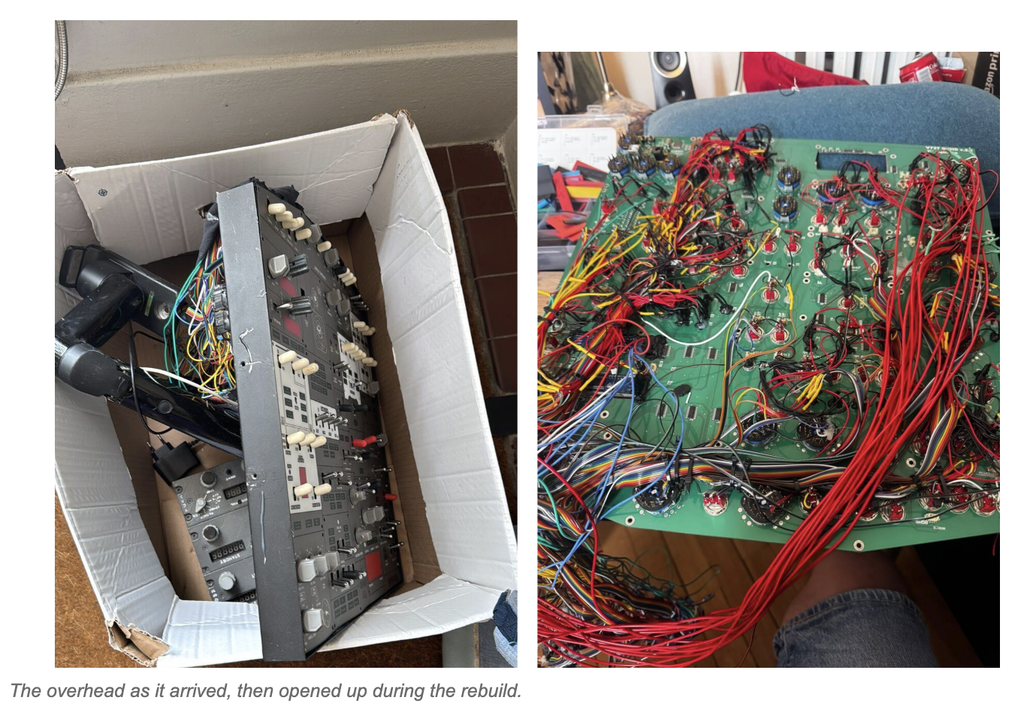
The Spicy Cockpit started with this panel. A full-size Boeing 737 overhead, the section above the pilots’ heads that runs fuel, lights, anti-ice and electrics, was the obvious first instrument: dozens of switches, annunciators and displays, all designed to be operated by feel.
Its original interface electronics had to go. I rebuilt them around four Arduino Mega boards running MobiFlight, the open-source cockpit firmware, and reworked the wiring, keeping every switch, light and display exactly where a pilot expects to find it.
Then came the software. I reverse-engineered the messages the hardware sends and wrote my own Python bridge to Ableton Live. Two problems, one after the other: make the electronics talk, then make what they say musical. About six months of experiments later, the panel was part of the set.
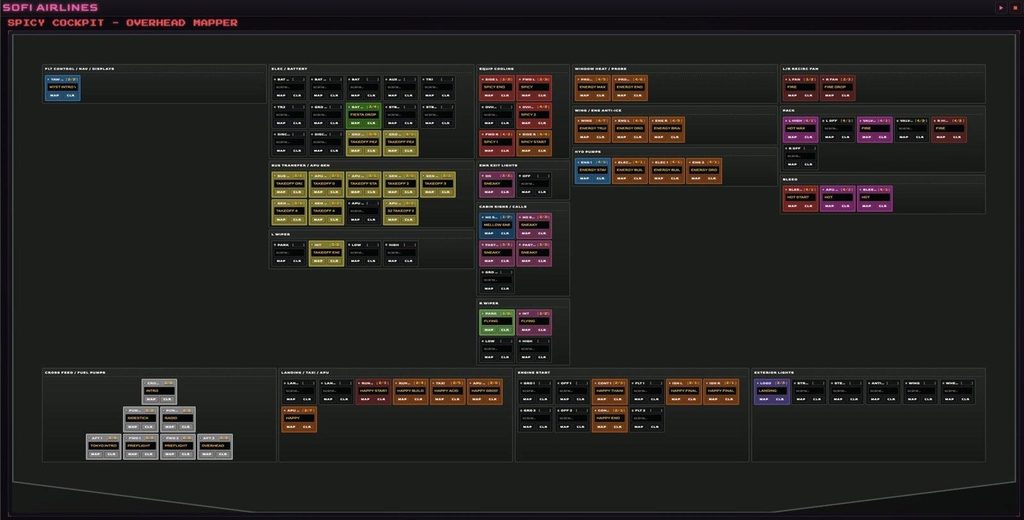
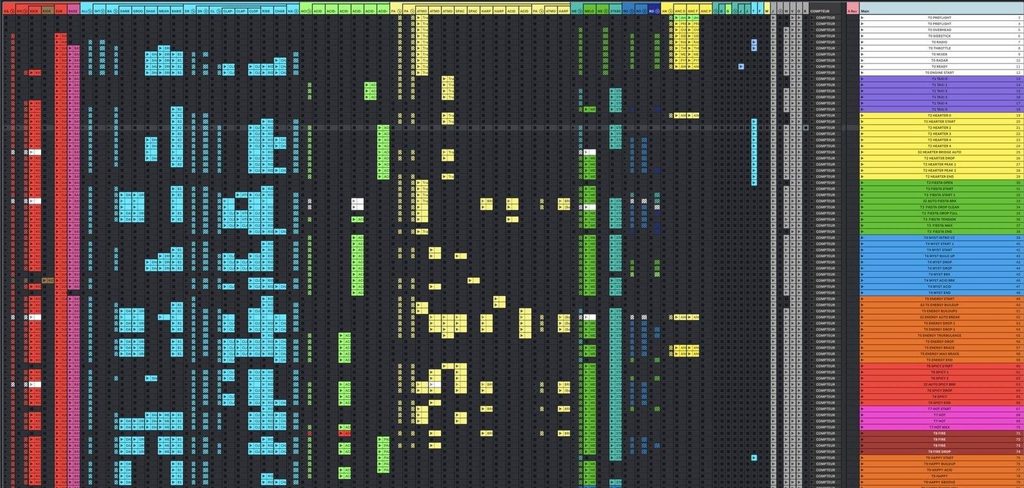
Today the switches launch and mute tracks, arm effects and fire scenes. The link runs both ways over MIDI and OSC: when a track plays or a warning stem fires, the matching annunciator lights up. A small web-based mapping tool lets me reassign any control in seconds before a gig.

A pilot manages several systems at once, through clear physical controls and instant feedback. A live set asks for exactly the same thing. The labels still belong to aviation; the systems behind them now make music. That became the whole idea of SOFI AIRLINES: give existing hardware a second life, and let its history and its gestures shape the instrument.
Airbus Throttle Quadrant and Sidestick
If the overhead is the brain, the throttles are the hands. The two thrust levers are long-throw faders, the most physical control in the rig. I map them to synth parameters on the instruments described below: filter cutoff, resonance, drive, oscillator detune, the kind of movement that makes an acid line scream or a breakdown rise. Pushing both levers forward on a build feels exactly like a takeoff roll, and the crowd reads it instantly.
The Airbus sidestick is my rhythm controller. It fires drums and robotic synths loops: the buttons launch and swap loops, and the stick itself bends them in real time. Left and right, forward and back, it sweeps filters and effects on two axes at once, so I can close a groove down to a thin hi-hat line, throw it into a delay, then open it back up in one gesture.
For now these two pieces are flight-sim hardware (Thrustmaster TCA Airbus), bridged to MIDI with my own Python scripts. That is a deliberate choice for touring: they are light and compact, so they travel far more easily than real aircraft parts. Longer term, I want to replace them with real salvaged aircraft parts. I am talking with people in aviation about upcycling decommissioned parts that would otherwise be scrapped.

Boeing Radio Tuning Panel
Also called VHR Radio is the panel a pilot uses to tune frequencies and talk to air traffic control. Mine is 3D printed: three modules, VHF COMM, NAV and transponder, modelled on the Boeing units and slightly simplified so they are easier to wire, maintain and tour with. Its 8 encoders and 14 switches drive three native Ableton Audio Effect Racks, all on their own MIDI channel:
- VHF Comms: band-limited, slightly crushed, like a voice through a headset. I put vocals and stabs through it.
- NAV Space: long reverbs and delays, for the cruise moments where the music opens up.
- ATC Glitch: stutter, repeat and bit reduction, for transitions and tension.
The frequency displays show real values that change as I turn the knobs, so the panel reads like a working radio. Aviation radio is also a big source of sound material for me: callsigns, static, tuning noise. That idea of transmission and reception as music is something I want to push much further.

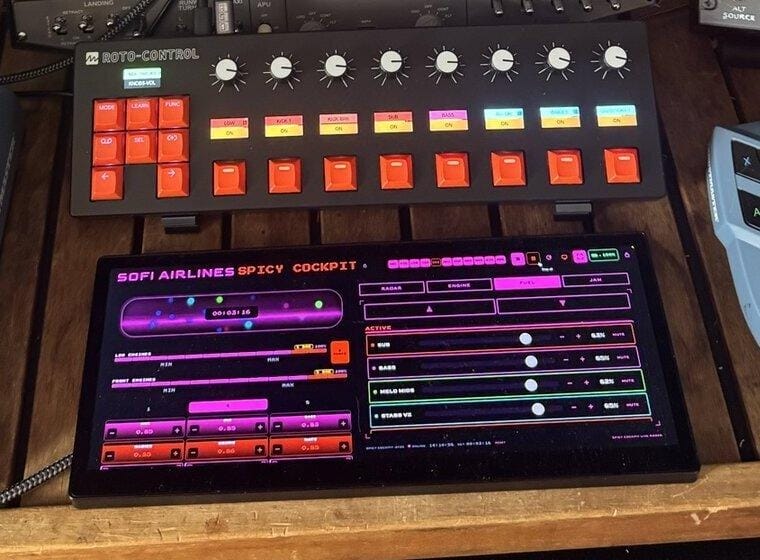
Melbourne Instruments Roto-Control
The Roto-Control is the one modern controller in the cockpit, and I chose it for its motorised knobs. A live set like this runs a lot of tracks and a lot of parameters at once. When I switch to a new track or device, the knobs physically move to the current values, so there are no jumps and I can do fine mixing live without looking at the screen.
It also has a plugin mode I use in the studio rather than on stage. It makes finding the sweet spots in a synth patch very fast, and it keeps the mappings for each synth across projects. So the work I do in production carries straight into the live set, with the same controls in the same places.
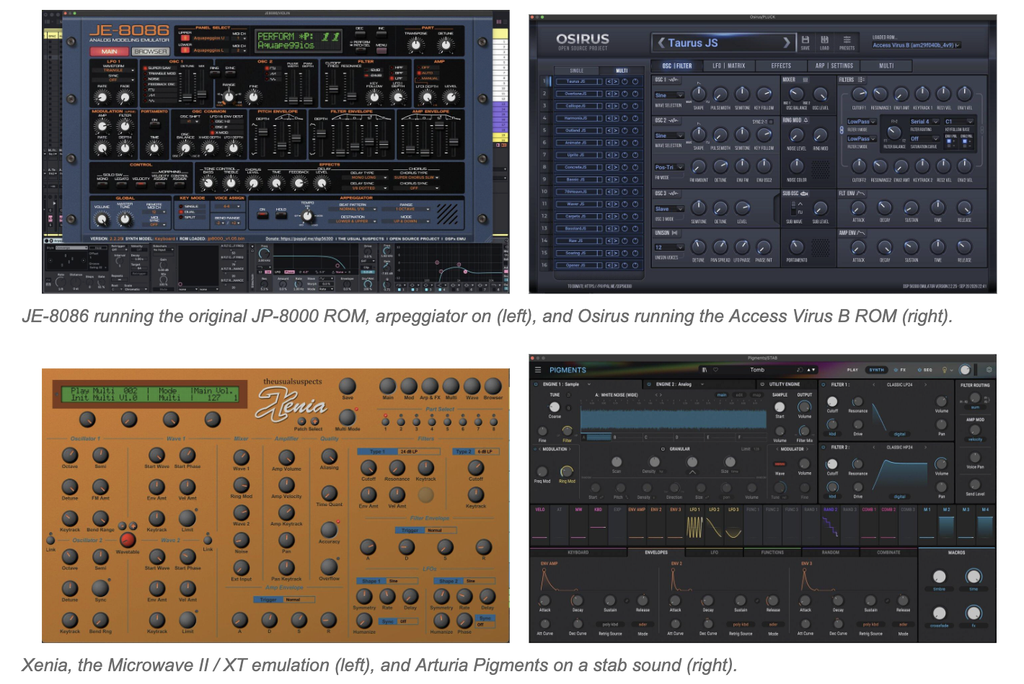
The Sound Engine: JE-8086, Osirus, Xenia and Pigments
Everything you hear is played live in Ableton Live 12, from four instruments I know inside out. Three of them come from The Usual Suspects, an open-source project that emulates the DSP chips inside classic digital synths and loads their original firmware. It is not a sound-alike: it is the machine’s own code, running on my laptop.
- JE-8086, running the Roland JP-8000 ROM: the supersaw behind 90s trance and progressive, plus an arpeggiator I lean on heavily.
- Osirus, running the Access Virus B ROM: basses, plucks and the hard, cutting leads of that era.
- Xenia, the Waldorf Microwave II / XT: digital wavetables for metallic, glassy tones nothing else quite gives.
- Arturia Pigments: the modern layer, with sample, analog and granular engines for stabs, textures and evolving pads.
Every patch is prepared for the cockpit. A catalogue maps the key parameters of each sound to the same throttle and sidestick controls, so whatever synth is playing, the levers always do something musical.
The Software Brain: Python, MIDI, OSC and Ableton Live 12
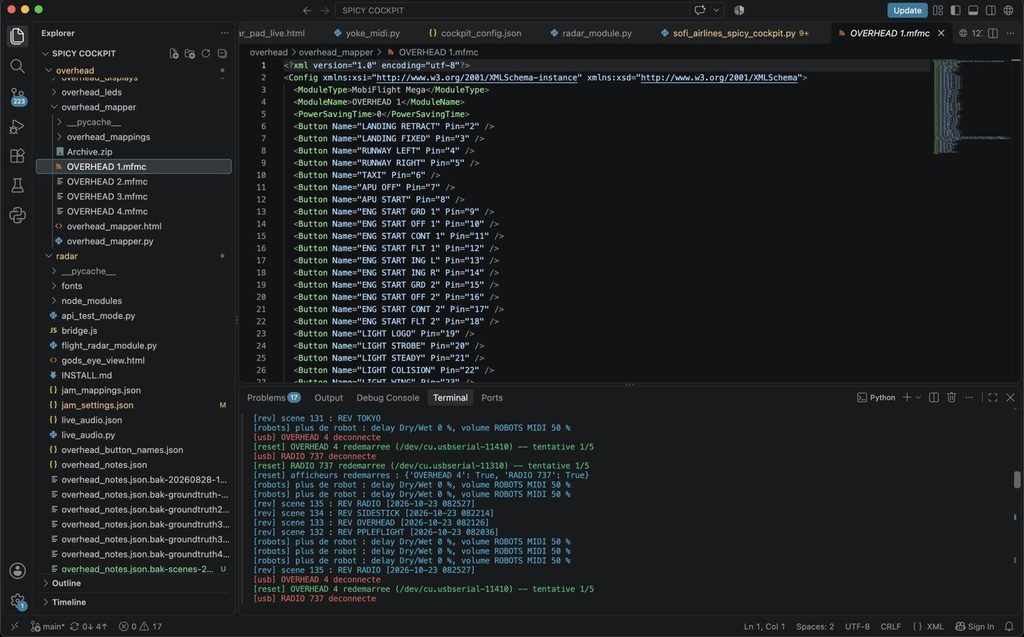
I trained as a telecom engineer and then spent years as a complex systems architect, so I approached the cockpit less as a music project than as a systems one. None of this hardware was designed to talk to a computer, let alone to Ableton. Each panel has its own interface card, and each needed reverse engineering: working out which signal every switch sends, how every LED, display and gauge is driven, and writing a driver for it in Python.
The architecture is modular. Each panel (overhead, throttle, sidestick, radio, radar) is its own module, and one orchestrator ties them together: a single hub reads every interface card, translates the input into MIDI and OSC for Ableton Live 12, and sends Ableton’s state back through AbletonOSC to the lights, displays and gauges. The behaviour lives in config files rather than code: which button does what, which gauge shows which parameter, which tracks count as “warnings”, even the cabin announcements and their colours. A local web interface lets me monitor and remap the whole cockpit, so changing the show means editing a file, never rewiring.
The telecom side is what makes it stable. In telecoms you design on the assumption that links will fail, and I treat every protocol in the rig, USB HID, MIDI, OSC and WebSocket, like a network link: message rates are controlled so nothing floods Ableton, devices reconnect on their own, and state resyncs the moment a panel comes back. That discipline is what lets me trust a pile of reverse-engineered aircraft hardware in front of a crowd.
The last rule is two separate networks. The cockpit is control only, all USB, no audio. Audio leaves the MacBook (M4 Pro) through an Apollo Twin X as one clean stereo pair. If a panel ever drops out, the music keeps playing and nobody notices.
The A/V Show: In Collaboration with FMRXR Studio
The visuals are performed live, not run from a timeline, and the visual artist is not in the room. FMR, Haïfa Becheikh, founder of the Tunis studio FMRXR, plays the show with me from Tunis. What connects us is the cockpit’s data.
On stage, the Spicy Radar is my flight deck screen, a touch interface I coded in HTML. AIRWAY lays out the scenes by flight phase, from taxi to landing. ENGINE holds the drums and bass, FUEL the level of each layer, ANC the cabin announcements and their voice effects, and the JAM radar plots the real air traffic around the venue. Behind it, a Node.js bridge I wrote converts Ableton’s OSC messages into a WebSocket stream, and that stream goes out through an API. Every meaningful event of the set leaves Paris as structured data: tempo and beat, which scene just launched and how much energy it carries, throttle and sidestick positions, the overhead’s warnings, the cabin announcements, the phase of the flight.
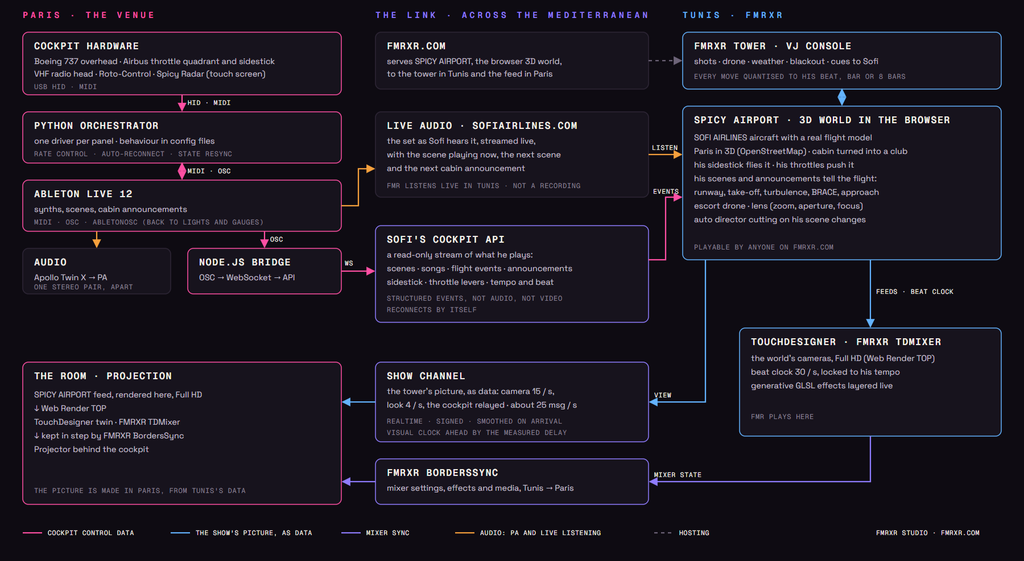
A flight you can play in a browser. SPICY AIRPORT is a real-time 3D experience that runs in any web browser, nothing to install. It holds the SOFI AIRLINES aircraft with a real flight model (Airbus-style fly-by-wire handling, autopilot, take-off and climb physics), an airport, a cabin turned into a club with my booth inside it, and Paris rebuilt in 3D from OpenStreetMap: the boulevards, the Seine, the monuments, the Eiffel Tower, the twenty arrondissements, the venues hosting Morninglory. Anyone can open it on fmrxr.com and fly it. During the show, it becomes the instrument she plays.
My cockpit flies her aircraft. When I raise the robots and take the sidestick, my hand is on the stick of the plane on screen: it banks and rolls with my gesture. When I fire the risers and push the levers, the engines heat up and the aircraft climbs. In the virtual booth, the 3D throttle quadrant and sidestick move with my real hands.
The music edits the film. Each of my Ableton scenes is read by its name. A DROP pushes the lens in and opens the aperture, a BREAK pulls focus out and back, a BUILD UP slowly tightens the frame. An auto director cuts between an escort drone flying in formation with the aircraft and the cabin, wing and chase cameras, only on the moments where the music changes.
She hears what I hear. Haïfa listens to the set live online, the SOFI AIRLINES player that broadcasts on air from the Spicy Cockpit, with the scene playing now, the next scene and the next cabin announcement on screen. She hears the music I am making as I make it, and she can see where I am taking the flight next.

FMRXR TOWER, her console. Haïfa does not watch this happen, she conducts it. From Tunis she runs the FMRXR TOWER, a VJ console in the browser: she picks the shots, flies the drone, calls the weather, holds or blacks out the picture, sends cues to my booth, and every gesture can be quantised to my next beat, bar or eight bars.
TouchDesigner on both sides of the sea. The 3D world is a source, not the final picture. Each of its cameras is rendered in Full HD into TouchDesigner through a Web Render TOP, as live inputs of FMRXR TDMixer, the TouchDesigner mixer Haïfa designed, where she layers them with her own generative GLSL effects. A beat clock leaves the feed for TouchDesigner thirty times a second, so her effects lock to my tempo as well. And a twin of her mixer runs in Paris, next to the projector, kept in step by FMRXR BordersSync, the plugin she created for FMRXR TDMixer: when she changes a setting in Tunis, the Paris instance follows, new effects and media included. BordersSync will soon be released on Patreon for the TouchDesigner community, so other artists can play a show across borders the way we do.

No borders, and no lag you can feel. No video crosses the Mediterranean, and the music only travels to her ears. The show itself travels as data, about twenty-five small messages a second over a realtime channel, signed so that nobody else can drive the show, and each city renders its own picture locally. That turns latency into something we design around instead of suffering it. Motion is smoothed over a short buffer so the picture never stutters. The visual clock runs ahead by the exact delay we measure at soundcheck with a tap-calibration tool, so an effect computed in Tunis lands on the beat in the room in Paris. And her moves are scheduled on my bars rather than fired whenever a packet arrives.

“Sofi sends data, I send a world back,” says Haïfa. “We decided early that no video would cross the sea. Everything is rendered where it is seen, so the only thing travelling is the performance information: a lever, a scene, a cut. That is what lets two performers in two countries play one show as if they shared the same booth.”


The Flight Wall and the Jam Mode
The Flight Wall is a partner LED display that shows the real flights passing overhead: callsign, route, airports. It sits on the booth facing the crowd. Most of the night it shows the actual air traffic above the venue, so the planes in the sky become part of the show. Today it is the simplest piece of the rig: USB power only, no MIDI, no audio.
That is where the show goes next. I call it the Jam Mode: real flight data playing the music with me. The JAM radar on the Spicy Radar already plots the traffic around the venue. The plan is to turn it into musical input. A flight entering the airspace could open a filter, its altitude or speed could shape a sound, and the Flight Wall itself would be customised live from the set. The sky above the crowd becomes a co-pilot, and no two shows could play out the same way.
Flying the Set: From Boarding to Landing
The gear only makes sense with the story. A SOFI AIRLINES set, 45 minutes to an hour, is built as a flight:
- Boarding: ambient textures, cabin announcements, the overhead lighting up system by system.
- Taxi and takeoff: the first kick, throttles pushed forward, progressive house rolling in.
- Cruise: the long middle section, deeper grooves, NAV Space reverbs, the Flight Wall showing real traffic.
- Turbulence: acid and breakbeat, warning stems on the annunciators, ATC Glitch on the radio.
- Descent and landing: the energy comes down, the panel switches off light by light.
One more detail: I play facing the crowd like a DJ but also facing the cockpit like a pilot. The crowd can’t really see the cockpit so we designed a large touring mirror, so the audience can see my face and the panels at the same time.
Quick Fire Hot Takes About Live Performance

Your setup should tell your story.
The best live setup reflects your personality, your curiosity and everything you learned while building it. To me, that story matters as much as the music itself. On the dancefloor, the art lies in how you bring it all together: the sound, the gestures and the journey you take people on.
Learn to build your own tools.
Python, MIDI and OSC aren’t reserved for engineers. Start small: make an object control something in your DAW, then build from there. Once you understand how to connect things, you can combine familiar instruments with tools that exist only because you imagined them.
Separate control from audio.
Your sound should never depend on your most experimental piece of hardware. Build your setup so that if a panel crashes or a controller disconnects, the music keeps playing. Experiment freely with the controls, and give the audio a reliable foundation.
Upcycle before you buy.
Beautiful industrial hardware gets discarded every day: aircraft parts, old consoles, machine panels. Giving it a second life as an instrument preserves its character and lets its design inspire new ways to play. Before buying another controller, see what you could bring back to life.
For A/V, send data and render locally.
A live video feed can demand heavy bandwidth and introduce latency. Performance data; a lever position, a scene change, a beat; can travel much more lightly. Let the music send the cues and the visual system render locally: you gain flexibility, preserve visual quality and make the images respond directly to the performance.

Will Vance is a professional music producer who has been involved in the industry for the better part of a decade and has been the managing editor at Magnetic Magazine since mid-2022. In that time period, he has published thousands of articles on music production, industry think pieces and educational articles about the music industry. Over the last decade as a professional music producer, Will Vance has also ran multiple successful and highly respected record labels in the industry, including Where The Heart Is Records as well as having launched a new label with a focus on community through Magnetic Magazine. When not running these labels or producing his own music, Vance is likely writing for other top industry sites like Waves or the Hyperbits Masterclass or working on his upcoming book on mindfulness in music production. On the rare chance he's not thinking about music production, he's probably running a game of Dungeons and Dragons with his friends which he has been the dungeon master for for many years.