A digital mixer sounds like an excessive purchase right up until your live set has a laptop, a couple of stereo synthesizers, a drum machine, vocals, and separate monitoring all asking for a place to go. I have enough hardware connected around my own studio to know how quickly the channel count disappears, and taking that same equipment onstage adds a completely different set of problems. You need to know where every cable goes, you need access to the levels that could cause problems, and you need the whole system to come back exactly as expected when the next show starts.
That was one of the most interesting parts of my feature on UTOPIA’s hybrid performance at Kadinjača, where analog synths, live vocals, drum machines, effects processors, and Ableton had to operate at a location without conventional venue infrastructure.
Most of us are unlikely to play a set under those conditions, although the larger lesson applies almost anywhere because the room changes, soundcheck time gets reduced, and something always ends up sitting farther away than expected. A compact digital mixer gives you saved scenes, multitrack recording, remote control, individual monitor mixes, and channel processing without asking you to carry a conventional console.
The tradeoff is that many of these mixers place nearly every control on a tablet or computer, which means your control device and network are now part of the performance. Rodriguez Jr. discussed this balance between musical intention and travel logistics in my feature on his live setup, and that is the perspective I kept coming back to here. The best digital mixer is the one that lets you perform without constantly thinking about the mixer, while still giving you a fast way to correct something when the venue decides to make your life harder.
Disclosure: This article contains affiliate links, and Magnetic may receive a commission if you purchase something after following one. This does not affect which products I include or what I say about their limitations.
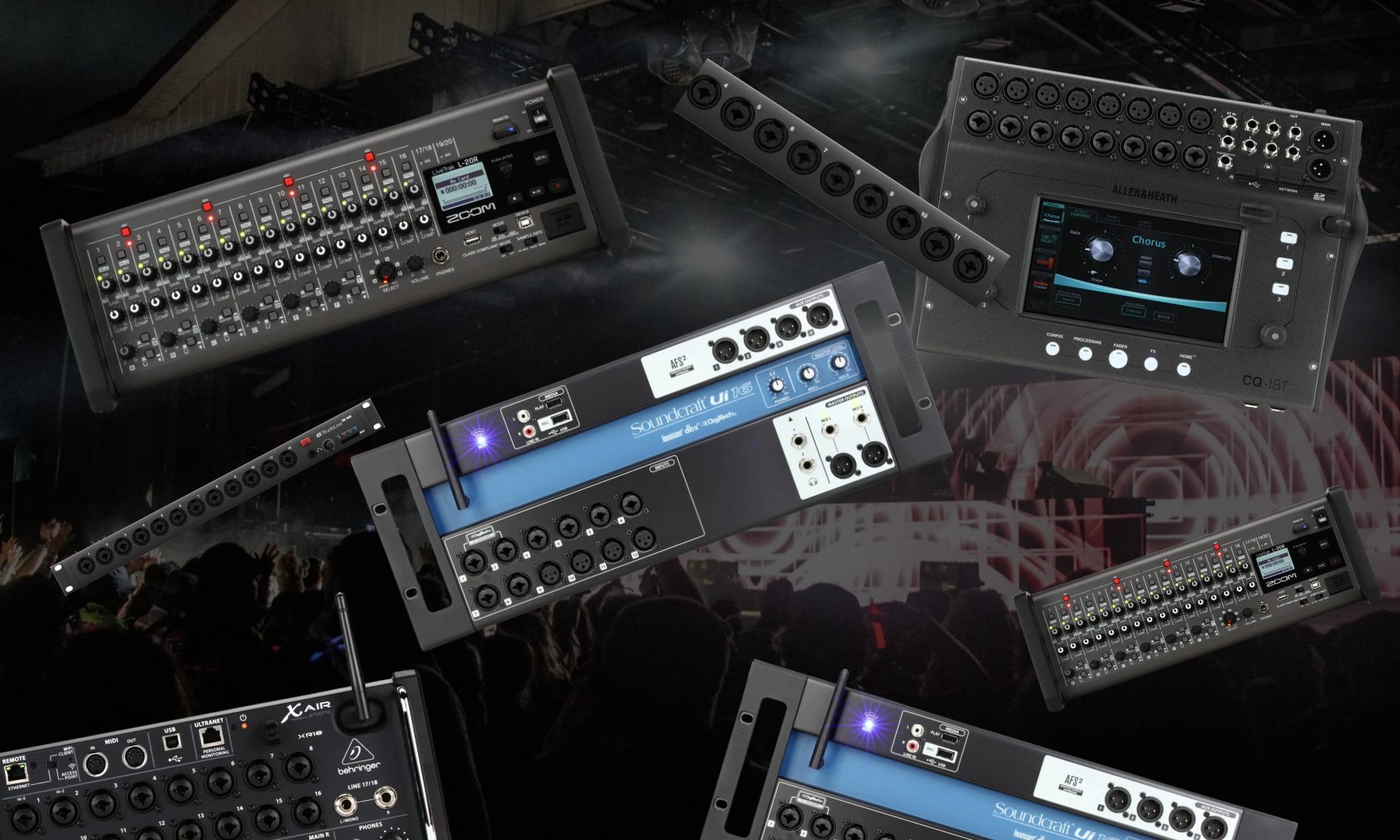
The best compact digital mixers at a glance
| Product | Best use | Key specification | Main limitation |
|---|---|---|---|
| Allen & Heath CQ-18T | Most electronic live sets | Touchscreen with multitrack USB and SD recording | Costs around $1,200 |
| Behringer X Air XR18 | Lower-cost multitrack system | 18-in/18-out USB and six auxiliary buses | No screen or conventional channel controls |
| PreSonus StudioLive SE 16R | Expandable performance rack | 64×64 USB and AVB networking | Full mixing access happens remotely |
| Zoom LiveTrak L-20R | Recording every performance | 22-track SD recording and six monitor outputs | Remote mixing is centered on iPad |
| Soundcraft Ui16 | Browser-based remote mixing | Cross-platform browser control | USB recording is limited to stereo |
The quick answer
You want the quick answer, ay?!
The Allen & Heath CQ-18T is the one I would buy first for most electronic live sets because it gives you a seven-inch touchscreen, physical rotary controls, multitrack recording, and enough source channels for a fairly serious hardware setup. That screen may sound like a minor convenience when you are shopping at home, although it becomes a much bigger deal when a tablet disconnects and you need to fix something immediately.
The Behringer XR18 is the easier recommendation when you want similar multitrack capacity for around $509 and already plan to control the mixer from a laptop or tablet. I would add a dedicated router and keep Ethernet ready because the money saved on the mixer should leave plenty of room for a safer control system.
PreSonus makes the better choice when this mixer is the beginning of an expandable rack with AVB stage equipment or personal monitoring. Zoom’s LiveTrak L-20R is the one to buy when recording separate tracks directly to SD is one of the main reasons you are shopping.
The Soundcraft Ui16 is worth considering when several performers need access from different phones or computers. Its browser interface is easy to open across macOS, Windows, Linux, iOS, and Android, although its stereo recording is far less appealing for anyone planning to remix the performance later.
What I looked for in these digital mixers
Before getting into the individual picks, the first thing I would do is stop looking at the number printed in the product name. A stereo synthesizer uses two channels, Ableton playback can use another pair, and a stereo effects return takes two more, so a mixer described as having 16 channels may hold far less equipment than you initially assumed.
My next concern is how quickly I can reach the channel that needs attention. A rack mixer controlled from a tablet looks beautifully compact, although that advantage disappears when the wireless connection drops and the tablet was your only way back into the mix. Monitoring comes next because the number of main source channels tells you almost nothing about what the performers can hear. A solo set may need one stereo in-ear mix, while a duo can need separate mixes alongside the PA feed and a recording feed.
Recording was another dividing line. Some digital mixers preserve every instrument as a separate file, while others record the completed stereo mix and leave you with no way to revisit the balance afterward. I also looked at scene recall, control-device compatibility, effects access, network expansion, rack size, and the amount of extra equipment needed before I would trust the mixer at a show. A $500 mixer that needs a router and dedicated tablet may still be the right purchase, although those pieces belong in the actual budget.
For a concrete comparison, imagine a set with two stereo synthesizers, a stereo drum machine, stereo playback from Ableton, one vocal microphone, and an external stereo effects unit. That system already needs eleven source channels, which makes the smallest rack mixers far less spacious than they appear.
Allen & Heath CQ-18T is the best compact digital mixer overall
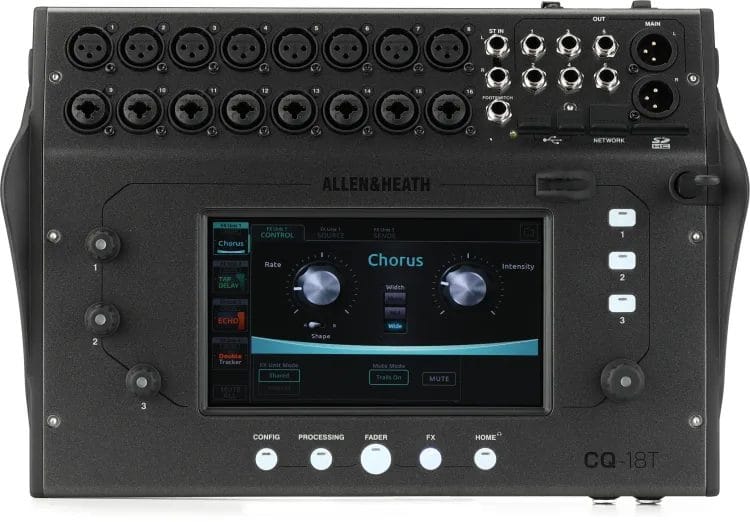
The Allen & Heath CQ-18T is the one I would recommend first because it gives an electronic performer several ways to control the set without turning the mixer into another large piece of stage furniture. You get a seven-inch touchscreen on the unit, three soft rotary controls, three soft keys, and remote access from the CQ-MixPad application.
I keep coming back to that touchscreen because this entire category has become so dependent on separate devices. If your phone disconnects or your tablet battery dies, the CQ-18T still lets you reach the channels and correct the mix directly. The mixer gives you 16 microphone preamps, with eight combination XLR and quarter-inch connections alongside eight XLR connections. Two extra quarter-inch line connections bring the total source capacity to 18, while six mix outputs provide room for monitoring or additional feeds.
Allen & Heath also gives the CQ-18T 24-in/22-out USB and SD recording, so you can record the set without asking the Ableton computer to carry another job. That is especially appealing when your laptop is already handling playback, software instruments, MIDI communication, or synced visuals.
Gain Assistant and Feedback Assistant are included as well. I would still set the system properly during soundcheck, although those features can help someone who is performing and mixing at the same time get to a workable starting point faster. The CQ-18T runs at 96kHz and includes four effects engines, channel EQ, compression, gating, and automatic microphone mixing. Some of that processing may sit unused in a hardware techno set, although it becomes far more relevant when vocals or acoustic instruments join the show.
I also like the CQ-18T for a performance setup that changes from one event to another. The screen gives you a fast way to adapt a saved scene, while the recording system lets you bring each show back into the studio and hear what actually happened.
My article on KORG’s NTS-4 performance mixer looked at a far smaller analog option for desktop instruments and Eurorack equipment, and the CQ-18T is where I would look once that kind of rig needs individual monitoring, recallable processing, and separate recordings. It costs around $1,200, so none of those additions come cheaply, although they solve genuine stage problems rather than padding out a specification page.
Skip it if the mixer will remain inside a rack and you know every adjustment will happen from a dedicated computer. You would be paying for a screen and desktop control layout that rarely get touched. For everyone else, the CQ-18T offers the best balance between compact size and immediate control, and that is the combination I would want when something changes five minutes before the set.
Behringer X Air XR18 is the best lower-cost multitrack option
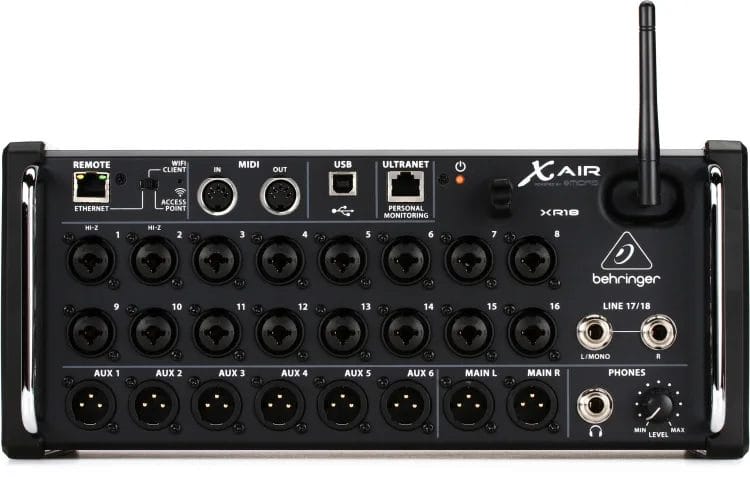
The Behringer X Air XR18 has been around long enough that it lacks the new-product appeal of the CQ-18T, although the numbers still look almost unreasonable for around $509. You get 16 programmable Midas-designed preamps, two additional line channels, six auxiliary buses, four stereo effects engines, and an 18-in/18-out USB interface.
That USB connection is the main reason I would recommend it to electronic performers. Every connected instrument can reach a separate Ableton track, which means the live recording can still be mixed properly once you are back in the studio. The XR18 also gives you plenty of monitor flexibility for a solo set or duo. Those six auxiliary buses can handle in-ear monitoring, stage monitors, or a separate recording feed without taking channels away from the main mix.
Behringer includes applications for iOS, Android, macOS, Windows, and Linux, and the mixer has an Ethernet port alongside its built-in Wi-Fi. I would use an external dual-band router for shows and keep a wired computer nearby, even if the built-in connection behaves perfectly during rehearsals. That may sound overly cautious until you remember that the XR18 has no touchscreen and no conventional channel controls. If the remote device disappears, the audio keeps running, although you have very little access to what it is doing.
The compact stage-box format works particularly well inside a prewired rack. You can leave the router, patch panel, power distribution, and playback connections assembled, then connect the instruments and PA when you reach the venue.
This links naturally with my article on the best hardware synthesizers for live performance, where portability and stage durability affect the recommendation alongside the sound of the instrument. An electronic set should be considered as one transportable system, and the XR18 earns its place by giving a lot of equipment one compact destination.
MIDI connections also let compatible hardware controllers handle channel levels, mutes, and panning. Adding a controller increases the size of the system, although it gives performers who dislike touchscreen mixing a more physical way to manage the XR18.
Skip it if you want direct SD recording or immediate control from the mixer itself. It is also a questionable choice for someone who does not want to build and test a small network before performing. If you already use a laptop onstage and want separate recordings without spending $1,000, the XR18 remains extremely difficult to argue against.
PreSonus StudioLive SE 16R is best for an expandable performance rack

The PreSonus StudioLive Series III SE 16R starts making sense when the mixer is part of a larger plan rather than one isolated purchase. It places 16 recallable XMAX-R preamps inside a single rack space and combines them with six FlexMix buses, four effects mixes, SD recording, and Milan-certified AVB networking.
That AVB connection is the reason to buy this over the CQ-18T or XR18. It allows the mixer to become part of a system with compatible PreSonus stage boxes, EarMix personal monitor mixers, and StudioLive consoles using network cabling.
The SE 16R also includes a 64×64 USB interface, which goes far beyond the number of analog connections built into the rack. That extra capacity is designed for expansion and larger recording routes, so it has far greater relevance when you already know the system will grow. For a solo artist bringing eight hardware sources to local shows, the AVB side may add very little. The XR18 would cover the immediate job for roughly half the price and still provide separate computer recording.
I would look at the SE 16R for an electronic duo carrying a dedicated rack with personal monitoring, playback, and several hardware instruments. It can run the live mix now and later serve as a networked stage box when a StudioLive console becomes part of the show.
PreSonus provides UC Surface for remote control, while QMix-UC lets performers manage assigned monitor mixes from their own devices. This removes the need for everyone to ask one person for repeated level changes during soundcheck.
Hannes Bieger discussed the importance of monitor control in my feature on his Ableton-based live setup, where his mixer had to handle the main system while giving him the stage access needed to perform comfortably. His SSL console belongs to another price class, although the same concern applies here because your monitor mix determines how confidently you can play. The SE 16R costs around $1,000, which places it close enough to the CQ-18T that the choice comes down to expansion versus direct access. Allen & Heath gives you the touchscreen, while PreSonus gives you the clearer path toward a networked rack.
Skip it if you have no interest in AVB or compatible PreSonus equipment. Buying around a future system that you have no real plan to build adds cost without improving the set you are currently playing. For someone who already knows the live rack will expand, the StudioLive SE 16R gives that expansion a defined direction.
Zoom LiveTrak L-20R is best for recording every show

The Zoom LiveTrak L-20R is the digital mixer I would buy if recording the performance is part of the reason the show exists. It can capture 20 individual channels plus the stereo master directly to an SD card, leaving you with 22 tracks that can be transferred into a DAW afterward.
That removes recording duties from the performance laptop, which is a much larger advantage than it sounds. If Ableton is already playing stems and controlling hardware, I would rather let a separate device handle the recording than ask one computer to carry the entire set.
The L-20R provides 16 microphone or line channels alongside two stereo line channels, so it has enough room for a fairly involved electronic setup. Six monitor outputs can operate as mono feeds or stereo headphone mixes, giving several performers their own balances.
Zoom also includes a 22-in/4-out USB interface. Direct SD recording reaches 24-bit/96kHz, while using USB and SD at the same time limits operation to 44.1kHz or 48kHz.
This model makes particular sense for an artist who wants concert recordings for later editing, social clips, or live releases. You can start the recorder from the mixer system and leave Ableton focused on performing the music.
My article on the best in-ear monitors for stage and studio work looks at how fit, isolation, cable quality, tuning, and comfort affect monitoring during longer performances. The L-20R can create several monitor mixes, although the mixer is only one part of getting that monitoring system right.
The main purchasing limit is the remote-control system. Zoom’s Remote Mixer application is centered on iPad, and channel gain still uses the physical controls on the rack. That means the L-20R needs to sit somewhere accessible during setup. If one hardware instrument comes in much louder than it did during rehearsal, correcting the gain may involve reaching the rack rather than moving a control on the iPad.
At around $800, the L-20R sits in a sensible middle position between the XR18 and CQ-18T. The price becomes much easier to accept when those 22-track recordings will be captured regularly.
Skip it if you do not own an iPad or want complete remote access from several operating systems. Skip it as well if your main priority is flexible network expansion rather than direct recording. For an artist who wants every set preserved as separate tracks without relying on the performance computer, the L-20R has the clearest reason to exist.
Soundcraft Ui16 is best for browser-based control
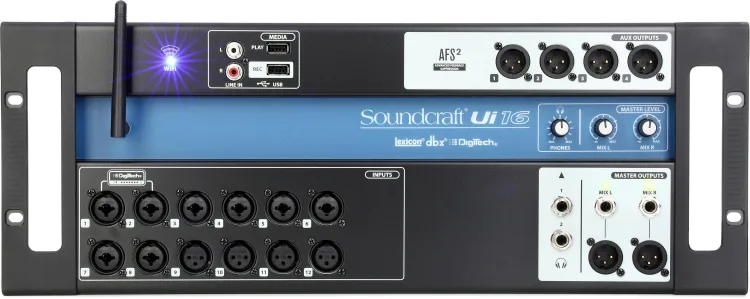
The Soundcraft Ui16 takes a different approach because its mixer interface opens inside an HTML5-compatible browser. You can control it from macOS, Windows, Linux, iOS, or Android without installing a dedicated application on every device.
I like that idea for a duo or group where everyone owns different phones and computers. One person can manage the main mix from a laptop while other performers use their own devices to adjust monitor levels.
The Ui16 provides eight combination microphone or line connections, four extra XLR microphone connections, two high-impedance instrument channels, and stereo RCA playback. Four auxiliary outputs sit alongside its main connections, giving the mixer enough monitor capacity for a compact performance system.
Soundcraft includes four-band parametric EQ, compression, gating, de-essing, feedback suppression, and effects based on Lexicon, dbx, and DigiTech designs. Shows, snapshots, and channel presets can be saved from the browser interface for later recall.
The main limitation is recording. The Ui16 captures the stereo mix to connected USB storage, while Soundcraft reserves multitrack USB recording for the larger Ui24R. That means the Ui16 can document the show, although it cannot give you every instrument as a separate file afterward. If you plan to remix the performance, the XR18 offers far better recording capacity for less money. Browser control does provide a good fallback plan because several devices can remain connected. Keep one phone beside the instruments, run the main view from a laptop, and use Ethernet when you want a wired connection.
That connects with my feature on Long Island Sound’s live-performance backup plan, where the artists discussed carrying replacement laptops, USB drives, cables, and adapters. A second mixer-control device belongs on that same packing list because the only tablet being dropped should not end the soundcheck.
The Ui16 costs around $659, which makes its stereo recording difficult to overlook when comparing it directly with the XR18. You are paying for browser access and wide device compatibility rather than greater recording capacity. Skip it if separate channel recordings or physical mixer controls are essential. Choose it when several performers need access from different devices and a stereo recording is enough.
Common digital mixer mistakes
The easiest mistake is counting pieces of equipment instead of channels. One stereo synthesizer uses two channels, and a stereo drum machine takes another pair before vocals or Ableton playback enter the setup. I would write every source down before buying anything and mark it as mono or stereo. Then I would add the external effects returns, spare microphone channels, and any house feeds that might be needed at larger events.
Monitoring gets overlooked almost as often. A mixer may have enough source channels while lacking the outputs needed for separate in-ear mixes, especially when those monitor feeds need to operate in stereo.
The wireless system deserves the same attention as the audio connections. Built-in Wi-Fi may behave perfectly at home and become unpredictable once hundreds of phones fill a venue, so a dedicated router and Ethernet backup belong in the performance case. Saved scenes can also create false confidence. The channel settings may return exactly as stored, while the venue PA and performer levels have changed enough that the old balance needs adjustment.
Recording should be tested using the exact SD card and sample rate planned for the show. Check that every channel is armed, record several minutes, transfer the files, and open them inside the DAW before trusting the system at an event. I would also rehearse losing remote access. Disconnect the tablet intentionally, reconnect from the wired computer, and confirm that the audio continues while the control system recovers.
Finally, do not assume the venue understands what your mixer is doing. Send a clear technical specification before the event that explains whether you are providing a stereo main feed or separate channels for the house engineer.
How to plan a digital mixer around your live set
Start by deciding how much mixing happens onstage. Some performers want to give the venue a finished stereo feed, while others send separate drums and musical channels so the house engineer can adjust them for the room.
A finished stereo feed gives you greater control over the artistic balance, although it also places responsibility for that balance on you. Separate feeds let the venue engineer adapt the set, although your rack needs enough outputs and cabling to provide them.
Next, decide who controls the monitor mix. A solo artist can manage one in-ear feed from the main tablet, while a duo may prefer separate phone access so each person can adjust their own balance. The mixer should be positioned around the connections rather than placed where it looks tidy. Keep cable runs short, protect the power connection, and make sure any physical gain controls remain reachable during setup.
Ableton users should think carefully about how many responsibilities are placed on the same computer. My article on syncing Ableton Live with modular equipment shows how quickly one laptop can become responsible for software playback and hardware communication, so adding mixer control and multitrack recording increases the consequences of one computer issue.
Power needs its own plan as well. I would place the mixer, router, playback computer, and network switch on protected power, then label every supply so nothing gets swapped during setup.
Once the mixer has been configured, rehearse with the complete performance rack. Use the same cables and control devices that will travel, then pack the replacement items beside them.
The point of a digital mixer is to reduce what needs to be rebuilt at each show. If the rack still takes an hour of improvised cabling to assemble, the larger system has not been planned far enough.
Frequently asked questions
Are digital mixers better than analog mixers for electronic live sets?
Digital mixers give you saved scenes, remote access, multitrack recording, channel processing, and several monitor mixes inside a smaller chassis. Analog mixers provide immediate physical controls and remove the network from the performance system.
A small set using a few stereo devices may be easier with an analog mixer. A larger setup with individual monitoring and separate recording tracks usually benefits from digital operation.
Do I need an external router?
I would use one for any remote-controlled mixer at a paid event. A dedicated dual-band router lets you position the wireless connection away from the rack and gives you greater control over how the control devices connect.
Ethernet should remain available as well. Wireless control is convenient, while the wired connection is the one I would want when something needs immediate attention.
Can these digital mixers record every channel separately?
The Allen & Heath CQ-18T, Behringer XR18, PreSonus StudioLive SE 16R, and Zoom LiveTrak L-20R support separate channel recording using a computer, SD storage, or a combination of the two.
The Soundcraft Ui16 records a stereo mix. Choose the Ui24R if you want Soundcraft’s browser system with multitrack recording.
How many channels does an electronic live set need?
Count every mono device as one channel and every stereo device as two. Add vocals, Ableton playback, effects returns, and spare channels after that.
A solo electronic set can reach ten or twelve channels surprisingly quickly. I would leave room for at least one additional stereo device rather than buying a mixer that is full before the first show.
Which compact digital mixer should you buy?
I would buy the Allen & Heath CQ-18T for most electronic live sets because the touchscreen gives you immediate control while USB and SD recording cover the studio side afterward. It costs the most here, although the money goes toward access you may be extremely glad to have onstage.
Choose the Behringer XR18 when separate computer recording and price lead the decision. Spend some of the savings on a dedicated router, then keep a wired laptop ready.
The PreSonus StudioLive SE 16R is the better purchase when you already plan to add AVB stage equipment or personal monitoring. Its expansion system needs to be part of a real plan before the higher price becomes worthwhile.
Choose the Zoom LiveTrak L-20R when recording every show directly to SD is central to what you are doing. Confirm that its iPad-centered control system fits the devices you already own.
The Soundcraft Ui16 works for performers who want browser access from several device types and only need a stereo recording. Its cross-platform control is the reason to buy it, while its recording limitations are the reason to skip it.
Before ordering anything, write down the number of mono channels, stereo pairs, monitor feeds, recording tracks, and control devices your set needs. Those numbers will tell you far more than the product name will.

Will Vance is a professional music producer who has been involved in the industry for the better part of a decade and has been the managing editor at Magnetic Magazine since mid-2022. In that time period, he has published thousands of articles on music production, industry think pieces and educational articles about the music industry. Over the last decade as a professional music producer, Will Vance has also ran multiple successful and highly respected record labels in the industry, including Where The Heart Is Records as well as having launched a new label with a focus on community through Magnetic Magazine. When not running these labels or producing his own music, Vance is likely writing for other top industry sites like Waves or the Hyperbits Masterclass or working on his upcoming book on mindfulness in music production. On the rare chance he's not thinking about music production, he's probably running a game of Dungeons and Dragons with his friends which he has been the dungeon master for for many years.