Table of Contents
It’s an open secret that the key to making great electronic dance music is found in the low end.
It’s tricky to get a perfect bass frequency region. You need it to be strong, but not overpowering. You need it to be thick, but not messy. Any one error can lead you to a blown out speaker or a muddled low end. It takes professionals years to get it right. It’s even harder for newcomers.
Luckily, there are a ton of plugins out there to help you get your basses just right. And, when I saw that Impact Soundworks, the people behind some of the best orchestral Kontakt libraries out there, had a plugin dedicated to shaping your bass, I was intrigued.
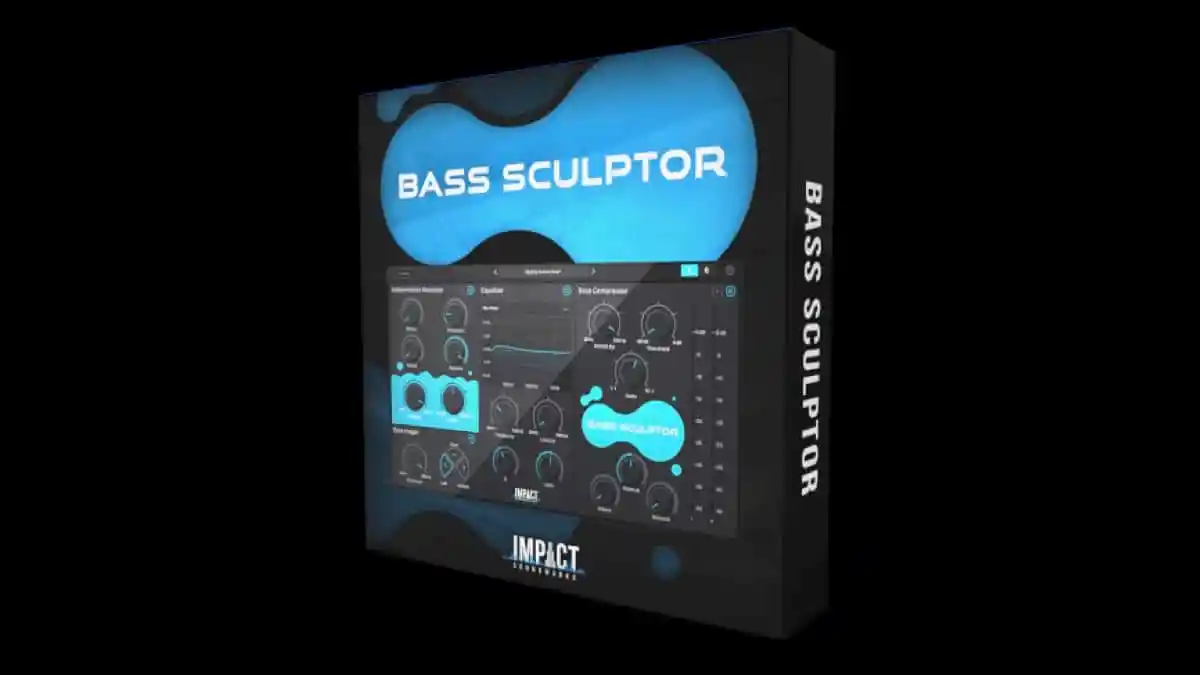
Bass Sculptor, a VST made in collaboration with Jatin Chowdhury of ChowdhuryDSP, is described as a “multi-FX” plugin that can help you manage low end frequencies with a simple, uncomplicated UI. It uses four modules, and promises to help you do things like “fatten up weak drums, smooth out bass guitar recordings, clean up mud, or tighten up a whole mix.” That sounds great to me.
Let’s try out Bass Sculptor.
Four Simple Modules

So, here’s everything.
We’ll start with the subharmonics generator. The amount tab is the most important part of this part, and it controls how much sub is being generated. Everything else just shapes that sound; the filter determines what frequencies get let through, and the top four knobs work exactly how attack, decay, release, and threshold knobs work: shaping the length of the sound and determining what gets through.
The bass imager is next, which makes your bass mono and allows you to determine exactly where your bass is played; left, middle, or center? The crossover also functions kind of like a filter.
Lastly, the EQ and compressor work like traditional EQs and compressors. Here, you can boost whatever frequencies you’d like, and compress them however you’d like. That’s pretty much it.
You do get a lot of knobs here without a lot of explanation of what they do. Luckily, every segment except the EQ allows you to solo that segment on its own so you can hear exactly what it’s doing to your low end, so you can play around and figure it out. There are also tons of presets to play with; you can study these and learn how to use the plugin, and you can actually compare presets back to back using the “A” and “B” at the top of the screen.
That’s pretty much it. Now, let’s see how well this works.

A Low-End Machine
The work this plugin does is in the low end, so you’ll want to make sure you have a pair of good headphones or speakers to hear what’s going on.
When you can, you’ll notice that it does what it does in a very surgical and clean manner. It’s so easy to add clean low end to drums, or some width to synths, or to tighten an instrument that’s too wide. The presets are great here and all serve as good starting points.
This plugin definitely isn’t a distortion; it’s instead meant to serve as a subtle way to give your instruments more presence in the low end. And, that it does. There really isn’t much else that this plugin does besides what it’s supposed to, which is a good thing.
Because I could see myself using this plugin to add more bass to my drums, I’ve provided a sample here of a drum break I found in my sample library. The original sample plays first, followed by the sample with the “Dance Kick Fattener” on it. Take a listen.
It definitely needs a little more polishing and cleaning up, but it’s great starting point. You can hear just how much boomier and intense the kick drum is without the rest of the sample being too intense. It’s only affecting the bass frequencies of this loop – exactly what I wanted it to do.
Pros and Cons
Pros:
There are many ways to enhance your bass.
This isn’t a one-size-fits-all plugin. You can add a sub, or you can boost the frequencies, or you can compress the sound, or you can do all three. You can make the plugin easily work with your production style, which I like a lot.
It only messes with the low end.
You can process your instruments here without worrying about ruining the high end or midrange. This only deals with low frequencies and everything else will be untouched.
It’s fast and fairly easy to use.
There’s only one screen and it doesn’t take much processing power. Once you figure out how all the knobs work, you’ll be able to do everything you want to in a very speedy manner. I doubt this plugin will be the reason why your project crashes.
Cons:
It’s not the cheapest option on the market.
Bass Sculptor retails for $70 USD. That is a lot of money for an effect plugin, and one specifically geared towards one part of the frequency range. It’s a great product, but I understand that 70 dollars is a lot of money for some people.
I think this plugin would benefit from a dynamic mode.
There’s no guarantee that your bass will stay the exact same throughout an entire track. If there was a way for the plugin to sense the low frequency input and automatically adjust its parameters to make sure that you’re getting the same effect throughout your entire track, that would be great. But, that feels like a bonus.
Conclusion: Should you get it?
If you struggle with mixing basses and need a little extra help to get over the hump, then I’d grab this plugin if you have the cash. Even if you’re an expert bass mixer, this plugin definitely can help you make them even better. It’s a great tool that most every electronic dance music producer should be able to benefit from.
Buy Bass Sculptor here.

Ben Lepper is a music producer and journalist from Boston, Massachusetts.







![Baby Audio HyperWarp Review: Why Less [Processing] Is More](https://magneticmag.com/wp-content/uploads/2026/10/Untitled-Design-88.png)



![Baby Audio HyperWarp Review: Why Less [Processing] Is More](https://magneticmag.com/wp-content/uploads/2026/10/Untitled-Design-88-1024x683.png)
![How It Was Made: Lang Father i(Junkyard Dog) [Welofi]](https://magneticmag.com/wp-content/uploads/2026/10/Press-Pic_2-1024x576.jpg)