Lunacy is a plugin company that caught my attention about a year ago with their Cube plugin. It quickly became one of my favorite tools for creating textures, pads, and playable soundscapes. It was a truly innovative plugin, far from just another version of a plugin type that has been around for years (do we need another EQ!?).
So, when I learned that they were releasing another plugin, this time a multi-effects one, I eagerly seized the opportunity to try it out early.
“I don’t mind potential glitches in beta builds! I gotta test this plugin now!” I politely screamed to the Lunacy’s founder, and he graciously agreed. I have been using this plugin in my studio and projects for a few weeks and discovered many aspects that I appreciate (along with one thing that didn’t quite resonate with me).
Learn More About This Plugin And Snag It For Yourself (hopefully at an introductory price) Right Here
Before delving into my detailed thoughts on this plugin, you are probably curious how it sounds. Let’s address that quickly. To showcase this, I created a simple loop—nothing too complex—and initially kept it dry without effects. The second version features Beam at 100% wet on all four channels provided (pads, leads, drums, chords).
So, listen to these two versions to grasp the capabilities of this plugin. Then, we can explore the technical features of this VST and discuss all my insights.
What Lunacy’s Beam Plugin Sounds Like
What Is Beam?!

Lunacy, a Los Angeles-based plugin developer, has announced the release of BEAM, an innovative interactive multi-effects engine. This new addition to the Lunacy product line aims to redefine the boundaries of sound design through advanced features and a user-friendly interface. BEAM introduces capabilities to transform and elevate audio production, including granular sound design, textural convolution, and parallel processing. The plugin offers a unique approach to sound manipulation, allowing users to alter and enhance various elements of their music, from keys and vocals to drums and synths, through its “hear what you see” audio graph system.
BEAM boasts an array of technical features that cater to the needs of modern sound designers and music producers. Among its core functionalities are real-time granular processing, which enables the creation of detailed sonic textures; a textural convolution engine that includes a unique set of impulse responses for depth and ambiance; and an interactive dynamic audio graph for crafting complex effect chains. Additionally, BEAM provides tools for deep modulation, including LFOs and macro controls, an intelligent preset maker for generating new sounds effortlessly, and a vast library of presets and impulse responses developed by renowned sound designers.

This plugin is part of Lunacy’s broader initiative to push the envelope in virtual sound production and interface design following the success of their 3D sampling engine, CUBE. BEAM is available at a promotional price of $59, discounted from the original $99, until April 24th (2024). It is compatible with primary digital audio workstations (DAWs) across MacOS and Windows platforms and requires a stable internet connection for downloading and activation. The launch of BEAM marks another milestone in Lunacy’s commitment to innovation in the audio production sphere, offering an expansive toolset for creators looking to explore new sonic territories.
But now with the boring old techs and basics out of the way, let’s dive into what I thought about it, more hot takes, and something that I wish was a little different.
What I Love Most About Lunacy’s Beam
It’s On Par With Portal (…And That’s An Incredible Thing)
Output’s Portland delay plugin has long been one of the genre-defining plugins in multiple genres, which is a feat in and of itself. It’s genuinely wild what Portal could pull off with being a delay plugin, and Beam pulls off just as much, if not more!
Much like Portal, Beam can drastically alter a sound, as proven by scrolling through its presets. This plugin can do it if you want to add granular artifacts, rhythmic pulses, ambient spaces, or whatever.
Below is an example of a simple little loop I found on Loopcloud being run through several of my favorite presets. Notice just how wildly different each of them is. It can turn a simple guitar loop into almost anything we need in a mix, like rhythmic supports, atmospheric ear candies, textural sounds, FX, and more.
It Let’s You Get ‘More From Less’
Few plugins can single-handedly make the sound or synth carry more than its fair share of composition. What I mean by that is that I usually have to use a ton of modulation, layering, processing, and resampling to get a single instrument in one of my tracks to sound cool enough that I don’t need to add extra channels and musical layers to my tracks. This allows me to keep my projects down to just 6-7 main channels in my projects, whereas, at the start of my career, I would have upwards of 30+.
But Beam does just this and, better yet, gives you the option to attack this problem in a handful of different ways. Whether you want your lead synth to add textural ear candies through Beam’s granulation options or have a pad create a pulsing rhythmic beat similar to what Leaving Laurel suggests to do in this production, Beam is the ultimate tool for the job.
Each sound it’s applied to can make that sound come off as more complex, nuanced and alive and prevents you from being tempted to add ANOTHER synth or ANOTHER ear candy loop to flesh out the arrangement.
Et Voila! Less for more…
Let’s take an example of a basic little loop I was toying with last night. I like the lead sound, but if I were to leave it as it, I would feel compelled to include a counter melody or some textural background to fill in the space and keep it interesting. But adding Beam to the track instantly brings it alive, and the lead doesn’t really need anything else (save for a TON of mixing, lol. Cut me some slack, though. I was just playing around!)
Its Organization In On Point

There are a ton of presets in this plugin to choose from, and it would be easy to get lost in if it wasn’t for the multiple points of organization and filtering that help you navigate your way through the VST.
Both being able to filter through the types of effects like Simple, Expansive, Rhythmic, etc., and saving your favorites is a great way to navigate through the vast number of patches included quickly. It rewards you the more you use it and the more you dig through its presets and assemble a short list of favorites you can soon call upon at a moment’s notice.
Its User Interface Is The Coolest I’ve Seen In Ages
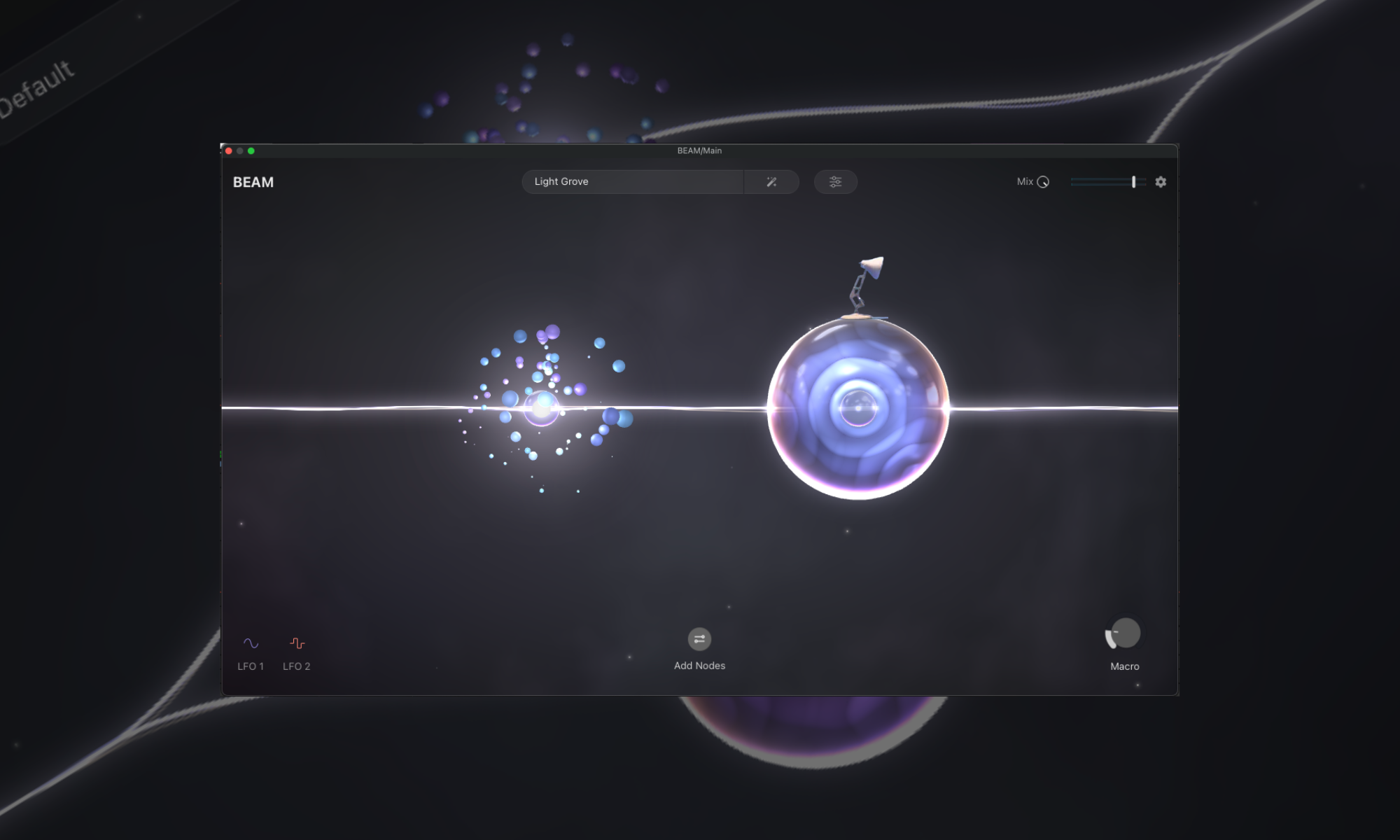
The graphic user interface for this plugin is simply stunning, making messing around with Beam a true delight. It looks fantastic, and it seems lighthearted, so I did it! What else could I say?
Well, there is a fun fact actually that Lunacy told me…
The person who helped develop this GUI used to work at Pixar, which totally makes sense once you know! The bubbly colors and soft-edged seem pulled right out of some of the most timeless classics of my childhood!
What I Wasn’t Impressed By
I Wish You Could Get More Hands On

This is one of those plugins that want you to experiment with its different touch points, nodes, and parameters, but doing anything more than clicking through the options requires a lot of uninspiring configurations.
I’m not a coding wizard or plugin dev, but one of the things I love about plugins like the Soundtoys bundle is that all the parameters are instantly displayed on the plugin window and, thus, on my Push. I wish Beam would have had this so that I could load up the plugin, queue up a preset, and then take my hands off my mouse and onto the knobs of my Push to give that hands-on fiddling that gets me in a flow state.
That being said, Lunacy is far from the only plugin company that omits this to the point where I consider this more of a missed opportunity and far from a gripe or frustration.
Final Thoughts
Beam introduces a fresh array of sounds and fosters a more personal and refined approach to composing tracks. The capability to morph a simple loop into a complex, multi-layered composition with just a few adjustments is truly enchanting. Lunacy has once again excelled in providing a groundbreaking and indispensable tool for those seeking to enhance their sonic landscapes.
Nevertheless, it’s essential to acknowledge that while Beam unveils new horizons in sound design, it leaves me yearning for more direct tactile control. The desire for a hands-on experience is certainly there, though, similar to what Soundtoys offers. Despite this, the distinctiveness of Beam’s user interface, combined with its extensive organizational features, sets it apart.
Learning that a Pixar alum contributed to its design only enhances its appeal, blending technical expertise with a hint of playfulness. As I delve further into Beam and its possibilities, it remains a crucial addition to my arsenal, reshaping my music production approach with each session. Lunacy, through the creation of Beam, has not only met the standards set by their previous endeavors but has also established a new benchmark for what can be achieved in the realm of audio plugins.
Learn More About This Plugin And Snag It For Yourself (hopefully at an introductory price) Right Here

Will Vance is a professional music producer who has been involved in the industry for the better part of a decade and has been the managing editor at Magnetic Magazine since mid-2022. In that time period, he has published thousands of articles on music production, industry think pieces and educational articles about the music industry. Over the last decade as a professional music producer, Will Vance has also ran multiple successful and highly respected record labels in the industry, including Where The Heart Is Records as well as having launched a new label with a focus on community through Magnetic Magazine. When not running these labels or producing his own music, Vance is likely writing for other top industry sites like Waves or the Hyperbits Masterclass or working on his upcoming book on mindfulness in music production. On the rare chance he's not thinking about music production, he's probably running a game of Dungeons and Dragons with his friends which he has been the dungeon master for for many years.