I’ve always found that the biggest friction between the music I wish I could be making and the music I am making is getting ideas out of my head and into Ableton Live.
The more fluently you can communicate with your tools and instruments, the more exact your ideas can become. That is why I am always careful about which synths, controllers, and hardware pieces I bring into my setup for the long haul. If something is going to stay, I know it will require a lot of time to fully learn.
The Push 2, which I bought for myself years ago, was the device that taught me this lesson. I did not feel like I was getting the most out of it until it had been in my studio, used almost daily, for about a year. That is not a slight on the Push. There was just that much to discover.
So, with the Ableton Push now well into its life cycle, and the standalone model having sat in the place where my Push 2 used to live, I have a clearer view of what this instrument does well, where it still feels limited, and how it stacks up in 2026.
Quick answer: Push 3 Standalone is still worth buying in 2026 if Ableton Live is already the center of your production or performance setup. Buy it if you want expressive pads, standalone sketching, Live integration, audio and MIDI I/O, ADAT expansion, and a hardware-first way to write. Skip it if you need arrangement view, third-party plugins, long battery life, or a lower-cost standalone box.
What Is The Ableton Push 3?
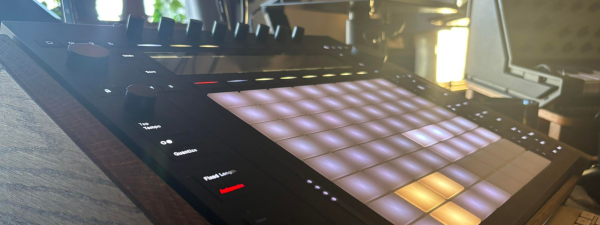
The Ableton Push 3, a successor to the Push 2, introduces a mix of fresh features and modern iterations of some of the best qualities that made the Push 2 such a massive improvement over even the first original model. The device retains its predecessor’s form factor and core workflow, ensuring a seamless transition for existing users. Some of the more prominent improvements include onboard audio and MIDI interfacing capabilities, making the Push an all-in-one control hub for MIDI sequencing, a standalone instrument in its own right, and a tactile control unit for modulating and playing your in-the-box instruments.
Notably, the Push 3 now serves as a standalone workstation powered by an internal battery for computer-free operation, a feature eagerly anticipated by the music production community, which boasts a short and sweet two-hour battery life. Sure, it doesn’t seem very long, but considering how much power this thing is using to work its magic, it’s all you need to make some music on the go while you find the next place to plug in directly to an outlet.
Adding ADAT I/O and versatile connectivity options on the back panel, including USB A and C ports and MIDI I/O, underscore the Push 3’s role as a central hub for studio and live performance setups.
Regarding control features, Push 3 elevates the user experience with new functionalities to maximize creative expression and efficiency in music production. Integrating MIDI Polyphonic Expression (MPE) capabilities expands the expressive potential of the pad grid, offering nuanced control over individual notes. This advancement, coupled with the device’s ability to operate in standalone mode, positions the Push 3 as a formidable tool for capturing musical ideas and executing complex productions without needing a connected computer.
The device’s compatibility with Ableton Live’s extensive sound library and instruments, facilitated by its internal processing power, allows users to explore a broad sonic palette directly from the hardware.
But with all this technical stuff out of the way, let’s start chatting about the fun stuff…
What Is The 2026 Verdict On Push 3 Standalone?
Push 3 Standalone still gets a positive verdict in 2026, but the recommendation needs a sharper frame than it did at launch.
This is still one of the best pieces of hardware for producers who already think in Ableton Live. The MPE pads are excellent. The jog wheel and browsing system make the hardware feel faster than Push 2 in real use. Standalone mode is good for starting ideas away from the computer, and the ability to move those Sets into Live later is still the main reason this device works.
The price is the part that needs to be addressed immediately. Push Standalone is now $1,799 from Ableton, while the controller version is $999. That is cheaper than the original $1,999 launch price for the standalone model, but it is still a serious purchase.
My updated verdict is simple: buy Push 3 Standalone if you are already committed to Ableton Live and want a hardware instrument that can start ideas, perform Sets, and control your studio without always opening the laptop. Buy the $999 controller version if you only need the pads, interface, and Live control. Skip the standalone version if you mainly want a portable sketchpad, because Ableton Move now covers that lighter job for much less money.
Design And Build On The Push 3

Improvements To The Familiar
Anyone familiar with the Push series, especially the previous iteration, will feel right at home on the Push 3. The primary carryover, at least from a design perspective, is the row of encoders at the top, the pad grid, and the LED screen that runs along the top. But anyone familiar enough with some of these features will also note some marked improvements over the Push 2, such as:
- Better Pads: The white coloration of the pads, coupled with the firmer feel compared to the gummy feel of the Push 2’s pads, makes for a preferable sensory and aesthetic experience.
- Better Encoders: The encoders along the top fit snugly but turn fluidly, which is a welcome improvement over my Push 2, whose encoders could easily be pulled off (granted, this is after many years of using the Push 2 extensively).
- Better Pitch/Mod Strip: Here’s another slight but tactile improvement. The pitch and mod strip on the left has been raised slightly and is made of a different, less sticky material than the Push 2’s, allowing for more fluid and light modulation sweeps.
- Better Layout: Many of the same buttons on the Push 2 are still present but just arranged more ergonomically, allowing for quicker access to features like metronome, quantize, and tempo, helping keep your hands playing instead of reaching to the upper corners of the device for such critical and oft-adjusted functions.
This is also where Hannes Bieger’s point from our interview on studio design and creative flow applies. He said anything that disrupts creative flow should be avoided. Push works best when it reduces the back-and-forth between idea and execution. If it becomes another device you have to fight, you are using it wrong.
Welcome New Additions

New things were introduced on the Push 3 that go beyond just essential quality of life features and quickly became some of my favorite qualities about the Push 3. So, let’s take a bird’s eye view of some of the best ones that are entirely new or wholly revamped as to deserve a dedicated shoutout in this section.
- The Large Encoder: The larger encoder button, the Jog Wheel, on the right-hand side of the device makes cruising around and menu diving a breeze. Allowing for both directions navigation through clicking the encoder in the described direction and turning the encoder to scroll, I think it’s a far more fluid way to browse samples and plugins than endlessly clicking directional arrows.
- Better Tempo and Vol. Encoders: Located on the left side, the tempo and main output knobs can be clicked inwards, which switches them to adjust the swing and the headphone volumes. Simple functions like this help get more mileage from fewer knobs which helps streamline the design without having to rely on convoluted menu diving.
- It’s Robust As Heck: The device’s body is built like a tank, and the weight of the Push 3 reflects that. I never had durability issues with my Push 2, but I will admit it felt flimsy, doubly so, after comparing how solid and sturdy the Push 3 is.

The added standalone functionality also includes a suite of new connectivity tools for the Push 3. Features include headphone outs, audio ins for recording, ADAT connectivity, and many other features.
Most of these features can be checked out quickly and easily through either the picture above or the specs list below, but the one thing that deserves its call out is the ability to connect to WiFi. This simple yet highly powerful feature enables so much additional functionality. Everything from updates while in standalone mode to immediately syncing projects and importing those I was working on outside the studio into Ableton to polish them can be handled via the onboard WiFi.
Keep in mind as well that, through Ableton Link; you can sync Ableton (and the Push 3) up as an external device to other DAWs and play it like its own synth or outboard instrument (which it is, but we’ll be talking about that in a second).
What I Loved Most About The Ableton Push 3
It’s An Instrument, First And Foremost

One of the biggest and arguably most defining features about the Push 3, standalone especially, is the fact that it’s an instrument first and foremost, and that is why it was easy for me to award it the title of best instrument to have hit the market last year in the editors choice awards that myself and the team put together (linked below in the card).
It’s as much to be played anywhere and everywhere as a guitar has been for decades, and as music production becomes more accessible, DJs and producers are the new rock stars, and the Push 3 is the defacto answer I wish I would have had coming up as an artist over the last decade when old-school musicians would laughing ask what the heck I meant when I said, “My instrument is my laptop.”
When I started to view the Push 3 standalone as an instrument, first and foremost, new avenues opened up for not only its use cases but also groups of people and users I could excitedly recommend this product to. But I guess we’ll save that for the closing thoughts.
Let’s keep pushing forward with some of the other new features of this Push 3.
What Changed For 2026?
The biggest update is price. The original review listed Push Standalone at just under $2,000. Ableton now lists Push Standalone at $1,799 and the controller version at $999.
The second update is that Ableton’s hardware lineup has expanded. Ableton Move now sits below Push as a $499 standalone idea tool with four tracks, built-in mic, speaker, stereo input and output, built-in WiFi, 64GB storage, and up to 4 hours of battery life. That changes how I would talk about Push. Push is the deeper Ableton instrument. Move is the faster sketchpad.
The third update is that Push sits in a more crowded standalone market. The Akai MPC Live III is now a serious current rival at $1,699. The Native Instruments Maschine+ remains a cheaper standalone option at common retail. Elektron Digitakt II, Roland SP-404MKII, and Polyend Tracker Mini also give producers different hardware-first routes.
The fourth update is that Push has had more time to settle into the Live 12 era. Push 3 requires Live 11.3 or later in Control Mode, and Push Standalone comes with Live 12 Intro installed. If you own Standard or Suite, you can use the instruments and effects included with your license.
I also covered Ableton’s sale cycle in Ableton Launches 2025 Black Friday Sale With Up To 25 Percent Off Live Push And Move, and that is worth remembering here. If Push feels expensive at full price, Ableton hardware has started showing up in official sale windows.
How Much Does Push 3 Standalone Cost In 2026?
Push Standalone is currently $1,799 from Ableton. The non-standalone Push controller is $999. The Push 3 Upgrade Kit can convert a controller version into the standalone version later, and Sweetwater has listed that kit at $849 during this check.
| Product | Current Price | What It Is | Best Fit |
|---|---|---|---|
| Ableton Push Standalone | $1,799 | Standalone Push with processor, battery, SSD, and Live 12 Intro | Ableton users who want computer-free idea starting and Live control |
| Ableton Push Controller | $999 | Push without standalone processor, battery, and SSD | Studio producers who always use a computer |
| Push 3 Upgrade Kit | Around $849 at common retail | Standalone conversion parts for Push 3 controller | Buyers who want to upgrade later |
| Ableton Move | $499 | Smaller standalone sketchpad | Producers who want Ableton hardware for quick ideas |
You Can Hotswap Samples Via The Push!
Once I started viewing the Push 3 as an instrument and not just as a new and improved Push 2, so much more of it just made sense to me, and almost every issue that I did have with the Push 2, which almost always attributed to having to take my hands off the Push to click around in Ableton with my mouse, were immediately revealed to have been solved with the Push 3.
The low-key, most exciting new bells and whistles on the Push 3 was the ability to hot-swap samples and plugins.
Nothing was less inspiring than jumping back and forth between hot-swapping samples. I want to find great sounds quickly and start doing the fun part of manipulating, adjusting, and playing them, and this simple yet incredibly exciting – at least to me – feature removed so much of the friction I never knew was there all along.
It Makes MPE Make Sense
MPE was the biggest buzzword in the game at the NAMM show when we went two years ago. While many companies have entered the market to match this rising demand, most seem catered to the artists who have Fred-Again..-levels of skill on the keys. Watching masters at their craft play on a Roli Seaboard Rise 2 keyboard was damn impressive, but for the longest time replicating such results seems unobtainable.
But switching from the conventional keyboard layout, coupled with the handful of dedicated MPE instruments and presets (with a suite of new tools coming with the next version of Ableton including MPE-friendly effects and instruments like Roar and Meld), MPE felt like something I would use and not just something for the Marlborough-College-graduates-turned-electronic-music-phenoms.

While I still don’t think I’m good enough of a player to get the most out of MPE when used on dominant instruments like basses or leads, I loved using it on supporting elements like pads, strings, and textures to the creative evocative, and slow evolving atmosphere in the music and loops that I was writing. I’ve also been in Zoom meetings watching my mentors use it on drums to create incredibly lifelike fills and runs entirely via MIDI.
Editing MIDI Clips Is Fluid

This isn’t as much an entirely new feature as it is one of my favorite legacy ones about the Push series, albeit with some noticeable improvements in how well the Push 3 handles it all.
I know it’s common for most producers to program and write their drums using audio, but I write mine almost entirely in MIDI. I love adjusting my drums’ pitch, tone, and ADSR envelopes to create tight, dialed-in grooves. But these drums would sound overly robotic if I didn’t pay extra attention to the grooves and swings in them. I fret over them so intensely that I even feel like groove and swing templates fail to get the right vibe of the organic house productions I usually make.
But going in on the clip level and adjusting and nudging the timings, velocities, and more, all using the encoders, is a fluid way to dial it all in. There’s no better feeling than closing your eyes and adjusting the placement for a bongo-hit syncopation or a shuffly hi-hat. Doing it all on the Push device feels much more natural than turning off the grid with my mouse and using the arrow keys on my keyboard to nudge the MIDI notes of my drums into place.
Create On The Go, Perfect In The Studio
The standalone feature is compelling, and while it does lack the more robust and professional features like arrangement view or third-party plugins that you need to create an entire track, the fact that I can bang out ideas quickly, often using my samples and loops from the SSD drive, is fantastic.
But still, the initial idea is only about 30% of the process, right?
Well, through the vast amount of connectivity options, the most powerful being the WiFi above functionality of the Push 3, I can make a loop on the bus headed downtown and then boot up Live when I get home and fine-tune, mix and arrange that loop into a full song by transferring the basic building blocks I made into my full studio setup.
I could easily see a world where this becomes the go-to instrument for kids learning to produce, bringing their devices to the teacher’s studio or conservatory for weekly lessons like students bringing their guitar to their teachers’ house or music academy.
It’s Upgradable!

The standalone version of the Push 3 isn’t cheap and will set you back just shy of $2,000 USB. That said, they offer just the controller version of the device for a bit less than half of that amount. The best part is, late last year, Ableton announced that it is possible to purchase upgrade kits that add a battery and some other essential tech to your controller, upgrading the controller to the more expensive standalone version.
Not only is this a great feature from a sustainability side of things, but it also allows producers to buy the more affordable version with confidence without having that nagging sense of FOMO feeling like they’re stuck with one version when they may or may not, plan on wanting the portability at a later date.
It’s also great to know that this functionality even exists in the first place! While Ableton hasn’t made any official announcements yet, it does leave the option for more potential upgrades to battery life, RAM, and storage all within the realms of possibility.
Who Is The Push 3 For?
On The Go Producers
I feel as if I’ve done a fair amount of justifications for this in this already lengthy review, so I’ll save you a bit of time and create a short and sweet breakdown of ways I’ve used the Push 3 Standalone to make music on the go in just the couple short months I’ve had access to it.
- Sketching Out Ideas On The Run: Whether on a plane, though TSA might look at your weird bringing this through security, on a bus, in a coffee shop, or whatever, this is a fantastic tool for sketching ideas to fine-tune later in the studio.
- Working With Demo Vocalists: While the vocal editing is far from pro-level, you can input a mic and record some basic demo vocals almost anywhere, which makes it possible to hash out basic ideas. Use it almost as an on-the-go, collaborative sketchpad. Just not that you’d probably need a mic preamp to get anything usable here, as the Push 3 does not come with a preamp.
- Jamming At A Friend’s Studio: Sync this up through Ableton Link to your friends’ systems and use it as its input to jam out beats or write synth lines no matter whose studio you’re in.
- Creating Beats For An Artist On The Fly: Because the workflow is so fast, you can cook up beats for an artist and adapt to their feedback in real-time. This could lead to more placements and beats sold instead of putting them up on Beatstars and hoping for the best.
- Prepping Samples: You can either import your samples or record them directly into the Push 3 and once they’re in there, you can edit and chop them up into drum racks. This is usually the most tedious part of sampling, and you can handle all this busy work while on the bus or before your shift, which is fantastic.
Touring Artists & Live Performers
I’ve already seen some excellent YouTube videos of artists using the Push 3 in a live setting, and I’m sure we’re just getting started. The Push 3 is a complex instrument with a ton of stuff that it can do, and most live-performing electronic artists usually need to know their gear inside and out before they start taking it to festival stages and more. That being said, give it another year or so, and I’m sure we’ll start seeing many more artists using these on some pretty massive stages.
The same could be said for smaller artists performing at intimate venues and open mic nights. I could see producers using this to add a new level of showmanship to hip-hop nights, being able to loop and perform their productions behind the artists doing their thing! This year, NAMM was filled with portable sound systems with built-in mixers to allow for even more accessible, smaller live shows, and I think this would be a perfect pairing for that.
However, the final aspect of Push 3 that makes it an insanely powerful tool for live performances is its robust MIDI sequencer. It easily could be the central brain of an entire live hardware performance. Not only would it allow you to sequence stuff on the fly from your hardware gear, but it would also allow you to take advantage of all the rest that Ableton’s best known for, like launching accompanying clips, drum patterns, and more to accompany your hardware.
Families Whose Kids Need Their First Instrument
This fantastic tool helps bridge the gap between “kids these days” wanting to be producers and electronic artists and parents not wanting or knowing how to set up an entirely production-ready studio. While there is a bit of a learning curve to get set up and start making beats and loops, it’s no more intensive or daunting than getting a guitar or violin hobby off the ground.
Ableton makes the Push 3 stand-alone ready-to-rock-and-roll almost straight out of the box. Once you register the device on their site, you can access tools, packs, and other resources that help you start making music ASAP.
Plus, if your kid gets the production bug, the Push 3 is way easier to bring with you places so they can work on tracks in the car, on a plane, or wherever else they are. It’s far less cumbersome than every other conventional instrument while simultaneously giving them access to write music with every instrument ever made through the beauty of modern music production and DAW-based music technology.
Final Thoughts
To wrap things up here, Ableton Push 3 marks a significant evolution in the landscape of music production tools, offering both seasoned producers and newcomers a seamless blend of tactile control and creative freedom. This device’s standout features—the addition of audio and MIDI interfacing, standalone operation, and MIDI Polyphonic Expression (MPE) capabilities—underscore its role as a central hub for studio and live performance setups.
The integration of these advanced features within the familiar form factor of the Push series ensures a smooth transition for existing users while opening up new possibilities for music creation and performance. The ability to operate without a connected computer, powered by an internal battery, adds a layer of flexibility and mobility, allowing musicians to capture ideas and develop projects wherever inspiration strikes.
In essence, Push 3 embodies the bridge between intuitive physical interaction with music and the boundless possibilities of digital sound manipulation. By maintaining the core workflow of its predecessor and introducing groundbreaking enhancements, Ableton has crafted a tool that enhances the fluidity of musical expression, making it an indispensable asset for producers aiming to translate their ideas into reality with greater ease and precision.
How Does Push 3 Standalone Compare To The Best Alternatives?
| Product | Price | Main Strength | Main Tradeoff |
| Ableton Push Standalone | $1,799 | Best hardware route into Ableton Live | Expensive and no third-party plugins in standalone |
| Ableton Push Controller | $999 | Same pad and Live-control feel for less money | Needs a computer |
| Ableton Move | $499 | Fast, portable Ableton sketchpad | Four-track limit and much smaller scope |
| Akai MPC Live III | $1,699 | Full standalone production system with deep sampling | Less direct if your main DAW is Ableton Live |
| Native Instruments Maschine+ | Around $999 | NI-centered standalone production and performance | Smaller standalone ceiling than Push or MPC Live III |
| Elektron Digitakt II | Around $1,149 | Stereo sampling and Elektron sequencing | Less suited to full Ableton-style Set building |
| Roland SP-404MKII | Around $549.99 | Sampling, performance effects, portability | Not a full DAW-like system |
| Polyend Tracker Mini | Price varies by retailer | Battery-powered tracker workflow | Tracker workflow will not fit everyone |
Tech Specs
- Intel 11th Gen Core i3-1115G4
- 8 GB RAM
- 256 GB SSD
- Lithium iron phosphate battery – 2-2.5 hours of playtime
- 64 expressive pads
- MPE-enabled
- Live Intro included
- I/O: 2x input jacks, 2x main output jacks, headphones out, ADAT in and out (up to 10-in/10-out), USB-C, USB, MIDI in and out (via adapter), 2x pedal/CV ports
- Pricing: controller: $999 | £879 | €949 standalone: $1999 | £1699 | €1899 upgrade kit (available in late 2023): $1049 | €999
- Dimensions: W 380mm / 14.96in D 318mm / 12.52in H 44.5mm / 1.75in
- Weight: standalone 3.95 kg / 8.7lbs, controller 3.1kg / 6.8lbs

Will Vance is a professional music producer who has been involved in the industry for the better part of a decade and has been the managing editor at Magnetic Magazine since mid-2022. In that time period, he has published thousands of articles on music production, industry think pieces and educational articles about the music industry. Over the last decade as a professional music producer, Will Vance has also ran multiple successful and highly respected record labels in the industry, including Where The Heart Is Records as well as having launched a new label with a focus on community through Magnetic Magazine. When not running these labels or producing his own music, Vance is likely writing for other top industry sites like Waves or the Hyperbits Masterclass or working on his upcoming book on mindfulness in music production. On the rare chance he's not thinking about music production, he's probably running a game of Dungeons and Dragons with his friends which he has been the dungeon master for for many years.