Table of Contents
In one of my recent plugin reviews, I touched briefly on saturation. I’d like to expand upon that here with you all today.
I like to think of saturation as distortion without the damage. It’s essentially making your sounds a little warmer, a little punchier, and a little more colorful without going overboard – of course, only if you want to, because you could absolutely go overboard if you tried.
As someone who’s been interested a lot in adding warmth to music as of late, I’ve been on the hunt for more and more saturators. I don’t care if it’s a tape saturator, an analog emulator, or entirely digital, I just want it to add some warmth and character to my songs and sound good while doing it.
And then, I found a saturator that had literally all of that – and more.
Meet Fusion by Prototype Audio. It’s a multiband saturator with four different saturation engines: “Chroma,” which is modeled after a tube saturator, “Mahiru no atsusa,” a tape saturator, “Surge,” which adds character inspired by analog mixing consoles, and “Taiko,” a digital option. Plus, since it’s a multiband saturator, you can add up to three of these on a given sound at different parts of the frequency range. For example, if you only want saturation on the highs, you can do that.
Let’s give Fusion a try.
Three Segments, One Result

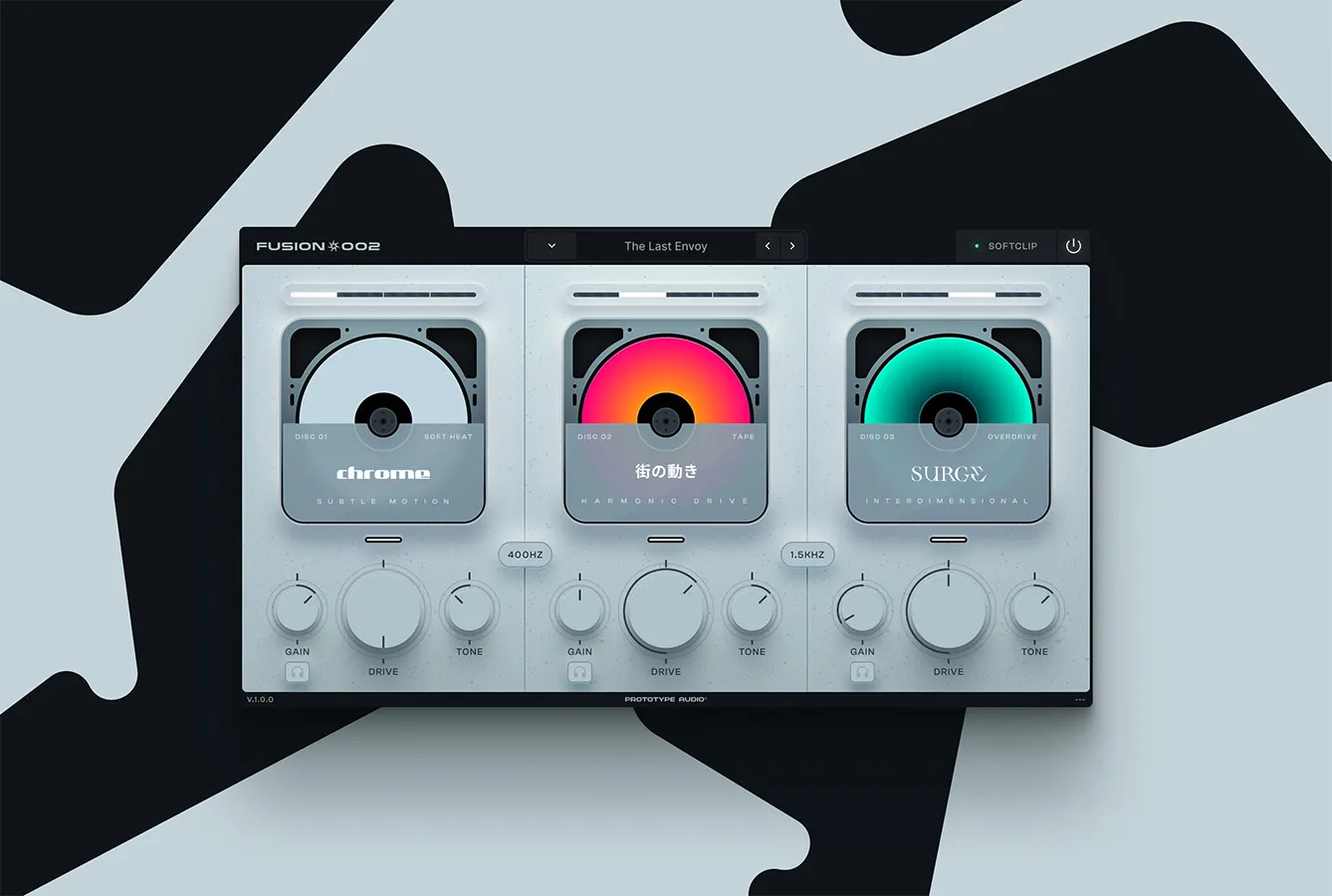
This is what you see when you load up Fusion for the first time. Three identical segments, each one handling a specific part of the frequency range. You can tell at what frequencies each engine cuts off at thanks to the lines displaying a number between each one, and you can adjust that number (and therefore how many frequencies each engine covers) by clicking and dragging left and right.
You can pick from any of the four aforementioned engines in each segment. Just click the bar above the image. If you want to bypass one of the engines, just click on the image.
Below that are gain, tone, and drive knobs, which work pretty much identically to any other distortion plugin you’ve ever used – gain adjusts volume, drive adjusts how much distortion is on the plugin, tone works similar to a filter. Just make sure you turn up the drive; when you initialize the plugin, it’s automatically at zero and not doing anything.
The headphones on each engine let you hear only that engine, which is super helpful. And, the button with the transient symbol on the low end engine helps restore transient peaks and punches.
At the top are a variety of presets to use. These serve as great starting points, and are worth playing around with – each one gives your sound a different character.

That’s about it. The plugin is easy to use and fun to learn.
So Many Ways to Saturate
In using this plugin, I had more fun with saturation than I ever had before.
Having four distinct engines to choose from really makes this plugin stand out. It’s so easy to change them when you’re sound designing in case the one you’re currently using doesn’t quite work with what you want to do. Plus, the straightforwardness of the layout and the helpful tips the plugin gives you when you hover over knobs entirely eliminates guesswork. You can figure out what you want to do and do it very, very quickly, instead of being taken out of a creative groove when trying to figure out what to do.
Here’s a little demonstration I’ve made of each of the four engines. The sample is from Basic Wavez’ “Dreams Vol. 5” pack, one of my favorite melodic house packs as of late. The first two bars have no processing, and then the following five instances have one of the four engines (in the order I introduced them earlier) on all three frequency ranges, with the drive at 50% and no change to the tone or gain.
Cool, right? You can really hear just how different these engines are. My personal favorite saturator on this loop was Chroma, but they all definitely have uses here. With a little more post-processing, I could see myself using all four engines in a lot of my tracks.
Pros and Cons:
Pros:
Four ways to play!
The big selling point here is that this isn’t just one saturator: it’s four. You can mix and match all four engines however you’d like.
Intense control over your sound.
Splitting the sound into three adjustable frequency ranges gives you so much control on exactly how the saturation affects it. You can only saturate the highs for some crunch, or only make the lows warmer, or just absolutely destroy all three ranges. It’s up to you. I love it when you can have this much control over your processing.
Cons:
It’s decently pricy for a saturator.
The original listing price for Fusion is $76 USD. That’s a good chunk of cash, especially for an effects plugin.
A while ago, you could have snagged Fusion Core (a version of Fusion with only one segment, akin to a regular, non-multiband saturator) for free. That deal seems to have ended – and, honestly, I’d like to see them bring it back.
I couldn’t find any information on a free trial, so it seems like you’ll just have to make the purchase if you want to try it out. Prototype Audio does seem to run a lot of sales, though, so keep an eye on that. And, for what it’s worth, I think you’d find it a worthwhile purchase if you paid full price for it. You can get so much use out of it.
Conclusion: Should you get it?
If you’ve got the cash and are in the market for a saturator, I’d wholly recommend this purchase.
It’s four saturators in one, and it’ll definitely allow you to do things with saturation that you may once have only dreamed of. It’s a great showing from the Prototype Audio team and I can’t wait to see what’s next.
Buy Fusion here.

Ben Lepper is a music producer and journalist from Boston, Massachusetts.